Holiday pay is one of the areas payroll teams get wrong most often. It is usually not carelessness. The rules genuinely changed in 2024, and...
Navigating UK Business Accounts in 2026
A lot of people still treat accounting software like an admin tool. That’s a mistake. In 2026, it’s part compliance system, part reporting engine, part employability filter.

If you’re a freelancer, sole trader, trainee bookkeeper, or career changer, the pressure is obvious. HMRC compliance is no longer something you can leave until year end. One underserved angle in existing content on software for business accounts is the lack of guidance on HMRC-compliant Making Tax Digital integration for UK freelancers and sole traders. With 4.2 million UK sole traders required to use MTD-ready software by 2026/27 according to HMRC data cited in this MTD software discussion for small businesses, many trainees struggle with compliance setup, and free tools often fail UK GAAP standards.
That matters for two reasons. First, businesses need systems that can produce clean records and support submissions properly. Second, employers want staff who can work inside those systems without needing weeks of hand-holding.
Why spreadsheets aren’t enough anymore
Excel still has a place. I use it often. But Excel is not a proper substitute for modern accounting software when a business needs live bank feeds, VAT workflows, audit trails, payroll links, or fast month-end reporting.
That’s where people get caught out. They know debits and credits in theory, but they can’t reconcile transactions in Xero, process payroll entries in Sage, or review management information in QuickBooks. Theory without software skill doesn’t convert well into jobs.
If you need a simple grounding in the shift from manual records to digital systems, this guide to cloud accounting software basics is worth reading before you choose a platform.
The three names that dominate most UK conversations
For most UK learners and small businesses, the practical shortlist is Xero, Sage, and QuickBooks.
They each solve the same core problem in different ways:
- Xero suits users who want a clean cloud setup, strong automation, and straightforward demos for daily bookkeeping.
- Sage suits businesses that need stronger control, deeper accounting structure, and robust modules around payroll, costing, and reporting.
- QuickBooks sits in the middle and appeals to teams that want broad usability and a familiar small business workflow.
Practical rule: Don’t ask which platform is “best” in the abstract. Ask which one makes you employable for the role you want and reliable for the business you support.
That’s the true test.
Meet the UKs Top Accounting Software
A hiring manager asks a simple question in your interview: which accounting package have you used, and what could you do in it on day one? Your answer shapes whether you look job-ready or still theoretical.
That is why software choice matters. You are not just picking a platform. You are choosing a route into bookkeeping, payroll, accounts support, or SME finance work.
| Platform | Best fit | Core strength | Career relevance |
|---|---|---|---|
| Xero | Small businesses, training environments, service firms | Cloud workflows, bank feeds, automation | Bookkeeping, VAT, accounts assistant |
| Sage 50cloud | Structured finance teams, regulated businesses, payroll-linked environments | Detailed ledger control, reporting, payroll links | Accounts assistant, final accounts support, advanced payroll |
| QuickBooks Online | Small firms that want broad usability | Familiar day-to-day bookkeeping workflows | Junior bookkeeper, SME finance support, accounts admin |
| Excel plus accounting software | Reporting-focused support roles | Data handling, reconciliations, analysis support | Finance analyst, business analyst, accounts support |
Xero
Xero is the fastest route to job-ready cloud bookkeeping for many beginners. It is clean, widely recognised, and well suited to the work junior hires do: posting transactions, reconciling bank feeds, raising invoices, handling supplier bills, and supporting VAT routines.
For employability, Xero fits best with entry-level bookkeeping and accounts assistant roles in small businesses and accountancy practices. If that is your target, start with training that builds transaction processing and VAT accuracy first, then practise those tasks in software. Professional Careers Training’s QuickBooks vs Xero vs Sage comparison for UK learners helps you see where Xero sits before you commit.
Sage
Sage is the platform I recommend when you want credibility in a more structured finance environment. Employers using Sage often expect stronger ledger discipline, cleaner month-end routines, and better awareness of how bookkeeping connects to payroll, reporting, and final accounts support.
That makes Sage a smart choice for career changers who want more than basic invoice processing.
If you are aiming for roles such as accounts assistant, payroll support, or junior staff working toward final accounts exposure, Sage proficiency carries weight. The right training path is not just software practice. It is software plus bookkeeping fundamentals, VAT, and payroll knowledge that lets you work accurately under supervision.
Sage signals that you can handle process, not just clicks.
QuickBooks
QuickBooks remains a practical option for small business finance teams. It is common in owner-managed businesses that need straightforward bookkeeping, expense tracking, customer invoicing, and accessible reporting without a heavy setup.
For job seekers, QuickBooks supports entry into junior bookkeeping and finance admin roles, especially in smaller firms. It may not be the strongest platform for every UK training path, but it is still worth learning because it appears often in SME vacancies. If you want a broader view of tools used by smaller firms, this roundup of 12 best bookkeeping apps for UK businesses is useful context.
What each platform says on your CV
Employers read software names as signals of work readiness.
- Xero proficiency suggests you can handle cloud bookkeeping, reconciliations, and routine VAT processing.
- Sage proficiency suggests you are better prepared for structured accounts work, month-end support, and payroll-linked finance tasks.
- QuickBooks proficiency suggests practical exposure to small business bookkeeping and day-to-day finance admin.
- Excel plus accounting software suggests you can support reporting, check data, and work beyond simple transaction entry.
The strongest CVs do not list software in isolation. They connect software to outputs. Reconciled bank accounts. Processed VAT returns. Posted journals. Supported payroll. Produced reports. That is also how Professional Careers Training should be used. Pick the software that matches the role you want, then build the bookkeeping, VAT, or payroll training behind it so you can prove real capability in interviews.
In-Depth Comparison of Accounting Platforms
A hiring manager scans your CV and sees Xero, Sage, or QuickBooks. They are not reading software names. They are judging whether you can step into the work on day one. That is how you should compare accounting platforms as well. Focus on the tasks each system prepares you to handle, and the training you need to become job-ready.
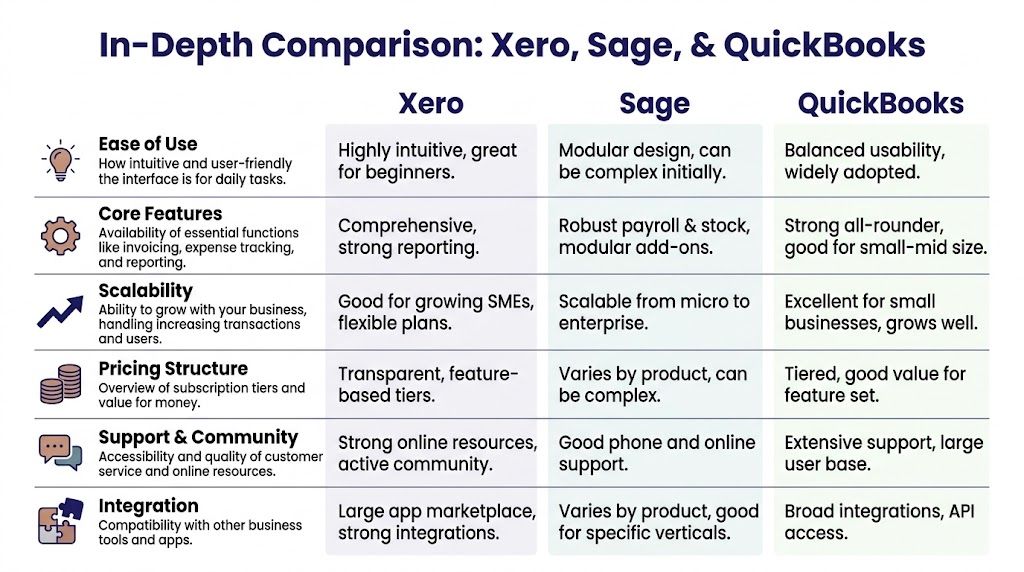
Here is the practical comparison.
| Feature | Xero | Sage 50cloud | QuickBooks Online |
|---|---|---|---|
| MTD and VAT handling | Strong for cloud-based VAT workflows and automation | Strong for structured compliance processes | Suitable for small business compliance workflows |
| Ease of learning | Very strong for beginners | Steeper learning curve, but stronger accounting depth | Accessible for many small business users |
| Payroll relevance | Useful in broader finance workflows | Strong fit for payroll-linked accounting environments | Suitable for smaller payroll-related admin contexts |
| Reporting and analysis | Fast dashboards and practical reporting | Strong month-end and management reporting | Good all-round business reporting |
| Scalability | Good for growing SMEs | Strong in more structured or regulated setups | Good for small and growing firms |
| Best job fit | Bookkeeper, accounts assistant, VAT trainee | Accounts assistant, final accounts, payroll support | Junior bookkeeper, SME finance support |
For a side-by-side explainer focused on hiring value and system differences, review this comparison of QuickBooks vs Xero vs Sage.
MTD and HMRC compliance
For UK users, compliance is the starting point.
Xero suits trainees and small firms that want a cloud-first workflow for bookkeeping, bank reconciliation, and VAT returns. It helps new starters build confidence fast because the transaction flow is visible and the interface is easier to learn. Pair that with Bookkeeping & VAT training from Professional Careers Training and you have a direct route into junior bookkeeping and accounts assistant roles.
Sage fits businesses that need tighter controls, cleaner audit trails, and more formal reporting routines. That matters if you are aiming at roles where month-end discipline, ledger accuracy, and finance procedures count. If your target job involves payroll support, control accounts, or preparing work for senior accountants, Sage gives better preparation.
QuickBooks works well in smaller owner-managed businesses. It is useful for entry-level finance admin and junior bookkeeping work, but it offers less training value than Sage for structured accounts roles and less career signalling than Xero for cloud bookkeeping vacancies.
For employability, choose software that builds correct habits under UK compliance rules, not software that only feels easy in the first week.
Core bookkeeping features
Many finance careers start with these fundamental tasks: Raising sales invoices, posting purchase invoices, reconciling the bank, coding VAT, correcting errors, and running basic reports.
Xero is the strongest starting point for learners who need to grasp process flow quickly. It is well suited to recent graduates, returners, and career changers moving into trainee bookkeeper or accounts assistant positions. Professional Careers Training can then add the bookkeeping logic behind the software, which is what employers test at interview.
QuickBooks is also approachable. It suits candidates aiming at smaller-business finance roles where the work is broad, practical, and less specialised. You may handle invoicing in the morning, bank matching after lunch, and supplier queries before the day ends.
Sage is harder at first. Good. The extra structure forces you to understand ledgers, postings, and controls properly. That makes Sage especially valuable for candidates who want to progress beyond data entry into month-end support and more technical accounts work.
Advanced payroll and linked finance work
Payroll software knowledge on its own is not enough. Employers need people who understand how payroll feeds into journals, pension deductions, HMRC liabilities, and month-end checks.
Sage stands out here because it is often used in environments where payroll and finance processes sit close together. That makes it the better choice for anyone targeting payroll administrator, finance officer, or accounts assistant roles with payroll exposure. If you plan to take Professional Careers Training’s Advanced Payroll pathway, Sage experience strengthens that training because the accounting impact of payroll is easier to connect to real finance work.
QuickBooks and Xero can support payroll-related admin, but Sage gives stronger preparation for roles that go beyond processing and into review, reconciliation, and reporting.
Career takeaway: If you want to move from basic bookkeeping into payroll support, month-end routines, or final accounts preparation, learn Sage and train around it.
Scalability and migration pressure
Software choice affects your career because businesses outgrow weak setups.
A sole trader doing basic invoicing can survive on almost any platform. A growing SME with VAT, staff costs, departmental reporting, and spreadsheet workarounds cannot. Once reporting complexity rises, the difference between an entry-level system user and a useful finance employee becomes obvious.
Xero handles growth well for many SMEs and remains a strong option for cloud bookkeeping careers. QuickBooks is reasonable for smaller firms that need practical day-to-day control. Sage usually makes more sense once finance operations become more formal and the reporting expectations increase.
Integration and data use
Employers now expect more than transaction processing. They want finance staff who can pull useful information from the ledger, spot errors, and support better reporting.
That creates a clear split in career value. Xero helps candidates start quickly. Sage often gives stronger preparation for reporting-heavy roles, especially where exported data, management accounts support, and system discipline matter. If you want to move toward analyst-facing finance work later, software knowledge combined with Excel and accounting training is a far stronger package than software alone.
My blunt verdict
Start with Xero if your target is junior bookkeeping, reconciliations, and VAT-focused SME work.
Choose Sage 50cloud if you want the strongest preparation for accounts assistant roles, payroll-linked finance work, month-end support, and progression into final accounts.
Add QuickBooks if you expect to work with small owner-managed businesses and want broader exposure to common SME systems.
The best choice is the one that matches the job you want next, then ties directly into the right training pathway through Professional Careers Training. That is how software becomes employability, not just another line on your CV.
A Framework for Choosing the Right Software
A graduate applies for an Accounts Assistant role, lists Xero on the CV, then struggles when the interview turns to month-end journals, payroll interaction, and Excel exports. That mistake is common. Software choice should start with the job you want, then the tasks that job will expect you to handle confidently from week one.

Treat software as a career filter, not a product preference. If your target role is junior bookkeeping, cloud-first tools usually make sense. If you want accounts support, payroll exposure, or a clearer route into month-end and reporting work, you need a platform with stronger structure and a training plan to match. That is the difference between being software-aware and being employable.
Start with the work you will actually do
Use four questions to choose properly.
-
Will your week be built around transaction processing?
If yes, choose software that handles bank reconciliation, invoicing, VAT coding, and routine ledger work efficiently. -
Will your role sit close to payroll, accruals, prepayments, or final accounts support?
If yes, favour accounting depth over a lighter user interface. -
Are you still relying on Excel for large parts of the process?
If yes, choose a system you can configure cleanly and learn how to move data without creating duplicate entries or poor coding. -
Will employers expect reporting, not just data entry?
If yes, focus on exports, nominal structure, audit trail discipline, and how well the software supports management information.
These questions matter because employers recruit for work output. They do not care that you opened a free trial for a weekend.
Judge software by the next role, not the first login
Cloud software is not automatically the right answer. A poor setup still creates weak VAT treatment, messy ledgers, and unreliable reports. The problem is rarely the badge on the login screen. It is the mismatch between the software, the role, and the user’s training.
That is why Professional Careers Training should sit alongside the software decision. If you are aiming for bookkeeping and VAT roles, Bookkeeping & VAT gives you the processing base that makes Xero or QuickBooks useful in practice. If your target is payroll-linked finance work, an Advanced Payroll route makes far more sense beside Sage. If you want accounts assistant progression, software training without core accounting principles will leave you stuck at data entry level.
Match the platform to the job outcome
Use this rule set.
- Choose Xero if your target is Bookkeeper, Finance Administrator, or junior Accounts Assistant work in smaller cloud-based businesses.
- Choose Sage 50cloud if you want stronger preparation for Accounts Assistant roles with month-end support, payroll interaction, and progression toward Assistant Accountant work.
- Choose QuickBooks if you expect to support owner-managed businesses where bookkeeping, invoicing, and general admin often overlap.
- Keep Excel in the plan if you want to move into reporting, management accounts support, or analyst-facing finance roles.
Then build the training around that choice. Software alone is never enough.
A practical decision filter
| If this sounds like you | Best starting point |
|---|---|
| “I want a fast route into bookkeeping and VAT processing.” | Xero plus Bookkeeping & VAT training |
| “I want stronger month-end exposure and better preparation for accounts support roles.” | Sage 50cloud plus Accounts Assistant-focused training |
| “I will probably work with smaller businesses and mixed finance tasks.” | QuickBooks plus bookkeeping fundamentals |
| “I want to progress from processing into reporting and analysis.” | Sage or Xero, plus Excel training and management accounts exposure |
One more point. Once you know which software matches your target role, present it properly on your CV. Use a perfect Accountant Curriculum Vitae format so employers can immediately see the connection between your software skills, your accounting training, and the job you are applying for.
Choose the software that fits the destination, then train for the work that destination requires.
Mapping Software Skills to Your Accounting Career
A recruiter opens two CVs for an entry-level finance role. Both candidates say they know accounting software. One can post invoices. The other can explain the full workflow, reconcile the bank, check VAT treatment, and match that experience to the job they want. The second candidate gets the interview.

That is how software skills work in practice. Employers do not hire for button-clicking. They hire for task readiness.
Professional Careers Training should be part of that plan. The right course turns software familiarity into evidence that you can do the job. That is the difference between “I have used Xero” and “I am ready for a Bookkeeper, Payroll Assistant, or Accounts Assistant role.”
Bookkeeping and VAT roles
Start here if you want the fastest route into finance work.
For Bookkeeper and junior Accounts Assistant roles, employers usually care about clean day-to-day processing. They want someone who can raise sales invoices, enter supplier bills, reconcile the bank, apply VAT correctly, and spot obvious posting errors before month-end.
Xero is a strong first platform for that pathway because the workflow is clear and widely used by smaller UK businesses and accountancy practices. Pair it with a Bookkeeping & VAT course and practise the actual task sequence, not isolated clicks. If you need a practical introduction, this guide on how to use Xero accounting software is a useful starting point.
Learn the flow. Transaction entry, coding, reconciliation, VAT impact, then reporting. That is what makes a junior candidate employable.
Advanced payroll and accounts support
Payroll is a specialist route. Treat it that way.
If you are aiming for Payroll Administrator, Payroll Assistant, or an Accounts Assistant role with payroll duties, Sage deserves serious attention. These jobs involve more than running payslips. You need to understand deductions, pension processing, statutory payments, payroll journals, and how payroll feeds into the wider accounts.
That is why Advanced Payroll training matters. It gives structure to the software work and prepares you for the questions employers ask. Can you process payroll accurately? Can you explain the journal entries? Can you handle payroll reports with confidence? Those are hiring questions, not software trivia.
Sage also suits candidates who want stronger exposure to control accounts and disciplined ledger work, which helps if you plan to progress beyond junior processing.
Final accounts and finance progression
Career changers often stop at data entry. That limits both pay and progression.
If you want to move toward Assistant Accountant or Final Accounts Assistant work, you need more than transactional competence. You need to understand accruals, prepayments, journals, trial balance review, and how errors in posting affect the final numbers. Software is still part of the job, but the value sits in your judgement.
A Final Accounts course closes that gap. It helps you move from “I can post transactions” to “I understand how the accounts are built.” Employers notice the difference quickly.
Business analyst and data analyst routes
This route is often missed by graduates who already have decent Excel skills.
Accounting platforms produce structured business data. If you can extract it, clean it, and explain what it means, you become relevant for Business Analyst, finance reporting, and junior Data Analyst roles. Sage can be useful here because it supports reporting-heavy finance environments, but the software alone will not carry you. You need Excel, reporting logic, and confidence with trends, variances, and operational metrics.
Your CV has to show that progression clearly. If you need help presenting software and finance experience properly, this guide to the perfect Accountant Curriculum Vitae format is a practical reference.
Best software by career target
| Career target | Most useful software | Best training focus |
|---|---|---|
| Bookkeeper | Xero, QuickBooks | Bookkeeping & VAT |
| Accounts Assistant | Xero, Sage, QuickBooks | Accounts Assistant, Bookkeeping & VAT |
| Payroll Administrator | Sage | Advanced Payroll |
| Final Accounts Assistant | Sage | Final Accounts |
| Business Analyst | Sage plus reporting tools | Business Analyst, Power BI, Excel |
| Data Analyst | Accounting software plus data tools | Data Analyst, Excel, SQL, Power BI |
Use software as a career tool, not a badge. Pick the role first. Then train on the platform and accounting tasks that role requires.
Your Onboarding and Training Pathway
Many users waste time at the start. They install the software, watch a few videos, click around, and assume they’re learning. They’re usually not.
Real onboarding means understanding the setup logic behind the screen. Chart of accounts structure. VAT configuration. customer and supplier records. Bank feeds. Reconciliations. Reporting outputs. If those basics are wrong, everything built on top of them is shaky.
What self-learning usually gets wrong
Self-learning often creates three problems:
- Patchy knowledge because people learn isolated tasks without understanding the accounting flow.
- Bad habits because nobody corrects coding mistakes or weak reconciliation practice.
- Poor employability because candidates can talk about software but can’t complete realistic tasks under pressure.
A better route is to learn in role order. Start with the tasks a junior bookkeeper or accounts assistant would perform. Then layer VAT, payroll, month-end, and reporting.
A practical sequence that works
This order makes sense for most learners:
-
Start with bookkeeping fundamentals
Learn sales, purchases, bank reconciliation, journals, and VAT basics. -
Move into platform-specific workflows
Use Xero, Sage, or QuickBooks to carry out those tasks properly. -
Add role-specific training
Payroll for payroll roles. Final accounts for finance progression. Reporting tools for analyst pathways. -
Practise with realistic business scenarios
A software certificate means more when you can explain what you did inside the system.
If you’re focusing on Xero first, this walkthrough on how to use Xero accounting software gives a useful starting point before formal practice begins.
What strong training should include
Good software training should give you more than access to a system. It should include:
- 1-2-1 support from qualified accountants
- Flexible scheduling, especially if you’re working or changing careers
- Official certification pathways for Sage, Xero, and QuickBooks
- Software installation support
- Career coaching, not just technical lessons
- CV and LinkedIn support
- Job search strategy linked to your new software skill
That last point matters. Training without recruitment support is incomplete. Employers don’t just want certificates. They want proof that you can step into a role and contribute.
Common Questions on Accounting Software Training
Is it better to specialise in one software or learn all three
Specialise first. Then expand.
Interviewers hire for usable skill, not scattered exposure. If you can process invoices, reconcile bank transactions, post journals, and handle VAT confidently in one platform, you are employable faster than someone who has clicked around three systems without depth.
Choose your first platform based on the job you want. Xero suits many entry-level bookkeeping and cloud accounts roles. Sage is the stronger first choice for candidates targeting accounts assistant posts in firms and businesses that still rely on established desktop or hybrid finance processes. QuickBooks works well for small business finance support and junior bookkeeping positions. Professional Careers Training builds this properly by pairing software study with the matching course pathway, such as Bookkeeping & VAT for bookkeeping roles or Advanced Payroll for payroll posts.
I’ve only used Excel for accounts. Is the move difficult
The move is usually straightforward.
Process discipline is the primary adjustment. Excel lets you create your own method, even when that method is messy. Accounting software expects you to follow a proper transaction flow, post items to the right ledgers, and keep an audit trail. That is exactly why employers value software experience.
Candidates with basic bookkeeping knowledge usually adapt quickly. Candidates without that foundation struggle because they memorise buttons instead of understanding what the entry is doing. Learn the accounting logic first, then practise it inside the software.
Do I need certification to get hired
Certification is not mandatory for every vacancy, but it strengthens your CV immediately.
It shows you have done more than watch videos. For recent graduates, career changers, and candidates without UK finance experience, that proof matters. A Xero, Sage, or QuickBooks certificate helps you get shortlisted. Job offers still depend on whether you can explain the workflow behind the screen, which is why training with practical exercises and tutor feedback carries more weight than certification alone.
How much does official software training cost
Price matters less than job-readiness.
A cheap course that gives you system access and nothing else is poor value. You need guided practice, feedback from qualified accountants, help with software setup, and career support that connects your training to actual job titles. Professional Careers Training stands out because the training is tied to outcomes. Bookkeeping & VAT supports bookkeeping and accounts junior roles. Advanced Payroll supports payroll administrator roles. Final Accounts helps candidates aiming to progress beyond data entry and processing work.
Compare what the fee includes, not just the headline number.
What about international students and newcomers to the UK
International students and newcomers to the UK need UK-specific finance training.
That means VAT rules, payroll context, HMRC awareness, UK business documents, and CV preparation that matches the local job market. Generic software courses often teach where to click but ignore how UK employers expect finance staff to work. That gap shows up quickly in interviews.
If you are entering the UK market for the first time, take a pathway that combines software with UK accounting processes and employability support. That approach gives you a far stronger case for accounts assistant, bookkeeper, and payroll roles.
Which pathway is strongest for employability
The strongest pathway is the one that matches a real vacancy.
For bookkeeping jobs, start with Bookkeeping & VAT plus Xero or QuickBooks.
For accounts assistant roles, build on bookkeeping and add Sage plus broader accounts processing.
For payroll jobs, focus on Advanced Payroll and Sage.
For analyst pathways, add Excel, Power BI, and data interpretation to your accounting software skills.
This is the point many training providers miss. Software for business accounts is not the end goal. It is evidence that you can do the work required in a specific finance role.
Professional Careers Training helps recent graduates, career changers, and upskilling professionals turn software knowledge into job-ready capability. If you want structured training in Sage, Xero, QuickBooks, Bookkeeping & VAT, Advanced Payroll, Final Accounts, Business Analyst, or Data Analyst pathways, with 1-2-1 support from ACCA-qualified trainers and recruitment guidance built in, explore Professional Careers Training.