You're staring at a blank CV and a job advert full of familiar words, requirements gathering, SQL, stakeholder management, Power BI, Agile, and you know...
The First Big Question in Your UK Accounting Career
A lot of people come to this choice too late. They apply for roles first, then realise half the shortlist asks for Sage, Xero, or both. At that point, they’re reacting instead of planning.
If you’re a graduate, career changer, or international candidate trying to enter the UK market, you need to treat software training like employability training. Employers don’t just want “good accounting knowledge”. They want someone who can log in, process work, and understand real workflows from day one.

A typical example is someone moving into finance from admin or customer service. They’ve got transferable skills, they’re organised, and they’re ready to learn. But when they look at vacancies, the software requirement becomes the barrier. The same applies to accounting graduates who know the theory but haven’t touched live bookkeeping systems. If that sounds familiar, start with a practical route into the sector rather than another academic detour, such as this guide on getting into accounting in the UK.
Why this choice matters more than people admit
The wrong first choice can slow you down. Not because either platform is bad, but because each one opens different doors.
- If you train only for ease of use, you may miss the software many established employers still ask for.
- If you train only for legacy demand, you may struggle in modern SME environments that expect faster cloud workflows.
- If you train in neither, your CV looks weaker than candidates with less theory but stronger practical software evidence.
Practical rule: Pick the software that matches the jobs you actually want, not the one people on social media say is “better”.
My blunt view
For most UK job-seekers, xero vs sage isn’t really a software debate. It’s a market positioning decision.
If you want broad employability, you need to think about bookkeeping, VAT, payroll, final accounts support, and reporting tasks. If you want to move toward business analyst or data analyst work, you also need to think about data flow, reporting habits, and integration exposure.
The strongest candidates don’t ask, “Which one is best?” They ask, “Which one gets me hired now, and which one should I add next?”
Understanding the Contenders Sage and Xero
Sage and Xero aren’t just two similar tools with different logos. They sit in different places in the UK market, and that difference matters for your training choices.
Here’s the short version.
| Area | Xero | Sage |
|---|---|---|
| Market identity | Cloud-first, modern, popular with many small firms and start-ups | Established UK name with deep roots in traditional firms |
| Training feel | Faster to learn for beginners | Often takes longer, but maps well to many UK office processes |
| Best first fit | Bookkeeping, accounts assistant, cloud workflows, app-led environments | Payroll, traditional practice roles, established SMEs, broader employability |
| Strongest career signal | You can work in modern cloud accounting environments | You can work in the software many established UK employers still trust |
Sage is the established UK heavyweight
Sage still carries serious weight in the UK. It has been around for decades, and many accountants, finance managers, and employers know it well. That matters because familiarity drives hiring.
According to this UK market analysis of Sage and Xero, Sage maintains a dominant position in the UK accounting software market, has nearly 6 million subscribers worldwide, and in the first half of its 2025 financial year reported a 16% profit increase to £236 million, with 97% of revenue now recurring. The same analysis notes strong UK adoption linked to HMRC compliance needs.
That tells you two things. First, Sage isn’t fading away. Second, cloud adoption hasn’t weakened its position in the way many people assume.
Xero is the cloud-native operator
Xero built its reputation on usability, cleaner workflows, and a more modern feel. That makes it attractive for smaller businesses, digital-first finance teams, and trainees who want a gentler learning curve.
It also tends to suit employers who value speed, automation, and app connections. If you’re aiming at small business finance teams, outsourced bookkeeping, or hands-on accounts support in a modern SME, Xero often appears in the conversation early.
Sage often gets dismissed as “old school”. That’s lazy thinking. In the UK jobs market, established software can be a career asset.
What this means for your training decision
Don’t confuse software identity with career value.
A more modern interface doesn’t automatically produce better employability. A more established product doesn’t automatically mean better learning. You need to judge each platform by the sort of employer that uses it and the kind of tasks you want to perform.
For a broader picture of how accounting platforms are positioned for small businesses, this 2026 guide to accounting software is useful background reading. It helps you understand the wider software environment, which is valuable when employers ask how these systems differ in practice.
Core Feature Showdown for Accounting Professionals
For job-seekers, feature comparisons only matter if they connect to real work. You don’t get hired because a platform has a nice dashboard. You get hired because you can reconcile accounts, process VAT correctly, support payroll, and produce usable reports.
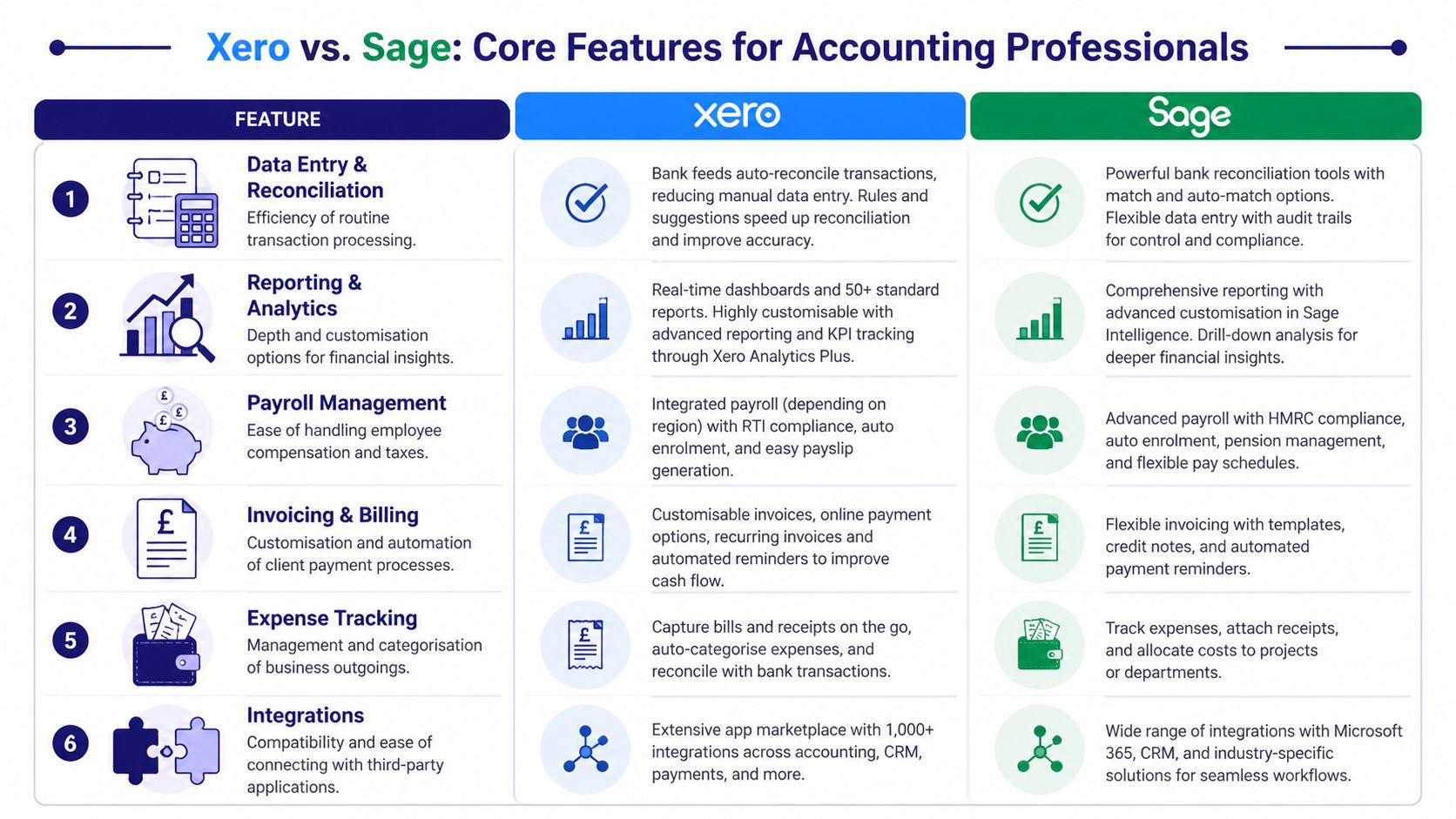
Quick comparison for trainees
| Task area | Xero | Sage | Best fit for training |
|---|---|---|---|
| Bank reconciliation | Strong automation and live matching | More manual checking in many workflows | Xero for speed, Sage for discipline |
| VAT and MTD | Clean cloud workflow | Strong compliance familiarity for UK firms | Both matter, but context matters more |
| Payroll | Useful, but often not the main reason firms choose it | Commonly valued for UK payroll work | Sage |
| Final accounts support | Good for routine reporting and cloud working | Better known in many established office environments | Sage for traditional settings |
| App ecosystem and connected tools | Strong integration culture | Useful, but often less central to the pitch | Xero |
| Learning curve | Easier for many beginners | Slightly steeper | Xero first, if confidence is low |
Bookkeeping and bank reconciliation
For entry-level bookkeeping and accounts assistant roles, reconciliation speed matters because it affects daily output. If you can process transactions efficiently and keep the ledger clean, you become useful quickly.
According to this comparison focused on UK users, Xero connects with over 21,000 global institutions including HSBC, Barclays, and NatWest, and its real-time transaction matching can reduce manual input by up to 80%. The same source contrasts that with Sage Accounting’s daily batch imports, which can require more manual verification for HMRC-compliant MTD entries.
That’s a real employability difference. Xero teaches you a faster cloud workflow. Sage teaches you to be more deliberate and hands-on.
If you’re training for:
- Bookkeeping & VAT, Xero is often easier to grasp first.
- Accounts assistant roles, either works, but Xero usually gets beginners productive faster.
- Audit-minded or control-heavy environments, Sage’s more manual style can help you build stronger checking habits.
VAT processing and MTD habits
Both systems matter in UK VAT work because employers care about process, not just button-clicking. You need to know how transactions flow, how VAT is reviewed, and where errors happen.
Xero tends to suit trainees who are still building confidence because the workflow feels more intuitive. Sage often suits firms that want tighter oversight and established routines.
If your training includes bookkeeping and VAT, I’d recommend learning:
- How bank entries affect VAT treatment
- How to review exceptions before filing
- How to explain your logic in plain English
Those three habits matter more than memorising menus.
Coach’s advice: The best trainee isn’t the one who clicks fastest. It’s the one who notices what doesn’t look right.
For a broader trainee-focused comparison across popular UK platforms, this guide to QuickBooks vs Xero vs Sage for UK accountants helps put the software choice into a career context.
Advanced payroll and UK office reality
Payroll is where career advice often becomes too simplistic. People assume cloud-first always wins. It doesn’t.
If you want to move into advanced payroll, Sage usually gives you stronger practical value in the UK market. That’s because payroll work often sits inside established finance processes, and employers want reliability, familiarity, and UK-specific handling more than a glossy interface.
This matters for:
- Payroll bureaus
- Accountancy practices
- SMEs with in-house payroll
- Candidates who want to become payroll officers or senior accounts staff
Xero knowledge still helps, especially if payroll links into wider bookkeeping and cloud reporting. But if payroll is your specialism, Sage is hard to ignore.
Final accounts and management reporting
If you’re aiming beyond transaction processing, look at how each platform shapes your thinking.
Xero encourages a more live, dashboard-led style. That’s useful for monthly reporting, cash visibility, and client-facing finance support. Sage often fits better where businesses want structure, detailed review, and reporting tied to established accounting routines.
For final accounts trainees, Sage often aligns better with office environments where the software is part of a longer-standing process. For business analyst or data analyst learners, Xero’s cloud-first habits can be more relevant because they push you towards connected systems, exports, and faster visibility.
The key point is simple. Xero can make you quicker early on. Sage can make you more versatile in traditional UK accounting settings.
The Employability Equation Which Certification Boosts Your CV
Most software comparisons dodge the core question. They tell you which platform is easier, prettier, or more popular with small business owners. That’s not what you need.
You need to know which certification changes your odds in the UK jobs market.
The unpopular answer
If your priority is employability, Sage has a stronger case than many people expect.
According to this analysis of UK job demand and salaries, Sage is required 35% more often than Xero in UK job postings in 2025, especially in established firms outside the tech start-up scene. The same analysis says dual-certified professionals or those with strong Sage skills can earn up to 15% more in mid-level accounting practice roles, averaging £45k compared with £39k for roles specifying only Xero.
That should get your attention.
If you’re a career changer, recent graduate, or newcomer to the UK, your first goal is usually not software enjoyment. It’s job access. On that basis, Sage deserves more respect than it gets.
Why employers still value Sage
Established employers don’t hire on hype. They hire on fit.
Many small and medium-sized firms in the UK still want staff who can work in familiar systems, support payroll, handle routine finance work, and slot into an existing process without drama. Sage often sits right in that space.
That makes Sage especially relevant for:
- Accounts assistant roles in established SMEs
- Bookkeeping and VAT support in local firms
- Payroll-focused vacancies
- Practice roles outside start-up culture
- Candidates who want long-term progression in traditional finance teams
If your CV needs to appeal to the broadest range of UK employers, Sage is usually the safer first bet.
Where Xero still gives you a sharp edge
Don’t misread this. Xero still has real CV value.
It helps when you target:
- Cloud bookkeeping roles
- Start-ups and digital SMEs
- Modern outsourced finance teams
- Businesses using app-heavy workflows
- Entry-level roles where employers want someone productive fast
Xero can also help nervous beginners build confidence faster. That matters. A course you complete properly is worth more than a course you quit because the software feels overwhelming.
Here’s a useful video if you want a broader career-minded take before choosing a path.
My recommendation on certification order
If you can only do one certification first, choose based on your target role.
- Choose Sage first if you want stronger coverage across the wider UK accounting job market.
- Choose Xero first if you need a faster route into entry-level cloud bookkeeping or modern SME finance work.
- Choose both if you want the strongest long-term position. That combination removes objections from employers and makes your CV more flexible.
I’ll put it plainly. If you’re serious about return on investment, single-platform loyalty is a mistake. The market rewards candidates who can adapt.
Tailoring Your Training Path for Specific Career Goals
The right software depends on the role you want, not the software people argue about online. Your training path should reflect the work you want to do every week.
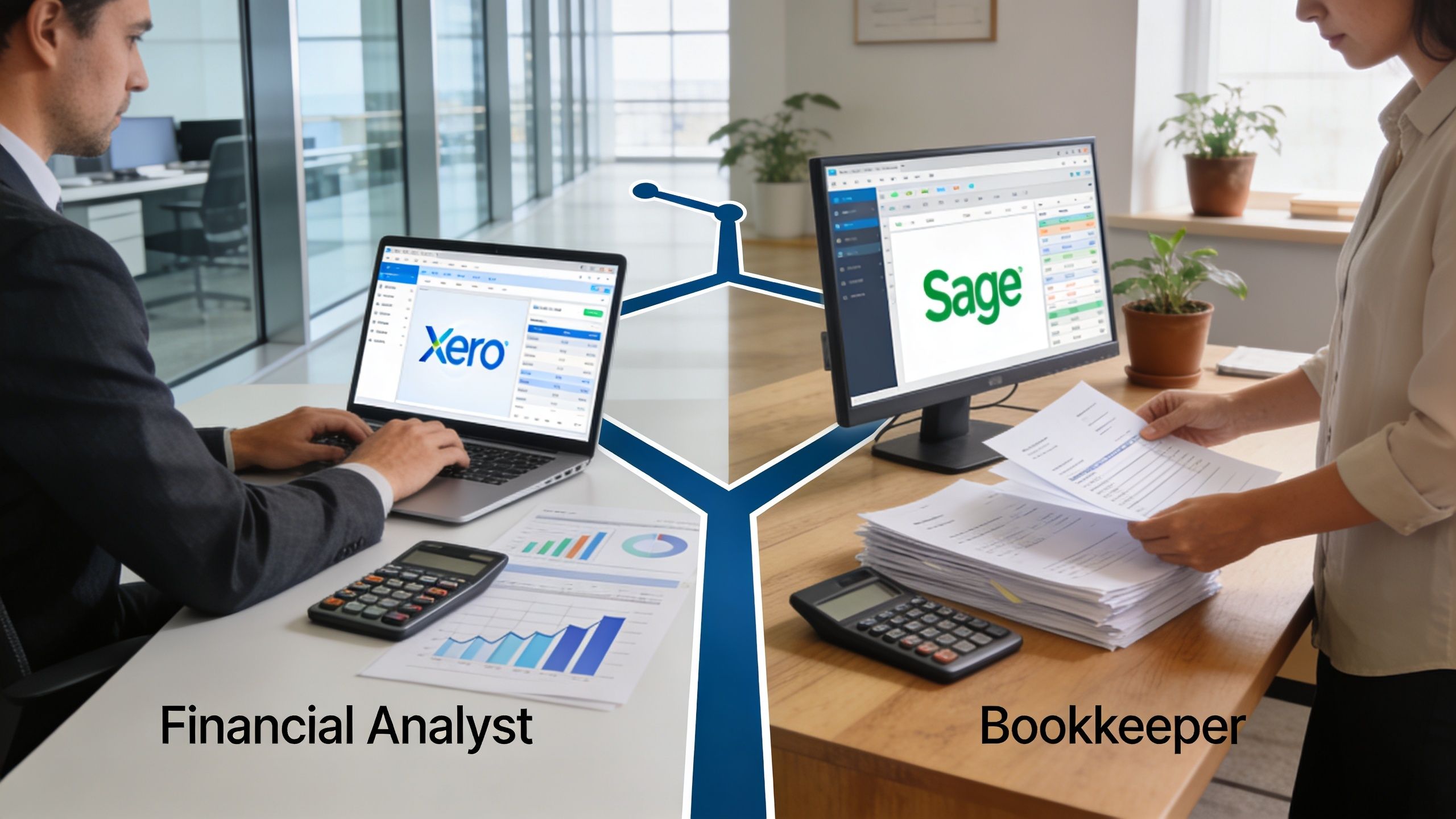
If you want bookkeeping and VAT work
Start with the platform that helps you understand workflow clearly. For many beginners, that’s Xero. It’s usually easier to follow the flow from bank feed to coding to reconciliation to VAT review.
But don’t stop at software familiarity. In bookkeeping and VAT training, you need to practise:
- Transaction posting
- Bank reconciliation
- VAT checks before submission
- Sales and purchase ledger control
- Error spotting and correction
If you learn those habits in Xero first, you’ll gain confidence quickly. Then add Sage to widen your job options.
If you want advanced payroll
Pick Sage.
This is the easiest recommendation in the whole xero vs sage debate. If payroll is your destination, Sage usually gives you stronger practical alignment with UK employer expectations. Payroll work often demands more than software navigation. It needs confidence with process, compliance, routine, and checking.
Good payroll training should include:
- Starters and leavers
- Payslip processing
- Pension and reporting workflows
- Error correction
- Communication with staff and managers
Sage fits that reality well.
If you want accounts assistant or final accounts progression
This group needs a wider base. You’re not just entering invoices. You’re supporting the month-end process, cleaning ledgers, helping with journals, and building towards year-end understanding.
For this path, my advice is simple:
- Start with Sage if your target is established employers, practice work, or broad employability.
- Add Xero if you want flexibility across modern SME environments.
This is also where structured training matters. One option in the market is Professional Careers Training, which offers official Sage, Xero, and QuickBooks certification, plus support with CV preparation, LinkedIn optimisation, and job hunting. That combination matters because software training on its own often isn’t enough to turn into interviews.
The best course is the one that links software practice to real office tasks and actual recruitment outcomes.
If you want business analyst or data analyst opportunities
Many accounting candidates think too narrowly.
If you want to move toward business analyst or data analyst roles, don’t only ask which software accountants prefer. Ask which software helps you think in terms of data flow, reporting logic, and system connections.
Xero often supports that mindset better because it sits naturally in more connected, cloud-based environments. It can help you get used to exporting data, interpreting dashboards, and understanding how finance data feeds wider reporting.
Sage still has value, especially in larger or more structured finance environments, but the day-to-day feel is different. If your long-term plan includes Excel, Power BI, SQL, or operational reporting, Xero can be a useful stepping stone because it encourages a more connected way of working.
Our Recommendation Which Software Is Right for You
You don’t need another vague answer. You need a decision.
The recent graduate
You’ve got some theory, maybe a degree or AAT knowledge, but not much software confidence.
Recommendation: Start with Sage if you’re applying broadly across UK accounting roles. It gives your CV stronger reach in established firms. Add Xero after that.
Why? Because graduates often need the widest possible employer appeal. You can learn Xero relatively quickly later. It’s harder to recover from limiting yourself too early.
The career changer
You want a fast route into a practical role. You need something employers recognise, and you can’t waste time on the wrong course.
Recommendation: Choose Sage first if you want accounting, payroll, or accounts assistant work. Choose Xero first only if you’re targeting cloud bookkeeping or small digital firms specifically.
Career changers need a skill that removes doubt from employers. In many cases, Sage does that better.
The aspiring entrepreneur
You may want paid employment now, but you also like the idea of managing your own books or supporting a small business later.
Recommendation: Start with Xero.
Why? It’s usually easier to pick up, easier to use daily, and a good fit for small business workflow thinking. If your career remains inside employment rather than self-employment, add Sage later.
If you also want a broader business-owner perspective on software selection, this startup accounting software guide is worth reading. It’s useful context, especially if you may work with start-ups or plan to freelance.
The international professional
You’ve got accounting experience from abroad, but UK employers want local software exposure and practical confidence.
Recommendation: Prioritise Sage, then add Xero.
That order usually makes more sense because your challenge isn’t general finance knowledge. It’s proving UK workplace relevance. Sage often helps more with that signal.
The future analyst
You’re interested in finance systems, reporting, business analysis, or data analysis.
Recommendation: Learn Xero first, but don’t ignore Sage.
Xero can help you build comfort with connected systems and reporting habits. Sage still matters if you want your profile to remain attractive to more traditional finance employers.
My final ranking
If I were advising most UK job-seekers one-to-one, I’d say:
- Sage first for broad employability
- Xero first only for specific cloud-focused targets
- Both for the strongest long-term return
That’s the honest answer.
Getting Certified and Becoming Job-Ready
Certification only helps if you can use it under pressure. Employers can tell the difference between someone who watched tutorials and someone who has practised tasks.
What to do next
Start with a training route that includes hands-on work, not just videos. You want live exercises in bank reconciliation, VAT workflows, invoice processing, reporting, and error correction. If payroll is part of your goal, make sure payroll processing is part of the course rather than an optional extra.
Then build proof.
- Add the certification clearly on your CV under software skills and training.
- Mention the tasks you practised, not just the software name.
- Update LinkedIn with the platform, training outcome, and target role.
- Prepare interview examples showing how you processed transactions, reviewed VAT, or handled reconciliation issues.
Don’t treat the platforms as separate worlds
A lot of your skill transfers across systems. The logic of bookkeeping, VAT review, payroll checking, ledger control, and reporting doesn’t disappear because the menu changes.
That means your first software choice isn’t permanent. It’s your entry point.
If you want a practical starting resource while building confidence in one of the most common cloud systems, this guide on how to use Xero accounting software is a useful place to begin.
Employers don’t expect you to know every button. They expect you to understand the job, learn fast, and work accurately.
The interview test most candidates fail
Many candidates say, “I know Xero” or “I’ve used Sage”. That’s weak.
Say this instead:
- what you processed
- what checks you carried out
- what reports you reviewed
- what issues you had to spot
- how the software supported the task
That answer sounds like workplace readiness, not course attendance.
If you’re still stuck on xero vs sage, keep it simple. Choose the software that fits your target role, then train in a way that proves you can do real work. That’s what gets interviews. That’s what gets offers.
Professional Careers Training offers accountancy and software training for learners who want practical Sage, Xero, QuickBooks, payroll, bookkeeping, business analysis, and data analysis skills, with 1-to-1 support from qualified trainers, flexible study options, and recruitment-focused help with CVs, LinkedIn, and job search preparation.