
You're probably here because you've seen IAS 19 on a syllabus, in a set of financial statements, or in a job description, and it felt...
You've finished your degree, updated your CV, and started scanning job adverts for trainee finance roles. Then the pattern appears. Employers ask for Sage, Xero, payroll software, Advanced Excel, Power BI, or SQL. Your lectures covered principles, ratios, reporting, and theory, but the software stack that powers day-to-day work is barely there.
That gap frustrates a lot of capable people. It also creates a real opening. In finance, accounting, and data work, computer software development courses often have a much more practical meaning than people expect. They aren't always about becoming a software engineer. They're often about learning the digital systems businesses already use so you can step into a role and contribute quickly.
For a graduate, career changer, or newcomer to the UK market, that shift in thinking matters. The fastest route to employability is rarely “learn everything”. It's “learn the tools attached to the job you want”.
Bridging the Gap Between Your Degree and Your First Job
A finance graduate usually doesn't struggle because they lack intelligence. They struggle because employers hire for applied competence. A hiring manager wants to know whether you can process invoices in Sage, reconcile bank feeds in Xero, help with VAT returns, build a payroll run, clean spreadsheet data, or turn reporting data into a Power BI dashboard.

That's why software-focused training matters so much. The UK's digital sector employed about 1.7 million people in 2023, and the government has reported that digital roles account for a large share of UK vacancies and pay well above the national average, as outlined in edX's overview of software development learning. Even if you're not aiming for a pure coding job, the message is clear. Digital capability has labour-market value.
What employers really mean by software skills
In finance and accounting, software skills usually sit in one of these areas:
- Transactional systems such as Sage, Xero, QuickBooks, and payroll tools
- Spreadsheet-heavy analysis using Advanced Excel
- Reporting and business intelligence using Power BI
- Data extraction and querying using SQL
- Light automation and data handling using Python in some analyst roles
Most entry-level applicants focus too much on qualification titles and not enough on workflow. Employers think in workflows. Can this person raise invoices, post journals, process payroll changes, match nominal codes, prepare a month-end support file, or spot anomalies in a data export?
Practical rule: A course helps your job search when it teaches you how work moves from input to output, not when it only shows you where buttons sit in the software.
There's another reason this matters. Finance applicants increasingly need evidence, not just claims. If you've built practice reports, completed realistic bookkeeping tasks, or recorded a walkthrough of a dashboard you created, you give employers something tangible. That's also why it helps to learn how to make product demos so you can present software tasks clearly during applications or interviews.
Why this is a career issue, not just a training issue
A lot of talented candidates stay stuck because they treat software as an optional extra. It isn't. For bookkeeping, payroll, accounts support, and analyst roles, software is part of the job itself.
A degree shows potential. Software fluency shows readiness.
When you combine core finance knowledge with the right systems training, you stop looking like a junior candidate who needs to be taught from scratch. You start looking like someone who can be trusted with real work, even in a first role.
Understanding Software Skills for Finance and Data Roles
The easiest way to understand computer software development courses for finance professionals is to stop thinking like a computer scientist and start thinking like a skilled tradesperson. A tradesperson doesn't need to invent the drill. They need to know which drill to use, when to use it, and how to use it well.
That's exactly how software works in modern finance careers.
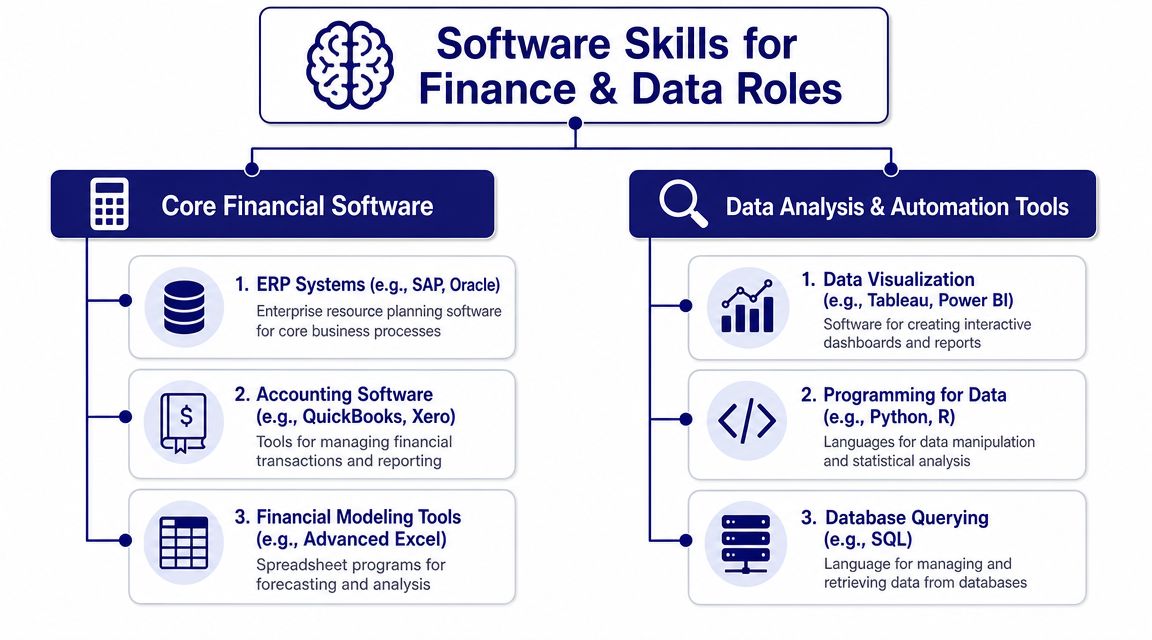
Stream one covers core financial software
If you want to work in bookkeeping, payroll, accounts administration, or final accounts support, this stream is usually the right fit.
It includes tools such as:
- Sage for postings, reconciliations, ledgers, and routine accounting work
- Xero for cloud bookkeeping, bank feeds, invoicing, and VAT workflows
- QuickBooks for similar small-business accounting tasks
- Payroll software for pay runs, deductions, and reporting
- Advanced Excel for reconciliations, schedules, checks, and reporting support
These tools run the operational side of many finance teams. If you're aiming for an accounts assistant role, employers often care less about whether you know abstract programming concepts and more about whether you can complete clean, accurate processing work.
For a useful overview of how digital tools fit into modern accounting work, see this guide to technology for accounting careers.
Stream two covers data analysis and automation tools
If your interest leans towards reporting, performance insight, process improvement, or business analysis, the second stream will make more sense.
This one often includes:
- Advanced Excel for modelling, lookups, pivot reporting, and data cleaning
- SQL for querying business data from databases
- Power BI for dashboards and visual reporting
- Python for data preparation and repeatable analysis tasks
- ERP exposure where reporting is pulled from wider business systems
The shift here is important. You're not just recording transactions. You're asking questions of data. Why did costs move? Which customers are slow payers? Where are process delays showing up? Which departments overspent?
Later in the section, this short video helps visualise how software skills connect to modern roles:
Software skill isn't one thing. In finance, it usually means either running core processes correctly or turning business data into decisions.
Choosing the right lane early
People often waste time by mixing tools without a clear job target. If you want payroll work, start with payroll systems, Sage, and Excel. If you want data analysis, start with Excel, SQL, and Power BI.
That doesn't mean you can't broaden later. It means your first training choice should match the vacancy type you'll apply for. The clearest training plans are built backwards from job adverts, not forwards from curiosity alone.
Exploring Key Training Pathways for Your Career
Some learners know they want “a job in finance” but can't yet name the exact role. That's normal. What helps is to compare pathways by daily work, software used, and the kind of employer demand attached to each one.
Bookkeeping and VAT
This pathway suits people who like order, detail, and routine financial processing. The work often includes sales and purchase ledgers, bank reconciliations, invoice handling, expense posting, and VAT-related tasks.
The software focus is usually Sage, Xero, QuickBooks, and Excel. Good training doesn't just show you where to click. It teaches how transactions flow through ledgers and affect reports.
Typical progression can move from junior bookkeeping support into broader finance administration or management accounts support.
Advanced payroll
Payroll needs precision and discretion. The work involves pay calculations, statutory elements, deductions, employee changes, and reporting deadlines.
Useful training usually centres on payroll software, Excel, and process controls. The strongest learners are often those who like rule-based work and can stay calm under deadline pressure.
Payroll can become a specialist path. That's attractive if you want a role with clear responsibility and repeatable systems work.
Accounts assistant and final accounts
This route is often the most direct fit for accounting graduates. It usually combines transaction processing with month-end support, journals, reconciliations, accruals, prepayments, and assistance with draft accounts preparation.
The software stack tends to include Sage, Xero, Excel, and sometimes wider accounting systems. Final accounts training matters because it connects the daily processing layer to the reporting outcome employers care about.
Business analyst
Business analysis sits between operations, data, and decision-making. You may work on requirements, reporting needs, process mapping, stakeholder communication, and system improvement.
Relevant tools often include Excel, Power BI, SQL, and documentation tools. This path suits people who can translate between business problems and technical or reporting solutions.
If that direction appeals to you, structured data analyst training can also provide a useful foundation because many business analyst roles rely on the same reporting and data-handling skills.
Data analyst
This path focuses more directly on extracting, cleaning, analysing, and visualising data. In finance-related settings, that can mean cash-flow analysis, trend reports, variance reporting, sales analysis, or operational dashboards.
The software core is often Excel, SQL, Power BI, and sometimes Python. This route suits learners who enjoy logic, patterns, and evidence-based problem-solving.
| Training Pathway | Key Software | Example Job Titles | Core Skills Acquired |
|---|---|---|---|
| Bookkeeping and VAT | Sage, Xero, QuickBooks, Excel | Bookkeeper, Finance Assistant, Accounts Administrator | Transaction posting, reconciliations, invoicing, VAT workflow |
| Advanced Payroll | Payroll software, Excel | Payroll Assistant, Payroll Administrator, Payroll Officer | Pay processing, deductions handling, compliance-focused workflow, reporting |
| Accounts Assistant and Final Accounts | Sage, Xero, Excel | Accounts Assistant, Junior Accountant, Trainee Accounts Assistant | Journals, month-end support, reconciliations, draft accounts support |
| Business Analyst | Excel, SQL, Power BI | Junior Business Analyst, Reporting Analyst, MI Analyst | Requirements thinking, process analysis, dashboarding, data interpretation |
| Data Analyst | Excel, SQL, Power BI, Python | Data Analyst, Finance Analyst, Reporting Analyst | Querying, data cleaning, visualisation, insight generation |
How to pick between them
Use three filters:
- Choose by task preference: Do you prefer routine financial processing, deadline-based payroll cycles, or investigative data work?
- Choose by tool comfort: If ledgers and bookkeeping software feel natural, stay in the accounting lane. If dashboards and queries interest you more, move towards analytics.
- Choose by work style: Some roles reward precision and consistency. Others reward interpretation and communication.
A lot of careers start with one lane and then widen. An accounts assistant can move into analysis. A payroll professional can expand into broader finance operations. A data analyst can specialise in finance reporting. The first course doesn't lock you in. It gives you an entry point.
Identifying the Hallmarks of a High-Quality Course
A weak course teaches software features in isolation. A strong course teaches work.
That difference matters because employers rarely hire for “knows menus and icons”. They hire for outcomes. Can you complete a task accurately, check the result, fix errors, and explain what you've done?
Look for full-process learning
In software-engineering education, the strongest curricula cover the full software development life cycle, including programming languages, development tools, Agile methodologies, software architecture, and testing, because real work goes beyond a single coding task, as described in Coursera's software development topic overview. The same logic applies in finance software training.
For example, bookkeeping training should cover more than entering transactions. It should show how entries affect ledgers, reconciliations, VAT treatment, reporting outputs, and error checks. Data training should cover more than building a chart. It should include data extraction, cleaning, validation, interpretation, and presentation.
What works in practice: Courses that teach complete workflows create candidates who can handle real assignments. Courses that only teach isolated clicks create candidates who freeze when the data is messy.
Signs the course is built for employability
Use this checklist before you enrol:
- Hands-on exercises: You need practice with realistic tasks, not passive videos alone.
- Relevant software access: If the course covers Sage, Xero, QuickBooks, Excel, SQL, or Power BI, you should have direct exposure to those tools.
- Integrated training: Good programmes show how software connects. A common example is exporting figures from an accounting package into Excel for checks or analysis.
- Feedback on your work: Marking, review, or tutor comments matter because software learning improves through correction.
- Job-facing outputs: Portfolio tasks, reports, reconciliations, or dashboards help you prove capability.
What to avoid
Some courses look polished but don't help employability much.
Be cautious if a course:
- Overpromises speed: Fast learning sounds appealing, but rushed content often leaves major gaps.
- Stays too theoretical: Finance software training should feel close to a working office environment.
- Skips error handling: Real work includes incorrect entries, mismatched data, and incomplete records.
- Ignores business context: Software actions mean little if you don't understand why the task exists.
A high-quality course should leave you able to complete a process from start to finish, explain your logic, and show evidence of practice. That's a far better signal to employers than a certificate on its own.
How to Choose the Right Course Format and Provider
The right format depends less on motivation and more on your real-life constraints. People often choose courses based on what sounds ambitious. They should choose based on what they can complete well.
A structured programme can be compressed into 12 weeks full-time or extended to 24 weeks part-time, and that shift affects learning intensity, retention, and project throughput. In practice, the part-time model is better for working learners who need longer cycles to consolidate concepts and complete portfolio work, according to the Institute of Data's software engineering programme overview.
Full-time versus part-time
Here's the simple trade-off.
Full-time study suits you if you can clear space, learn quickly, and want a faster move into applications and interviews. It can work well for recent graduates who are in active job-search mode and can devote regular daytime hours to learning.
Part-time study is usually better if you're working, managing family commitments, or returning to learning after a gap. The extra time helps with repetition, confidence, and project completion.
If you're weighing those formats, this comparison of online training vs classroom learning can help you think through flexibility, pace, and support.
Questions to ask before you commit
Don't judge a provider by the course title alone. Ask practical questions.
- Who teaches it: Trainer quality matters. In finance software training, industry-qualified tutors can usually connect software actions to accounting logic more clearly.
- How much support you get: Self-paced access sounds flexible, but some learners need live guidance and correction.
- Whether software setup is included: Installation and access problems can derail progress early.
- What evidence you'll finish with: Ask what outputs you'll have for interviews. A certificate, project file, dashboard, or practical assessment can all help.
- Whether the timetable fits your reality: Evening and weekend access often matters more than people expect.
If a provider can't explain how a learner moves from lesson one to interview readiness, the course may be content-rich but career-poor.
The provider matters as much as the syllabus
A good syllabus with weak learner support often leads to unfinished training. A well-run provider keeps you moving, answers technical questions, and helps you apply what you've learned to actual vacancy requirements.
That's especially important for finance and data learners because confidence tends to grow through guided practice, not just information.
The Support System That Turns Training into a Career
A learner can finish a Sage or Power BI course, pass the assessment, and still struggle in the job market because they cannot explain how they would use that software in an accounts assistant, payroll, or junior analyst role.
Support changes that result.
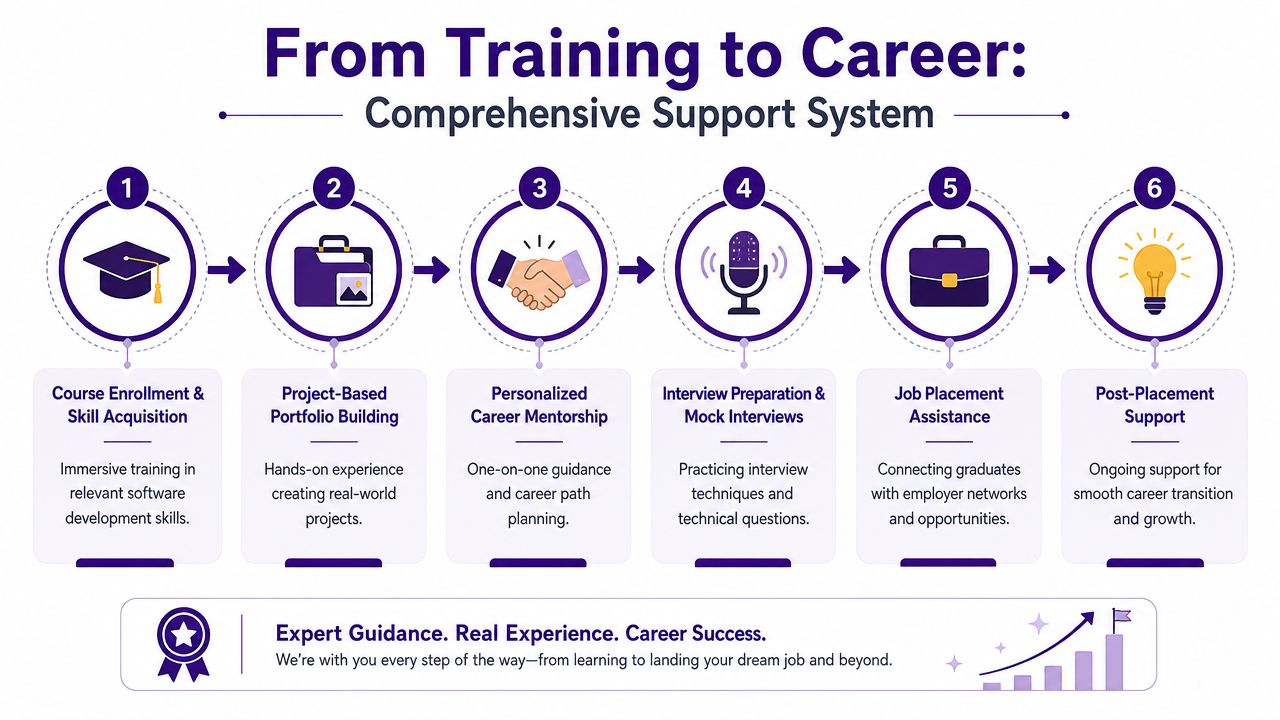
Technical support removes early friction
Practical issues stop progress more often than course brochures admit. A learner logs in, the software version differs from the lesson, a company file will not open, or SQL practice tables are missing. At that point, motivation drops fast.
Good providers deal with setup properly. They help learners install the right tools, access practice environments, and sort out errors before those errors turn into abandoned study. For finance and accounting training, that matters because software confidence builds through repetition. If Sage, Xero, Excel, or Power BI is not working properly, the learner is not practising the tasks employers ask about.
Personal guidance turns software knowledge into work-ready skill
In finance and data roles, learners rarely get stuck on the same problem. One person can post invoices in Xero but struggles to explain double-entry logic. Another can write an SQL query but cannot say what the output means for month-end reporting. Someone else builds a Power BI dashboard but misses the commercial point.
That is why individual feedback matters. A tutor or coach can correct the mistake, explain the business context, and push the learner to describe the task in employer language. That last part is often what gets interviews.
Professional Careers Training is one provider in this space. It offers one-to-one training with ACCA-qualified Chartered Accountants and CPD-approved trainers, flexible timetables, official certification in Sage, Xero, and QuickBooks, software support, and recruitment preparation including CV support and LinkedIn optimisation.
Recruitment support is what makes the training marketable
Completing a course is only one stage. Candidates also need evidence, positioning, and a clear target.
Useful career support usually includes:
- CV rewriting: software should be presented through tasks completed, such as bank reconciliations, VAT returns, payroll processing, SQL reporting, or dashboard creation
- LinkedIn updates: profiles need the right keywords for recruiter searches, especially tool names and job titles
- Interview practice: learners need short examples that prove they can use the software in a finance or data setting
- Application focus: targeting accounts, payroll, bookkeeping, reporting, or analyst roles usually works better than applying for every office vacancy
- Portfolio or project review: sample reports, spreadsheets, reconciliations, and dashboards give hiring managers something concrete to assess
A certificate gets attention. Clear examples of applied software work are what make a hiring manager believe the candidate can do the job.
That is also why finance learners sometimes compare specialist software training with wider tech routes. Looking at broader market signals, such as 2026 software engineer salary expectations, can help put software skills in context. The goal here is different, though. Finance employers are usually not asking for general coding ability. They are hiring people who can use accounting systems, spreadsheets, databases, and reporting tools accurately.
The strongest course outcomes usually come from a simple combination. Software training, technical help, and career coaching delivered together. That is what turns learning into a credible first step into work.
Your Next Step From Learning to Earning in 2026
If you work in finance, accounting, business analysis, or data, computer software development courses don't have to mean becoming a traditional programmer. In many cases, they mean becoming fluent in the software that employers already rely on. That includes bookkeeping platforms, payroll tools, Excel, SQL, and Power BI.
Your route depends on the kind of work you want to do. Bookkeeping and VAT training can prepare you for ledger-focused roles. Advanced payroll can lead to specialist process work. Accounts assistant and final accounts training support entry into broader finance teams. Business analyst and data analyst pathways suit learners who prefer reporting, systems, and insight.
The key is to choose with purpose. Match the course to the job family. Check that the training covers real workflows. Make sure the provider offers support that reaches beyond the classroom.
If you're also comparing wider digital career paths, it can help to review broader 2026 software engineer salary expectations as a projection, not because you need to switch careers, but because it gives context on how software capability is valued across the market.
Start with a simple self-check:
- Which job titles are you applying for
- Which software appears most often in those adverts
- Which gap can you close first
- Which course format can you realistically complete
Small, targeted decisions usually beat big vague plans. Learn the software that fits the role. Practise until you can show your work. Then apply with evidence, not hope.
If you want structured help turning software training into a job plan, Professional Careers Training offers accountancy and digital-skills training with flexible scheduling, practical software learning, and career support designed for learners moving into UK roles.