UK tax planning has become more operational, less theoretical. HMRC says the UK tax gap was £39.8 billion in 2022/23, and small businesses accounted for...
A strong profile doesn’t replace proper training, practical software skills, or interview preparation. It does make those things visible. If you’ve studied AAT content, completed bookkeeping and VAT training, learned Sage or Xero, or built SQL and Power BI projects, your profile should show that clearly and in recruiter language.
Your LinkedIn Profile Is Your Digital CV
A lot of people still treat LinkedIn like an online business card. That’s a mistake. Recruiters use it as a search tool first and a screening tool second.
In the UK, LinkedIn has grown to approximately 47.5 million users, and over 87% of recruiters globally use it to source candidates. An optimised profile can lead to up to 21 times more profile views, according to LinkedIn UK statistics. That’s why LinkedIn profile optimization isn’t optional if you want to compete properly.
For entry-level candidates, the problem usually isn’t a total lack of ability. It’s poor packaging. A graduate writes “Finance student” when the target role is Accounts Assistant. A career changer writes “Open to work” instead of “Trainee Bookkeeper | VAT Returns | Xero | Sage”. A junior analyst lists modules studied, but not the tools used or the outputs produced.
What recruiters actually look for
Recruiters don’t read your profile from top to bottom like a novel. They scan for fit.
They usually want to see whether you match the role on a few practical points:
- Target job title such as Bookkeeper, Accounts Assistant, Business Analyst, or Data Analyst
- Relevant tools like Xero, Sage, QuickBooks, Excel, SQL, Power BI, or Python
- Training and certifications that show job-ready knowledge
- UK relevance including location, spelling, and local terminology such as VAT, payroll, and final accounts
If your profile is vague, you make the recruiter do extra work. Most won’t bother.
A good LinkedIn profile doesn’t try to sound impressive. It makes it easy for the right person to say, “Yes, this candidate is relevant.”
Treat LinkedIn and your CV as a pair
Your CV gets you into an application. LinkedIn often confirms whether you look credible. The two should support each other, not contradict each other.
If your CV still needs tightening, these UK CV writing tips are a useful starting point. Then make sure your LinkedIn profile reflects the same direction, same skills, and same target role.
That matters even more in fields where employers want practical evidence. If you’re aiming for bookkeeping and VAT work, mention VAT returns, purchase ledger, sales ledger, bank reconciliation, and software use. If you want data roles, show SQL queries, dashboard work, reporting, and business problem solving. Generic profiles disappear into the crowd.
Secure Your Professional First Impression
The top of your profile does most of the heavy lifting. Before anyone reads your experience, they see your photo, headline, and URL. If those three elements are weak, the rest of the profile won’t get the attention it deserves.

A professional headshot makes a LinkedIn profile 14 times more likely to be viewed, and including at least five relevant skills in your profile and headline increases your chances of being discovered and messaged by recruiters by more than 31 times, based on this LinkedIn profile guide.
Use a photo that looks employable
This isn’t about looking glamorous. It’s about looking reliable.
A suitable photo for bookkeeping, payroll, finance, business analysis, or data work should have:
- Clear lighting so your face is easy to see
- A plain or tidy background that doesn’t distract
- Professional clothing appropriate for an office setting
- A recent image that looks like you now
Don’t use a cropped wedding photo, holiday photo, heavy filter, or a blurry selfie. In finance and analysis roles, presentation affects credibility more than people like to admit.
Fix your headline before anything else
Your headline should do two jobs. It should tell people what you do, and it should help you appear in search.
“Student”, “Job seeker”, and “Aspiring professional” are too weak on their own. They waste valuable space and don’t align with how recruiters search.
A better approach is to combine target role, core skills, and relevant software.
Here are some practical headline formats:
| Target role | Better headline example | ||
|---|---|---|---|
| Accounts Assistant | Accounts Assistant Trainee | Bookkeeping, VAT Returns, Payroll | Xero, Sage, Excel | ||
| Bookkeeper | AAT Trained Bookkeeper | Sales Ledger, Purchase Ledger, Bank Reconciliation | Xero and QuickBooks | ||
| Business Analyst | Aspiring Business Analyst | Requirements Gathering, Process Mapping, Excel | Seeking UK Entry-Level Roles | ||
| Data Analyst | Junior Data Analyst | SQL, Power BI, Excel | Turning Data into Clear Reporting Insights |
Clean your URL and check your top line
Your custom LinkedIn URL is a small detail, but it matters on CVs and email signatures. Use your name where possible. Avoid random strings of letters and numbers if you can edit them out.
Your opening section should also line up with the rest of the profile. If your headline says Business Analyst but your first visible experience is only retail work with no analytical framing, you need to fix the story underneath. If you need help shaping that part, this guide on optimizing your LinkedIn summary gives useful prompts for writing a stronger introduction.
Practical rule: your profile should tell a recruiter your target role within three seconds.
Craft a Compelling Career Story
The About section and Experience section are where weak profiles usually fall apart. People either say too little, or they paste in duties that sound flat and generic.
That’s a problem if you’re a recent graduate or a career changer, because your story needs to bridge the gap between training and employability. You don’t need to pretend you’ve done more than you have. You do need to frame what you’ve done in a way that sounds relevant to work.
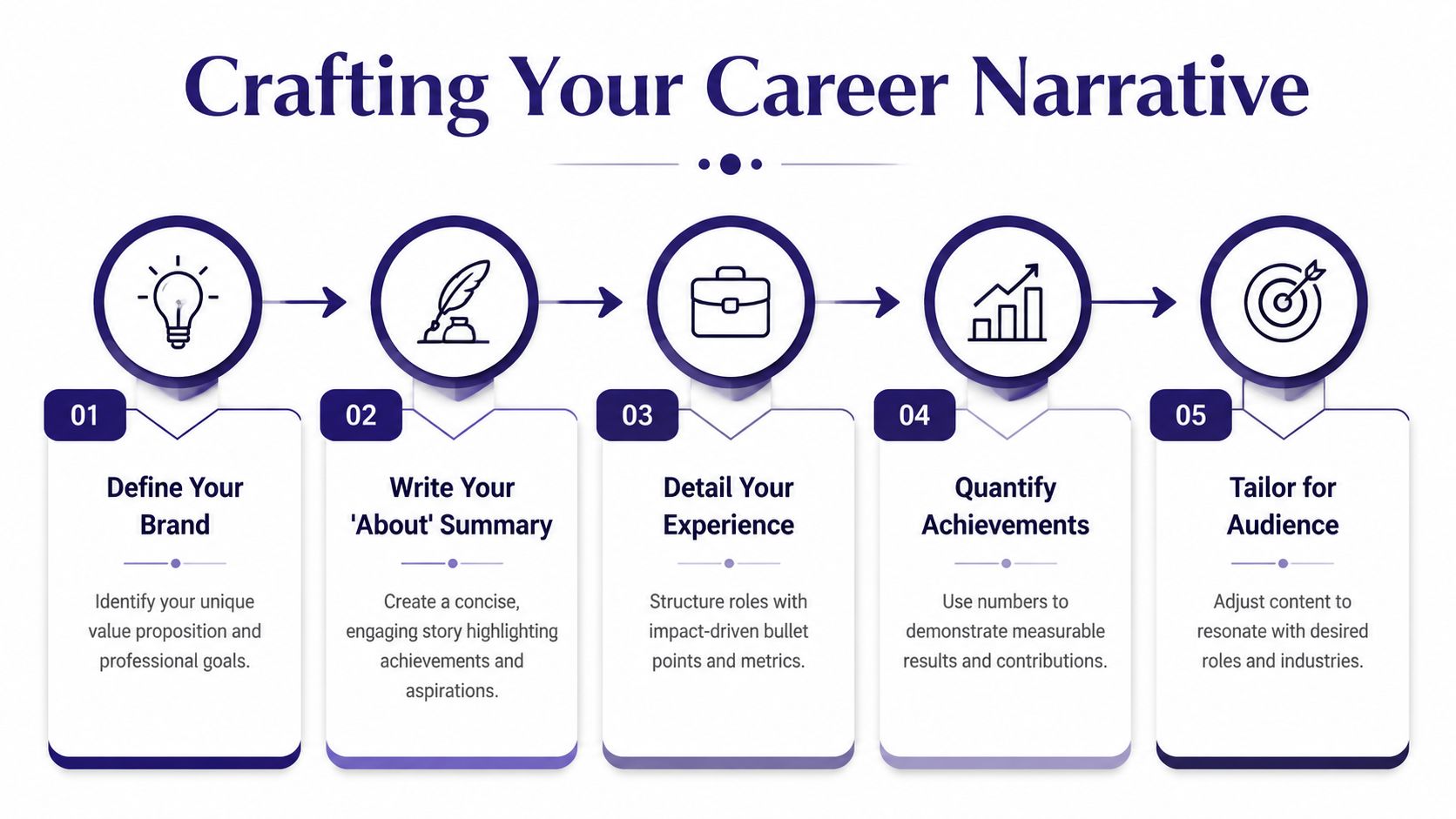
A strong keyword strategy helps here. Place 2 to 3 primary keywords such as “ACCA Qualified” or “Business Analyst” in the headline, About section, and most recent job title, and quantify achievements where you can. This approach can increase profile views by 40 to 60% in 30 to 60 days, according to this LinkedIn profile optimization resource.
Write an About section that sounds focused
Most About sections fail because they’re too broad. “Hard-working individual with a passion for learning” says nothing useful. Recruiters see that language every day.
A better About section has three clear parts:
- What you’re training for or moving into
- What tools or technical areas you’ve worked with
- What type of role you’re seeking in the UK market
For example, a bookkeeping candidate could write about training in bookkeeping and VAT, familiarity with Sage, Xero, and QuickBooks, and an interest in accounts assistant or trainee bookkeeper roles. A data candidate could mention SQL, Excel, Power BI, reporting, and dashboard work.
Keep the language in UK English. Use “organised”, “analysing”, “licence” where appropriate, and UK terms such as VAT, payroll, purchase ledger, and final accounts. Avoid American-style buzzwords if you’re applying to UK employers. Small language mismatches can make a profile feel imported rather than local.
Turn training into evidence
If you don’t have direct commercial experience yet, use your training accurately but professionally. That means describing course projects, software practice, and simulated tasks in a way that shows relevance.
Here’s the difference:
| Weak version | Stronger version |
|---|---|
| Completed bookkeeping course | Completed practical bookkeeping training covering sales ledger, purchase ledger, bank reconciliation, and VAT returns |
| Did accounting project | Prepared trial balances and draft financial statements as part of final accounts training for a simulated SME case |
| Learnt SQL in class | Used SQL to clean, query, and analyse structured datasets for reporting exercises |
| Studied business analysis | Produced process maps, requirement notes, and stakeholder-focused documentation during business analysis training |
This short video is useful if you need a visual prompt for structuring your profile content:
Quantify what you can, but don’t force it
If you have real numbers from work, coursework, or portfolio work, use them. If you don’t, don’t invent them. That’s where many profiles become unbelievable.
Good evidence for junior candidates includes:
- Software use such as Sage, Xero, QuickBooks, Excel, SQL, Power BI, or Python
- Task scope such as VAT return preparation, payroll processing practice, account reconciliation, reporting, or dashboard building
- Output produced such as a final accounts pack, requirement document, spreadsheet model, or data visualisation
Your profile should read like someone who has practised the work, not someone who has only read about it.
For career changers, this matters even more. A retail supervisor moving into payroll can reframe previous experience around accuracy, reconciliation, record keeping, and deadline discipline. An operations worker moving into business analysis can emphasise process improvement, reporting, and stakeholder communication. The goal isn’t to hide your past. It’s to translate it.
Showcase Your Job-Ready Technical Skills
The Skills section isn’t decorative. It’s one of the most searchable parts of your profile. For bookkeeping, accounts, business analysis, and data analysis roles, that means your technical choices matter a lot more than generic soft skills.
If your skills list starts with “Microsoft Word”, “Team player”, and “Communication”, you’re making your profile weaker. Recruiters searching for Sage, Xero, SQL, Power BI, payroll, VAT, or requirements gathering won’t get much from that.
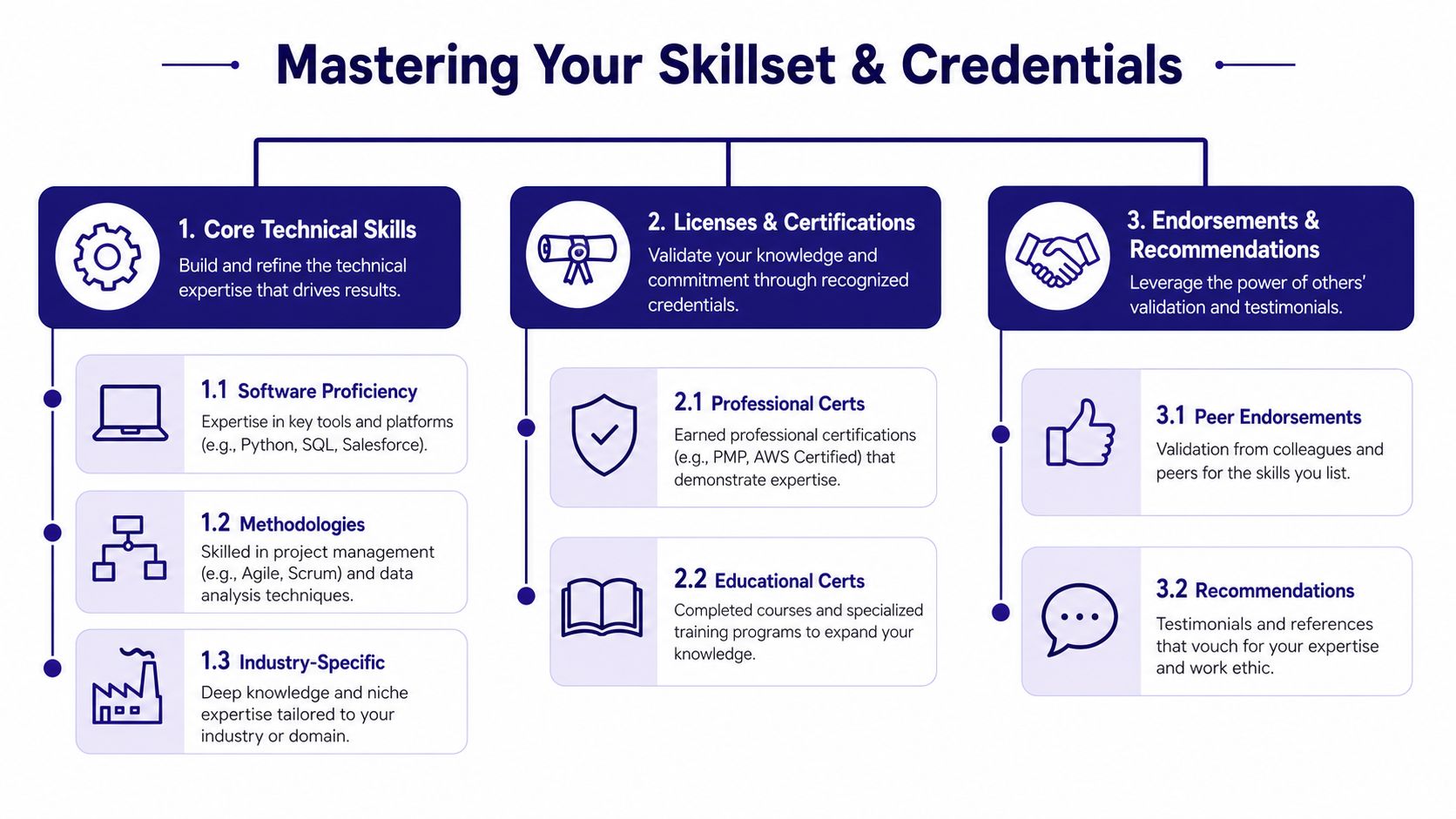
Adding 15 to 20 targeted skills such as Xero or SQL and securing endorsements increases hiring chances by 30% for UK candidates. On the other hand, failing to obtain verified skills badges for key accounting software can lead to a 9x reduction in connection requests, according to this UK-focused profile advice.
Build your skills list around the actual job
Think of your skills section as a recruiter filter, not a personality test. Put in the terms that match the jobs you want.
For finance and accounts roles, strong skills often include:
- Bookkeeping
- VAT Returns
- Advanced Payroll
- Bank Reconciliation
- Purchase Ledger
- Sales Ledger
- Final Accounts
- Xero
- Sage
- QuickBooks
- Microsoft Excel
For analysis roles, your list might include:
- SQL
- Power BI
- Python
- Data Analysis
- Data Cleaning
- Dashboard Reporting
- Business Analysis
- Requirements Gathering
- Process Mapping
- Stakeholder Management
Add recognised training and certifications properly
A skill with no evidence is weaker than a skill supported by training. That’s why the Licences & Certifications section matters.
If you’ve completed an AAT qualification, that’s worth featuring because AAT offers internationally recognised accounting and bookkeeping qualifications in the UK, including Level 2 Foundation Certificate routes that cover core bookkeeping and VAT knowledge for entry-level roles. You can see the qualification pathways on the AAT qualifications and courses page.
If your training covered bookkeeping and VAT in an endorsed setting, that’s also relevant. Level 2 Bookkeeping and VAT programmes endorsed by the Institute of Financial Accountants cover practical skills such as financial record-keeping, VAT returns, and identifying taxable supplies. The IFA outlines that on its endorsed training programme page.
For VAT specifically, don’t just write “understand VAT”. Be precise. Training should help you understand taxable persons, taxable supplies, tax points, and the value of supplies, which are core mechanics in UK VAT work, as described in this UK VAT course overview.
Don’t ignore verified and practical relevance
A bookkeeping profile that lists Xero but shows no course, no certification, and no endorsement is weaker than one that connects all three. The same applies to SQL, Power BI, or business analysis tools.
If you’re unsure whether your current training reads as job-ready, this guide on how our courses help students get job-ready gives a useful benchmark for what employers usually expect to see in a candidate profile.
Recruiters don’t reward long skills lists on their own. They respond to skills that are relevant, prioritised, and supported by visible evidence.
Amplify Your Visibility with Activity and Proof
A polished profile can still stay quiet if you never use it. LinkedIn profile optimization doesn’t end with your headline and skills. You also need proof on the page and some level of activity around it.

The best place to start is the Featured section. Add work that supports your claim. That might be a bookkeeping case study, a spreadsheet project, a Power BI dashboard screenshot, a short post about payroll processes, or a simple explanation of Making Tax Digital.
Show proof, not just claims
If you say you’re interested in business analysis, feature a process map or requirement summary. If you say you’re training in final accounts, upload a clean sample of financial statement work from a simulated exercise if your training provider allows it. If you’re targeting data analyst roles, feature a dashboard, a SQL project summary, or a workbook that shows reporting logic.
A simple weekly routine works better than bursts of random posting:
- Share one useful insight from your training, software practice, or job search
- Comment on three relevant posts from finance, data, or recruitment professionals
- Connect with a small number of relevant people such as recruiters, hiring managers, or people already working in your target role
This LinkedIn job search guide is a practical reference if you want a simple routine without overcomplicating it.
Post with enough substance to be worth reading
Analysis of over 3,000 LinkedIn posts found that long-form content between 1,900 and 2,000 words gets the most views, and posts with photos increase comment rates by 98%. Strong activity can also contribute to up to 21 times more profile views, as noted earlier in the article.
That doesn’t mean you need to become a full-time content creator. It means shallow posting won’t do much. A short, thoughtful post about what you learned from reconciling bank entries in Sage, or how you cleaned inconsistent data in Excel before loading it into Power BI, is more useful than “Excited for the future”.
For bookkeeping and VAT candidates, practical topics are easy to find. You could post about VAT registration basics, payroll deadlines, ledger accuracy, or the difference between purchase ledger and sales ledger work. For context, the UK VAT registration threshold is £90,000 of taxable turnover in any rolling 12-month period, and the deregistration threshold is £88,000, according to this UK VAT guide. That kind of topic gives you something concrete to discuss if VAT is part of your target role.
Measure Your Impact and Plan Your Next Move
Once you’ve done the work, check whether it’s improving the right signals. Look at your profile views and search appearances. The raw number matters less than the pattern.
If profile views rise after you add “Accounts Assistant”, “VAT Returns”, “Xero”, and “Sage”, that’s useful. If you start appearing in searches for the wrong roles, your wording still needs adjusting. If recruiters view your profile but don’t contact you, the issue may be your Experience section or lack of visible proof.
A simple review checklist helps:
- Headline aligned with one clear target role
- About section written in plain UK English
- Experience rewritten to reflect tasks, tools, and outputs
- Skills prioritised around role-specific software and technical terms
- Certifications added so your training looks real and current
- Featured section populated with evidence, not just claims
- Activity maintained so the profile doesn’t go stale
Some people struggle not because they lack information, but because they don’t stay consistent. If that sounds familiar, structured support such as accountability coaching can help you keep momentum while you update applications, follow up with recruiters, and improve your profile week by week.
LinkedIn won’t rescue a weak job search on its own. But it does reward clarity. If your profile says what you do, shows the right tools, and proves you’re ready for bookkeeping, payroll, accounts, business analysis, or data analysis work, it becomes a proper asset instead of a neglected page.
If you want practical help turning your profile into something employers can act on, Professional Careers Training offers accountancy and analytics-focused training with flexible study options, software support, recognised certifications in Sage, Xero, and QuickBooks, plus recruitment support including CV preparation, job hunting strategy, career coaching, and LinkedIn optimisation.