
Your startup probably didn't begin with a finance system. It began with speed. A founder sends invoices from one app, stores receipts in email folders,...
Your startup probably didn't begin with a finance system. It began with speed. A founder sends invoices from one app, stores receipts in email folders, checks the bank balance on a phone, and tells themselves they'll “sort the books later”.
That works until it doesn't.
The first late payment lands at the same time as software renewals, payroll questions, and an accountant asking for cleaner records. Suddenly, the problem isn't just bookkeeping. It's visibility. You can't see cash clearly, you're unsure what's overdue, and every admin task feels harder than it should.
That's why accounting software for startups matters so early. In practice, the right platform does more than record transactions. It creates routine, supports compliance, and gives founders, bookkeepers, payroll staff, and future finance hires a common system to work from. It also shapes careers. The people who know how to run Xero, QuickBooks, Sage, or FreeAgent properly are often the same people trusted with VAT, payroll, month-end work, and management reporting.
Choosing Your First Accounting Software
A familiar scene plays out in many new businesses. Sales are starting to come in, suppliers need paying, and someone is still trying to manage everything in spreadsheets. Then a customer asks for a proper invoice, the accountant asks for a clean export, and the founder realises the business has outgrown improvised admin.
That first software decision tends to happen under pressure. Founders want something affordable and easy. Bookkeepers want a proper audit trail. Accountants want records that reconcile cleanly. All three are right.
Early choices matter because finance habits form quickly. If a startup begins with poor coding, inconsistent invoice numbering, missing receipt capture, and weak bank reconciliation, those problems don't stay small. They show up later in VAT work, payroll processing, year-end accounts, and due diligence.
A sensible first step is to compare how platforms fit your business model, your level of in-house skill, and your likely reporting needs. If you're weighing the basics, this guide to choosing accounting software for startups is a useful companion because it frames the decision around growth rather than just entry price.
What founders usually get wrong
Most mistakes aren't technical. They're operational.
- They choose for today only. A system that feels fine for a founder-only business can become awkward once a payroll clerk, accounts assistant, or external accountant needs access.
- They underestimate bank reconciliation. If transactions don't match cleanly and regularly, reporting becomes unreliable fast.
- They treat setup as admin. Chart of accounts design, VAT settings, invoice templates, and user permissions affect every process that follows.
Good accounting software doesn't remove finance work. It makes the work visible, structured, and easier to review.
What a better first choice looks like
For most startups, the best first platform is the one your team can use well every week. Ease of invoicing, clean bank feeds, clear expense capture, accountant access, and practical reporting beat a long feature list you'll never touch.
Why The Right Software Is Non-Negotiable for UK Startups
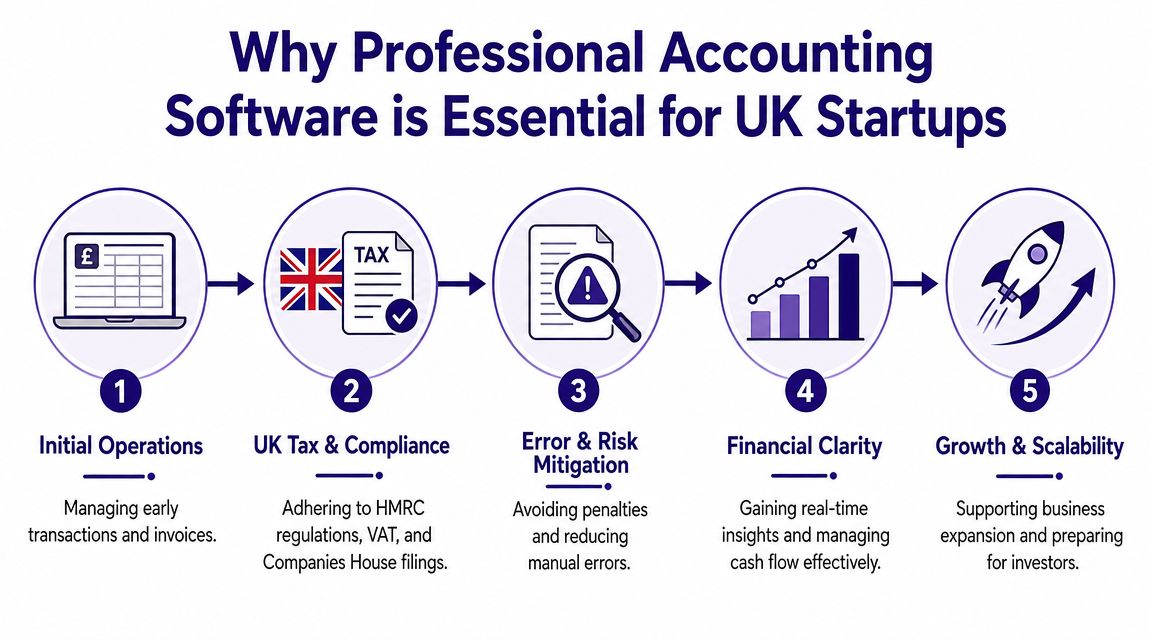
For a UK startup, proper accounting software isn't a nice extra. It sits close to legal compliance.
A key milestone was Making Tax Digital for VAT. It became compulsory for most VAT-registered businesses from 1 April 2019, and then applied to all VAT-registered businesses from 1 April 2022, requiring digital records and electronic submission for VAT work according to this UK startup accounting overview. That changed the conversation. Paper files and ad hoc spreadsheets no longer fit the reality for many growing firms.
Compliance starts with process
When founders hear “compliance”, they often think about year-end deadlines. Day to day, it's more basic than that. You need digital records that are complete, transactions coded sensibly, and VAT treatment applied consistently.
That's where cloud systems earn their place. If you want a simple explanation of what sits behind that shift, this overview of cloud accounting software gives the right foundation.
In practical terms, software helps with:
- Digital record keeping. Sales, purchases, receipts, and bank movements sit in one place.
- VAT workflow. Returns are easier to prepare when coding has been done properly throughout the quarter.
- User accountability. You can see who entered, changed, or approved information.
- Remote access. Founders, bookkeepers, and accountants don't need to pass files around by email.
Risk gets expensive quickly
Manual systems fail in ordinary ways. Duplicate entries creep in. Supplier invoices go missing. Personal spending gets mixed with business costs. Then someone has to spend hours untangling it.
That cleanup work is avoidable. Good software reduces friction, but only when it's used with discipline. The recurring lesson in startup finance is simple: the software is the system of record. If the team treats it as a secondary copy, the books won't hold up.
Practical rule: if the bank balance in your software can't be trusted without explanation, the rest of your reporting is already compromised.
Growth exposes weak finance setup
The biggest issue isn't usually the first month. It's the first period of complexity. You hire staff. You need payroll controls. You add a second sales channel. You want management accounts for a lender or investor. Suddenly the founder who “handles the books” is the bottleneck.
The right platform creates a single source of truth early. That gives the business cleaner cash visibility and gives finance staff a proper base to build from.
The Main Contenders in the UK Startup Scene
The UK market is shaped by small business reality. According to Wise's summary of the UK startup software market, 99.9% of the UK business population is made up of SMEs, with around 5.5 million businesses in that group. That matters because startup tools in the UK tend to prioritise compliance, cash-flow tracking, and collaboration over enterprise-heavy complexity.
That's why a small cluster of names keeps appearing. Xero, QuickBooks, Sage, and FreeAgent have become default options because they fit how many UK businesses operate.
Comparison at a glance
| UK Startup Accounting Software Feature Comparison 2026 | Xero | QuickBooks Online | Sage Accounting | FreeAgent |
|---|---|---|---|---|
| Best fit | Growing startups needing strong integrations | Founders wanting familiar small business workflows | UK firms that prefer Sage's established presence | Freelancers and small service businesses |
| Bookkeeping workflow | Strong reconciliation and invoice flow | Broad general bookkeeping coverage | Straightforward core bookkeeping | Simple and clean for lighter needs |
| VAT suitability | Well suited to regular compliance routines | Common choice for VAT and bookkeeping | Strong UK familiarity | Works best for simpler setups |
| Payroll fit | Often paired with broader finance workflows | Useful where owner-managers want one ecosystem | Natural choice for some UK finance teams | Less attractive once needs become more complex |
| Reporting depth | Good for growing firms and accountant collaboration | Practical reporting for owner-managed businesses | Solid operational reporting | Better for simpler reporting needs |
| Ecosystem style | Integration-led | Broad adoption and familiarity | Traditional UK business software heritage | Leaner, more focused environment |
Xero
Xero tends to suit startups that expect to build a wider finance stack around the ledger. It has a strong reputation for collaboration with accountants and for workflows that don't feel clumsy once transaction volume increases.
It often appeals to businesses that care about reconciliation discipline, clean invoicing, and app connectivity.
QuickBooks Online
QuickBooks Online remains a common choice because many founders and bookkeepers already know the name. Its appeal is familiarity. It gives small businesses a broad toolkit without demanding deep technical finance knowledge on day one.
That can be a strength and a weakness. Familiar doesn't always mean best fit. A startup should still test whether the workflow suits its users, not just its accountant.
Sage Accounting
Sage has long-standing weight in the UK market. Many finance professionals trained on Sage products before cloud accounting became the norm, so there's still trust in the brand.
For some teams, that heritage is useful. For others, it can feel less modern if they want an app-led ecosystem and lighter day-to-day navigation.
FreeAgent
FreeAgent is often attractive to smaller service-led businesses that want something less intimidating. It can work well where the finance process is relatively straightforward and the user base is limited.
A platform can be good software and still be the wrong software for your startup. Fit matters more than reputation.
For aspiring finance professionals, this matters too. If you want to work in startup finance, it's worth understanding more than one package. This guide to software for business accounts is helpful because employers rarely hire for theory alone. They hire for software confidence.
A Detailed Comparison for Core Startup Needs
The easiest way to compare accounting software for startups is to stop thinking in brand slogans and start thinking in work. What jobs must the system handle well each week? For most UK startups, the answer sits in four areas: bookkeeping, VAT, payroll, integrations, and reporting for growth.
Side by side on core tasks
| Feature | Xero | QuickBooks Online | Sage Accounting | FreeAgent |
|---|---|---|---|---|
| Bank reconciliation | Strong and widely praised | Good for routine bookkeeping | Reliable for standard workflows | Fine for simpler volumes |
| Invoicing | Strong | Strong | Good | Good for straightforward billing |
| MTD for VAT readiness | Suitable for digital VAT routines | Suitable for digital VAT routines | Suitable for UK compliance workflows | Suitable where needs are lighter |
| App ecosystem | Broad and attractive for growing firms | Broad and familiar | More selective depending on workflow | Narrower than larger rivals |
| Payroll coordination | Works well in broader finance setups | Convenient for many small businesses | Comfortable fit for traditional UK users | Less suited as complexity grows |
| Reporting for scale | Better once management reporting matters | Practical for owner-led oversight | Solid standard reporting | Best for less complex needs |
Bookkeeping and VAT
If your team can't keep the ledger clean, every later process becomes slower. This is why bank reconciliation is such a decisive feature. The software must help users match transactions quickly and flag exceptions clearly.
For UK-relevant startup choices, Intuit's overview of accounting tools highlights Xero for stronger bank reconciliation, invoicing, and integration ecosystem support, with pricing listed at $25 to $90/month and a positioning that suits accountants, bookkeepers, and growing firms. That aligns with what many UK finance teams value in practice. Reconciliation quality often matters more than cosmetic design.
Xero usually feels strongest when the books are getting busier and more people need to trust the same data.
QuickBooks Online is often easier for founders who want a broad all-rounder. Sage can be a comfortable fit where a UK finance team already knows the environment. FreeAgent works best when the bookkeeping remains relatively light.
Payroll and operational control
Payroll is where many startups discover the gap between basic bookkeeping and finance operations. Once salaries, pensions, statutory payments, and payroll journals enter the picture, a system has to support more than invoicing and expenses.
Look for three things:
- Clear user roles so payroll data isn't open to everyone.
- Reliable posting of payroll journals into the ledger.
- A workflow your team can repeat monthly without workaround spreadsheets.
A founder-run business may cope with a simple arrangement for a while. A hiring business usually needs more structure, especially if an accounts assistant or payroll administrator is taking over the process.
Integrations and ecosystem
A startup rarely uses accounting software in isolation. Payments, expenses, ecommerce, CRM, and reporting tools all affect the ledger. That makes integrations more than a convenience.
If your business depends on Stripe, Shopify, project tools, or subscription systems, test the accounting platform against those workflows before signing up. A weak integration doesn't just create admin. It creates reconciliation noise.
This is also where operational maturity shows. Teams bidding for auditing and fiscal services contracts know that auditability and clean data flow matter. Startups may not think in those terms yet, but the principle is the same. Bad input produces weak reporting.
Reporting for growth
Not every startup needs advanced reporting immediately. Many won't. But some will hit a point where basic bookkeeping reports stop answering management questions.
You're likely approaching that point if you need:
- Department or project visibility
- Foreign currency tracking
- More structured management accounts
- Cleaner investor or lender reporting
- Tighter month-end routines
At that stage, software choice starts to affect the finance team's career path as well. The person who can move from transaction posting into reporting, controls, and analysis becomes more valuable very quickly.
Beyond Software The Practical Skills Your Team Needs
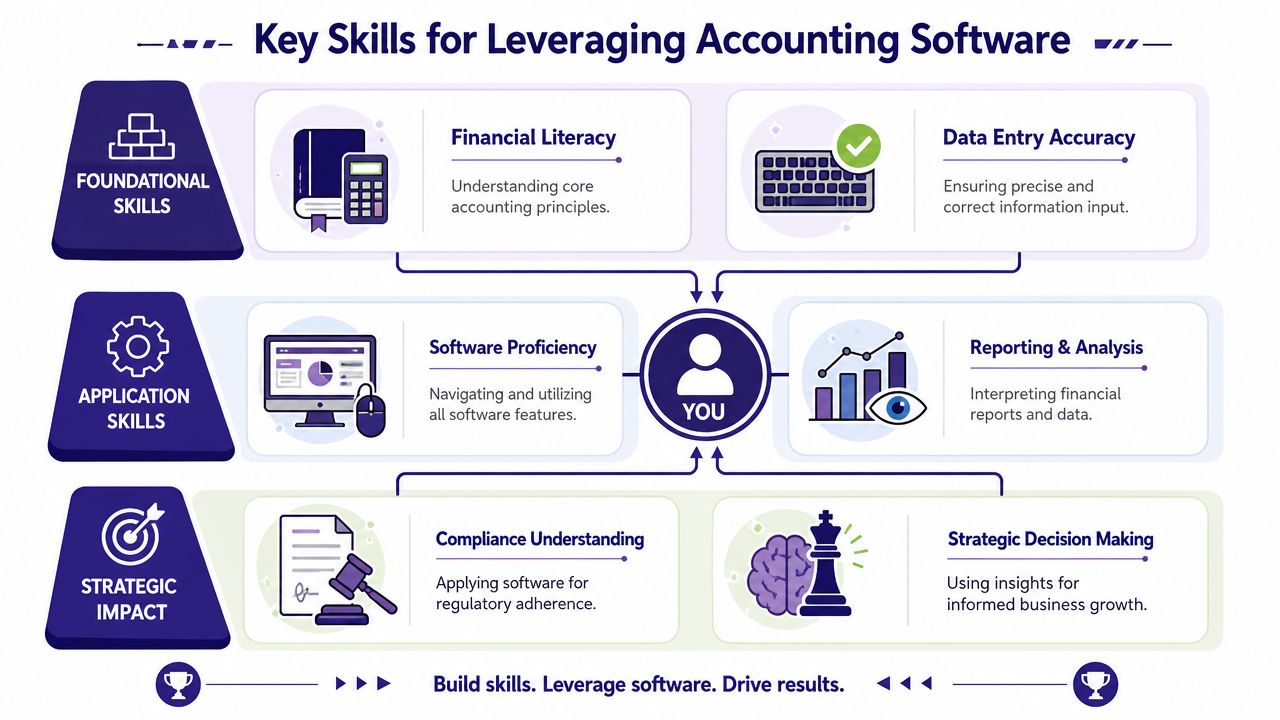
A startup can buy good software and still produce poor finance work. The difference is skill. The software records activity, but people decide how well that activity is coded, reviewed, analysed, and explained.
That matters for founders and for anyone building a career in finance. If you want to move into bookkeeping, payroll, final accounts, business analysis, or data analysis, software knowledge has to connect to real tasks.
Bookkeeping and VAT skills
At entry level, most finance professionals start with transaction work. That includes sales invoices, purchase invoices, credit notes, expense coding, bank postings, and reconciliations. In a startup, those aren't low-value tasks. They're the base layer of compliance and reporting.
A Bookkeeping and VAT training path supports work such as:
- Ledger accuracy. Posting to the right nominal codes.
- Reconciliation discipline. Matching the ledger to bank activity and supplier balances.
- VAT treatment. Understanding how transactions should be coded before a return is prepared.
- Document control. Keeping digital evidence organised and reviewable.
Without those skills, the software becomes a storage tool rather than a finance system.
Advanced payroll and accounts assistant capability
Payroll demands a different mindset. The work is timetable-driven, highly sensitive, and far less forgiving of error. A startup that begins with one or two staff can still make serious mistakes if payroll is handled casually.
An Advanced Payroll pathway prepares people for practical tasks such as salary runs, pension administration, statutory elements, and payroll journals. That's useful for payroll clerks, but also for founders and operations staff who need to understand what the software is doing.
An Accounts Assistant route usually broadens the role further. It combines bookkeeping with supplier control, customer accounts, month-end checks, and reporting support. In the startup world, that's often the person who keeps finance functioning while the founder focuses elsewhere.
Software proficiency becomes employable when you can explain the accounting behind the button you clicked.
If you're developing those hands-on skills, this guide on how to use Xero accounting software is a good practical reference because it links screen actions to finance processes.
Final accounts, business analysis, and data analysis
The jump from junior finance work to higher-value work usually happens when someone can interpret numbers rather than just input them.
A Final Accounts learner starts to understand adjustments, period-end thinking, and how bookkeeping feeds formal reporting. That's a major step for anyone aiming at assistant accountant roles.
A Business Analyst or Data Analyst pathway takes the same finance data in a different direction. Instead of asking, “Was this posted correctly?”, the question becomes, “What does this tell us about the business?” Trends in revenue, cost categories, overdue debtors, and cash timing all become more useful when someone can extract and interpret them confidently.
For startups, that crossover is powerful. The strongest junior finance hires are often the ones who can reconcile the bank, understand VAT, support payroll, and then turn around and explain what the numbers are saying.
A Framework for Choosing Your Startup's Platform
Founders often ask for a winner. There isn't one. The right platform depends on the shape of the business, the people using it, and how much complexity is likely to arrive over the next year.
That matters because not every startup grows into a large finance operation. The Office for National Statistics reported that around 39.4% of businesses born in 2018 were still active five years later, as noted in this discussion of startup accounting systems. Some firms stay small. Some close. A smaller group scales and needs stronger controls. Your software decision should respect that reality without trapping you in a weak setup.
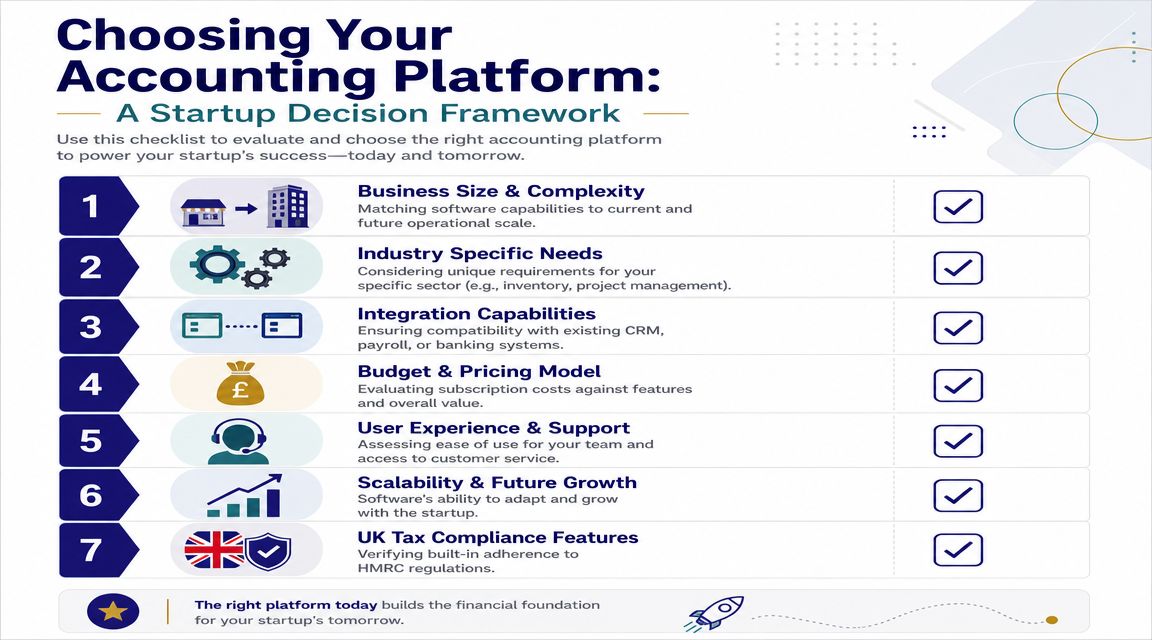
Ask these questions before you choose
Who will use the software?
If it's only the founder for now, simplicity matters. If a bookkeeper, payroll clerk, or accountant will also be involved, user permissions and collaboration matter more.What type of business are you running?
Service firms, ecommerce businesses, SaaS companies, and agencies all create different transaction patterns. Choose for your operational reality, not generic reviews.What must the software connect to?
Banking, payment processors, payroll tools, stock systems, and reporting apps all affect the daily workload.How much reporting do you need?
A founder who only needs cash visibility can tolerate a lighter setup. A funded startup that needs management accounts can't.
Match the platform to the decision style
A useful way to think about this is the same way you'd think about other operational choices. If you've ever looked at a guide to webinar production decisions, you'll recognise the pattern. The smartest choice usually isn't the cheapest or the most feature-rich. It's the one that fits your actual process, internal capability, and cost of getting it wrong.
A simple decision lens
- Choose Xero if reconciliation quality, accountant collaboration, and integrations sit high on the list.
- Choose QuickBooks Online if familiarity and broad owner-managed usability matter most.
- Choose Sage Accounting if your team values a known UK finance environment.
- Choose FreeAgent if the business is still relatively simple and you want a lighter experience.
Don't buy software for the business you pitch. Buy for the business you can run properly on Monday morning.
Frequently Asked Questions
How hard is it to move from spreadsheets to accounting software
It's usually manageable if the records are reasonably tidy. The key tasks are setting up the chart of accounts, importing opening balances, loading customer and supplier lists, connecting bank feeds, and checking VAT settings before live use. The core work is review. Imported data often needs cleaning.
Do software certifications matter for finance careers
Yes, especially for junior and career-change candidates. A certification on Xero, QuickBooks, or Sage doesn't replace accounting knowledge, but it does show that you can work inside a live system. Employers often value that because it lowers onboarding time and builds trust.
What security features should I look for
Focus on practical controls rather than marketing language:
- Two-factor authentication for login protection
- User permissions so staff only see what they need
- Audit trail visibility to review changes
- Secure bank connections through approved integrations
- Regular backup and data access policies that your team understands
Security is strongest when software controls and staff habits work together.
If you want to turn software knowledge into real employable skill, Professional Careers Training offers practical accountancy training across bookkeeping and VAT, advanced payroll, accounts assistant work, final accounts, and software certification in Sage, Xero, and QuickBooks. Their support also extends beyond the classroom with flexible study options, career coaching, CV help, LinkedIn optimisation, and recruitment guidance for people building a finance, business analysis, or data analysis career in the UK.