
If you're training to become a business analyst, or you already work as one, you've probably noticed AI tools turning up in more of your...
I see it all the time with graduates, career changers, and overseas candidates trying to break into bookkeeping, payroll, accounts assistant, final accounts, business analyst, and data analyst roles. They’ve used spreadsheets before. They can sort data, build a simple formula, maybe even make a chart. Then they sit in front of a hiring manager or a recruiter and get exposed within minutes.
London employers don’t care that you’ve “used Excel”. They care whether you can use it to do the job. Can you reconcile records, prepare VAT data, support payroll, analyse trends, clean reporting files, and build something another person can trust? That’s the standard.
Excel training in London can absolutely help, but only if you choose training that builds job-ready skill, not just course completion.
The Hidden Meaning of Excel Skills on a London Job Application
A candidate applies for an accounts assistant role in London. On paper, they look fine. Their CV lists Excel, bookkeeping knowledge, and a finance degree. Then the interview starts.
They’re asked how they’d check duplicated supplier entries, reconcile payment data, or pull figures into a monthly report without keying everything manually. Suddenly “Excel” turns out to mean basic formatting, SUM, and a few classroom exercises. That isn’t enough.
When finance employers in London ask for Excel, they usually mean something more practical. They want someone who can work with real files, spot errors quickly, structure data properly, and produce useful output under pressure. In data roles, that expectation goes even further. A spreadsheet isn’t just a document. It’s a working tool for analysis, reporting, and decision support.
That’s why screening has become tougher. Employers increasingly test practical ability before they trust a CV, and a useful read on that shift is this skills assessment software guide. It shows why broad claims are weak and demonstrated skills matter more.
Your CV has to reflect that reality as well. If you haven’t updated yours with role-specific spreadsheet skills, start with these UK CV writing tips.
Practical rule: Don’t write “proficient in Excel” unless you can explain exactly how you use Excel in bookkeeping, payroll, reporting, or analysis.
The hidden meaning is simple. Excel on a London job application doesn’t mean familiarity. It means output. It means being able to walk into a role and contribute without needing someone to reteach the basics.
Why Generic London Excel Courses Miss the Mark
A common mistake involves assuming any Excel course is a good investment.
It isn’t.
A generic course may teach menus, formulas, charts, and workbook features, but that still leaves a huge gap between passing a class and handling real finance work. That gap matters in London, where employers hire for execution, not for course attendance.
A key problem is relevance. A course can call itself advanced and still avoid the tasks that matter for accounting and analyst jobs. If there are no business case studies, no messy datasets, no reporting logic, and no link to finance workflows, you’re learning features in isolation.

The real skills gap
The clearest warning sign is this. A 2024 UK Skills Commission report found that 62% of recent finance graduates in London feel their Excel training lacked practical application in financial modeling and scenario analysis, yet only 18% of advertised London Excel courses mention business case studies or real-world accounting datasets according to the LSE Digital Skills Lab page.
That tells you almost everything you need to know. Many learners aren’t failing because they ignored Excel. They’re failing because they took training that stayed too generic.
What generic courses usually miss
Here’s what often gets left out:
- Bookkeeping context: Learners practise formulas but don’t work with ledgers, reconciliations, or VAT-style data structures.
- Payroll logic: They may learn arithmetic functions but not how to organise pay data, deductions, checks, and submission-ready reporting.
- Final accounts support: They aren’t trained to structure schedules, clean source data, and trace figures reliably.
- Analyst thinking: They use features without learning how to question data quality, compare scenarios, or present conclusions.
Generic Excel training teaches buttons. Job-ready Excel training teaches judgement.
What to look for instead
A better course does three things at once. It teaches the feature, places it inside a business task, and forces you to produce a usable result.
That means you should favour training that includes:
- Real finance examples
- Reporting exercises with flawed data
- Tasks linked to accounting software such as Sage or Xero
- Practice in explaining your spreadsheet choices
If your target is a London finance career, don’t buy a broad promise. Buy relevance.
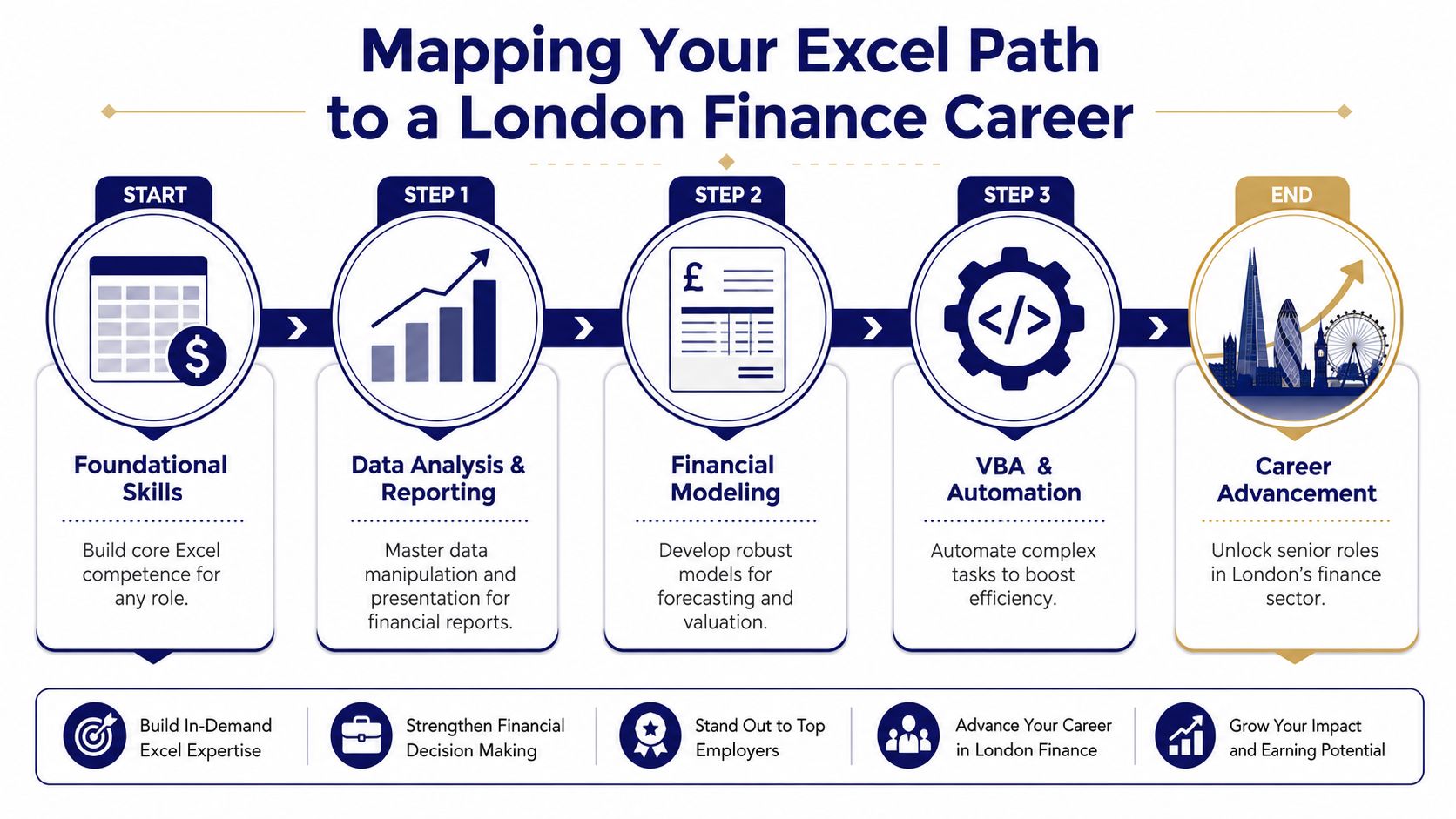
Mapping Your Excel Path to a London Finance Career
Stop thinking in the usual beginner, intermediate, advanced labels. They’re too vague to guide a career move.
Think in job levels instead. That’s how employers think, and it’s how you should plan your training. The smartest route through Excel training in London is to match spreadsheet capability to the role you want next, not the course title you like.
Accounts assistant level
Start here if you’re entering finance support work. You need clean habits, not flashy formulas.
Focus on:
- Accurate data entry and formatting
- Basic formulas for totals and checks
- Sorting, filtering, and structured tables
- Simple reconciliation support
- Clear workbook organisation
This level matters because accounts teams rely on consistency. If you can’t keep data clean, you won’t be trusted with higher-value tasks.
Bookkeeper and final accounts support level
Once the basics are solid, you need to handle more than entry. You need to interpret records and prepare them for review.
At this stage, training should cover:
- IF statements for checks and exceptions
- VLOOKUP-style retrieval and alternative lookup methods
- PivotTables for summary reporting
- Error spotting across ledgers and transaction logs
- Schedules that support month-end or year-end work
For people moving into self-employed, contract, or flexible finance work, it also helps to understand the wider market. This finance guide for UK contractors is useful for seeing how finance roles and working models can differ.
Payroll and compliance support level
Payroll work needs precision. A mistake in one formula can ripple through a full pay cycle.
Your training should prepare you to:
- organise payroll data clearly
- validate entries before submission
- calculate common pay elements and deductions
- check anomalies
- produce reports that another team member can review fast
Spreadsheet discipline serves as career protection. Good payroll staff don’t just process figures. They build files that stand up to checking.
Business analyst and data analyst level
Many people say they are advanced, but only a minority really are. In the UK, advanced Excel proficiency mandates mastery of What-if analysis tools, advanced spreadsheet analysis including PivotCharts, and dynamic dashboard creation.
That means your roadmap now includes:
| Career aim | Excel capability that matters |
|---|---|
| Business Analyst | What-if analysis, forecasting logic, dashboard building, summary reporting |
| Data Analyst | Data cleaning, structured analysis, PivotCharts, interpretation of multiple datasets |
| Senior finance support | Complex reporting, model checking, scenario comparison |
If you want analyst titles, stop training only for spreadsheet use. Train for spreadsheet decisions.
The path is straightforward. Build control first. Add reporting next. Then move into modelling, analysis, and presentation. That progression is what turns Excel from a line on your CV into a genuine career tool.
Finding Your Fit London Excel Course Formats and Costs
Once you know what you need to learn, the next question is practical. Where should you study, how should you study, and what should you expect to pay?
London gives you plenty of options, which is good news if you need flexibility. It also means you need to choose with some discipline, because convenience alone shouldn’t decide your course.
What the London market looks like
Excel training in London is highly accessible, with courses held in central locations like Holborn, just seconds from Chancery Lane tube station. Prices start from around £198 for introductory courses, with frequent dates scheduled throughout 2026 and options for online or onsite training, based on current London Excel course listings.
That accessibility matters. If you’re working, studying, or commuting from outside the centre, you can usually find a format that fits.
If you’re travelling into the capital for training, Split My Fare’s London page is worth checking to keep rail costs down.
Choosing by format, not by hype
Different formats suit different goals.
| Format | Best for | Watch out for |
|---|---|---|
| In-person classroom | Learners who want live support and structure | Pace may feel too fast or too slow |
| Live online | Busy professionals who need flexibility | Easy to drift if the course is generic |
| Onsite corporate training | Teams with shared workflows | May be too broad for individual career changers |
| Short intensive sessions | Fast upskilling before interviews | Little time to absorb and practise |
If you’re unsure which delivery style fits how you learn, this comparison of online training vs classroom learning will help you choose properly.
What course details deserve your attention
Ignore flashy wording and focus on details such as:
- Location: Central venues save time and reduce drop-off.
- Schedule: Frequent dates are useful, but only if the content matches your target role.
- Class size: Smaller groups usually make it easier to ask practical questions.
- Support after training: This often matters more than the course day itself.
- Role alignment: A cheap course is expensive if it doesn’t move you closer to a job.
A short one-day session can work well if you already have a foundation and need a focused boost. A broader programme suits you better if you’re changing careers, returning to work, or moving from academic study into practical finance.
The right format isn’t the one with the best marketing. It’s the one you’ll complete, practise, and use.
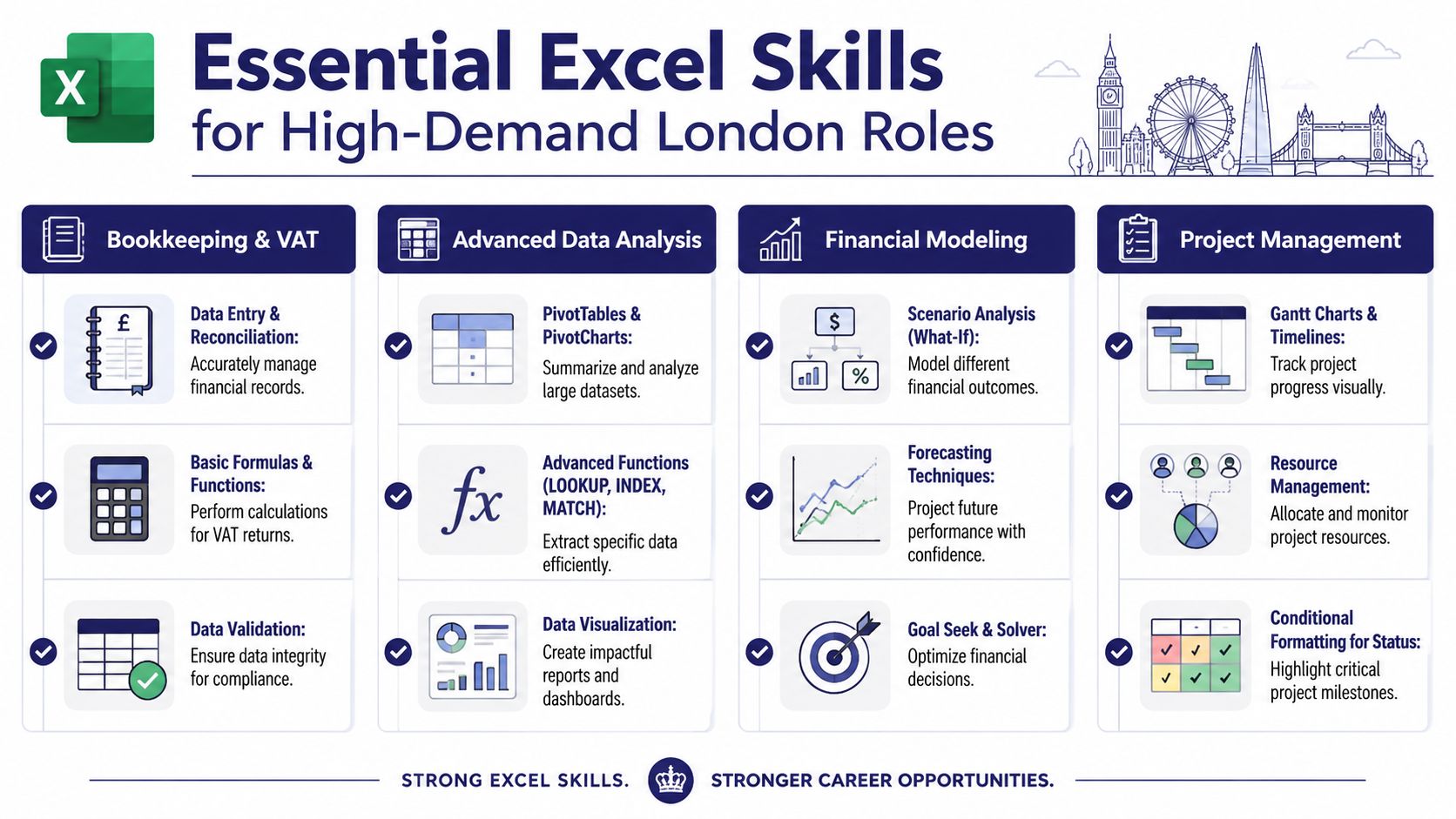
The Must-Have Excel Skills for High-Demand London Roles
You apply for a London finance role. Your CV says “Excel: intermediate.” The hiring manager reads that as one question. Can you clean messy data, check errors, reconcile figures, and produce work that someone else can trust on day one?
That is how Excel gets judged in London hiring. Not by course labels. By whether your spreadsheets hold up in bookkeeping, payroll, accounts support, and analyst work.
The gap between certification and job-readiness is where many candidates lose out. A certificate can help you get shortlisted. It does not prove you can build a clean VAT schedule, spot a payroll error before submission, or turn exported data from Sage or Xero into a usable report. Employers want evidence that you can do the work.
Combining advanced Excel with accounting software such as Xero and Sage helps learners show practical ability in financial modelling and reporting, which improves employability in accounting and business analysis roles. That is the standard to aim for.
If you want a practical companion piece, review this guide on Excel skills for accounting roles.
Bookkeeping and VAT
Bookkeeping work rewards accuracy, consistency, and clear structure. Fancy spreadsheets are useless here.
A bookkeeping-focused Excel course should teach you to:
- Set up clean transaction logs with consistent dates, categories, and references
- Reconcile records against bank statements, supplier balances, and internal entries
- Use formulas for VAT checks so totals can be reviewed quickly
- Apply data validation to reduce common input errors
- Prepare records for import or cross-checking with Xero and Sage workflows
Digital compliance matters too. Lantra’s Making Tax Digital course information notes that VAT digital record-keeping training is often delivered in a 1-day intensive format. Your Excel training should support that standard by teaching clean record structures, audit-friendly formulas, and files that transfer neatly into accounting systems.
Advanced payroll
Payroll leaves no room for sloppy workbook design. If your formulas are unclear or your checks are weak, people get paid incorrectly and the problem lands on your desk.
Strong payroll Excel training should include:
- Structured pay data sheets that are easy to review
- Checks for missing, duplicated, or inconsistent entries
- Formula patterns for recurring calculations such as pay, deductions, and adjustments
- Clear summaries for approval and sign-off
- Exception reporting so unusual cases stand out before submission
Advanced payroll training should cover Real Time Information requirements, thresholds, deductions, and more complex payroll scenarios. That means your spreadsheet skills need to support compliance, monthly routines, and review by another trained colleague.
Use this test. Could somebody else open your payroll file, follow the logic, and trust the result within five minutes? If not, your Excel standard is not job-ready yet.
Accounts assistant and final accounts support
This is where many London finance careers begin. It is also where weak Excel habits get exposed quickly.
For accounts assistant and final accounts support roles, focus on skills such as:
- Cleaning exported data fast
- Lookup functions to match invoices, payments, and ledger entries
- Month-end support schedules
- PivotTables for transaction summaries
- Error checks and exception flags
- Workbook layouts that separate raw data from outputs
These roles sit between data entry and real finance support. You are not expected to run the whole function. You are expected to help the finance team close the month without creating confusion. Clear tabs, sensible formulas, and tidy source data matter more than showing off obscure features.
Business analyst and data analyst roles
Analyst roles require more than confidence with formulas. They require judgement.
Start with data preparation. In real jobs, exported reports are messy, headings are inconsistent, categories do not match, and duplicate records appear everywhere. You need to know how to clean, standardise, and reshape data before you analyse it.
Then build reporting skills. Useful training should cover:
- PivotTables
- PivotCharts
- Lookup and reference functions
- Conditional formatting
- Trend reporting
- Dashboard layout decisions
You also need scenario skills. Analysts are hired to test assumptions, compare outcomes, and explain the effect of changes. That means using what-if tools, building sensible models, and presenting outputs that a manager can act on quickly.
A strong analyst workbook is easy to read, easy to audit, and hard to break.
If you are targeting bookkeeping, payroll, or analyst roles in London, choose Excel training that matches the software, tasks, and pressure of the actual job. Generic progression from beginner to advanced sounds tidy. Role-based training gets people hired.
How to Choose the Right London Training Provider
You find a London Excel course that looks polished, promises a certificate, and fits your budget. Three weeks later, you can follow classroom exercises, but you still cannot answer a hiring manager who asks how you would clean a Sage export, check a payroll sheet, or build a monthly reporting file for Xero data.
That is the true test. A training provider should prepare you for the work, not just the lesson.
Provider checklist
Use a simple standard. If a provider cannot show clear links between Excel training and London finance or data jobs, rule it out.
Check for these points:
- Role-based teaching: The course should use tasks drawn from bookkeeping, payroll, accounts support, or analyst work. Generic spreadsheet drills are not enough.
- Trainers who understand finance systems: You want tutors who can explain how Excel fits with Sage, Xero, QuickBooks, and exported reports from real workplaces.
- Practical workbook standards: Look for training that covers accuracy checks, clear layouts, error spotting, and files that another person can follow quickly.
- Flexible delivery that suits working adults: Evening, weekend, online, and classroom options matter if you are fitting study around a job or family commitments.
- Feedback on your actual work: Marked exercises, corrections, and direct guidance matter more than passive video content.
- Career support after the course: CV help, interview practice, and advice on how to present your spreadsheet work should be part of the offer.
The strongest providers close the gap between passing a course and performing in a job. That gap stops many applicants from getting hired.
Recruitment support matters more than providers admit
Plenty of training companies stop at delivery. They teach formulas, issue a certificate, and leave you to explain the value of the course to employers on your own. That is poor value.
Choose a provider that helps you translate training into evidence. For a bookkeeping applicant, that might mean showing a clean VAT workbook and accurate reconciliations. For payroll, it might mean demonstrating checking processes and reporting discipline. For analyst roles, it should include data cleaning, pivots, lookups, and clear presentation of findings.
A short example of what career-focused training support can look like is below.
Questions to ask before you enrol
Ask direct questions and listen for direct answers:
- Will I practise the Excel tasks used in my target job, such as payroll checks, bookkeeping reports, or analyst dashboards?
- Does the training include work based on Sage, Xero, or other accounting software exports?
- Will I finish with workbook examples I can discuss in interviews?
- Who gives feedback on my work, and how detailed is that feedback?
- What support do I get once the classes end if I need help with CVs, interviews, or job applications?
If a provider answers with vague promises, move on. London has plenty of Excel training. Very little of it is built to get you hired.
Your Next Step with Professional Careers Training
The pattern is clear. Generic Excel knowledge doesn’t carry much weight in London’s finance and data job market. Practical Excel does.
If you want to move into bookkeeping and VAT, advanced payroll, accounts assistant work, final accounts support, business analysis, or data analysis, you need training that reflects the work itself. That means role-based spreadsheets, accounting context, reporting discipline, and the ability to explain what you built and why.
You also need a provider that understands the gap between certification and employability. That gap is where many learners get stuck. They finish a course, but they still can’t show employers enough evidence that they’re ready to contribute.
What a smarter training choice looks like
The right setup should give you:
- 1-to-1 support from qualified professionals
- Flexible timetables that fit work, family, or study
- Training linked to Sage, Xero, QuickBooks, and Excel
- Career coaching, CV support, and job search guidance
- A route into actual finance and data roles, not just a certificate
That’s especially important if you’re a recent graduate, changing careers, returning to work, or entering the UK market for the first time. In all of those cases, structure matters. You need someone to help you build skill, present it well, and connect it to real vacancies.
My advice
Be selective. Don’t buy an Excel course because it’s nearby, cheap, or labelled advanced. Buy training that matches the role you want and gives you support after the lesson ends.
That decision changes everything. It affects how quickly you improve, how confidently you interview, and how believable your CV becomes.
If you’re serious about building job-ready Excel skills for London finance and data roles, choose a training route that treats employability as the end goal, not an optional extra.
If you want structured, job-focused support, Professional Careers Training offers 1-to-1 training with ACCA qualified Chartered Accountants and CPD approved trainers, flexible evening and weekend timetables, certification support for Sage, Xero and QuickBooks, plus recruitment help with CV preparation, career coaching, LinkedIn optimisation and employer introductions. For anyone serious about turning Excel training into a real London job outcome, that’s the kind of support worth prioritising.