

Think of your LinkedIn profile as your digital handshake. In the fast-paced UK job market, you only get a few seconds to make a great...
Why Process Modelling Is a Career Superpower

In today’s job market, understanding how a company really operates is not just a bonus—it is a core competency. For professionals in accounting, finance, and business analysis, the ability to map out a workflow is what separates a good employee from an indispensable one.
This skill gives you the clarity to answer critical questions. Where are the bottlenecks in our advanced payroll system? How can we speed up the final accounts preparation to close the books faster? Why does our bookkeeping & VAT process take so long every quarter? A visual model turns these vague, frustrating problems into concrete, solvable puzzles. Courses designed for roles like Accounts Assistant or Business Analyst directly equip you with the practical knowledge needed to tackle these challenges.
Connecting Models to Business Results
The true power of process modelling lies in its direct impact on the bottom line. When you create a clear process map, you can:
- Boost Efficiency: Instantly spot and cut out redundant steps in workflows like accounts payable or new client onboarding.
- Cut Costs: Pinpoint where resources are being wasted, whether it is time spent on manual data entry in a bookkeeping process or delays in payment approvals.
- Ensure Compliance: Create a visual record of your processes to prove you are meeting regulatory standards—a non-negotiable in finance, especially for VAT and payroll.
- Drive Improvement: Provide a clear “before” picture that justifies making a change and helps measure its success later on.
This is exactly why employers are desperate for these skills. The UK business process management (BPM) market has already hit USD 674.7 million, with process modelling taking a dominant 35.56% share of that. These numbers prove UK businesses are actively investing in professionals who can visualise and improve how work gets done. You can learn more about the UK’s growing BPM market on grandviewresearch.com.
By mastering process modelling, you are not just learning to draw diagrams; you are learning the language of business improvement. This skill empowers you to communicate complex ideas clearly and advocate for changes that deliver tangible results.
This ability makes you incredibly valuable, whether you’re an Accounts Assistant trying to streamline invoicing or a Business Analyst redesigning a whole department. To see how these skills slot into a specific career, take a look at our guide on how to become a successful Business Analyst.
Defining Your First Process from Start to Finish
Starting out with business process modelling can feel a bit like staring at a blank map. The trick is to focus on mapping a single, manageable journey—not the entire country. Instead of trying to diagram a massive, tangled function like “sales,” pick a process that’s well-defined, repetitive, and has a clear impact on your team or clients.
A great example for an accounts assistant would be the ‘new client onboarding’ workflow. It has a definite start (a signed contract lands on your desk) and a clear finish (the client is fully set up in all your systems). Likewise, a business analyst could get their teeth into the ‘end-of-month reporting’ cycle—it is crucial, time-bound, and made up of specific, repeatable steps. Training in final accounts provides the subject matter expertise to model this process effectively.
Setting Clear Boundaries
Once you have picked your process, the next job is to define its scope. Think of this as drawing a border around your map. You need to be crystal clear on exactly where the process begins and where it ends. Without this, you risk the project sprawling out of control—a classic problem we call scope creep.
To pin down your boundaries, just ask a few simple but powerful questions:
- What single event kicks this whole thing off? For a VAT return, it is the end of the quarter.
- What is the final, tangible outcome? For end-of-month reporting, it has to be the submission of the final accounts pack to management.
- Who is the “customer” of this process? This might be an internal stakeholder or an external client who gets the final output.
Answering these questions keeps you focused and makes sure you only model what is necessary for your initial goal.
A well-defined scope is the bedrock of successful process modelling. It stops you from getting dragged down rabbit holes in adjacent workflows and keeps your project on track, on time, and genuinely relevant to the business problem you are trying to fix.
Gathering the Real-World Details
A process model is completely useless if it does not reflect what actually happens day-to-day. This means you have to get out there and talk to the people who do the work. Your mission is to capture the ‘as-is’ process—how things operate right now, warts and all, including all the unofficial workarounds and hidden steps.
Set up some informal interviews or small workshops with the key people involved. A Data Analyst might run a workshop to understand a reporting process, while someone trained in advanced payroll would interview payroll clerks. Ask open-ended questions like, “Can you walk me through what you do when X happens?” or “What information do you need before you can start your bit?” Just listen carefully and note down the sequence of tasks, the decisions people make, and the different systems they use.
This detective work is absolutely vital. It is also where many UK companies see huge value, which has helped the Business Process Outsourcing (BPO) sector grow into an industry expected to hit £75.4 billion in revenue by 2025. Businesses invest heavily in understanding these workflows so they can improve them. You can explore more UK BPO industry insights on ibisworld.com.
Once you have a clear picture of your processes from start to finish, you can then figure out how to streamline business processes to make everything run more smoothly.
Choosing the Right Language for Your Model
Once you have identified and scoped a process, the next job is to bring it to life visually. But not all diagrams speak the same language. The notation you choose for modelling business processes has a huge impact on how clearly your model communicates its message—and who it communicates to.
Picking the right language is not about technical perfection. It is about choosing the right tool for the job. You would not use a sledgehammer to hang a picture frame, and you do not need the most complex notation for a simple, internal workflow. The goal is always clarity.
The Go-To Choice for Simple Workflows
For many day-to-day tasks, a simple flowchart is more than enough. Flowcharts use basic shapes like rectangles for tasks and diamonds for decisions, making them universally understood. This simplicity is their greatest strength, especially when you need to show a process to non-technical colleagues or senior stakeholders who just need a quick, high-level overview.
Think of it this way: if you are mapping out an expense claim process for a new accounts assistant, a flowchart is perfect. It can clearly show the steps: submit receipt, manager approval (yes/no), and payment processed. It is direct, easy to follow, and gets the point across without any confusing jargon.
This kind of straightforward, decision-based mapping is also brilliant for prioritising which processes to tackle first.
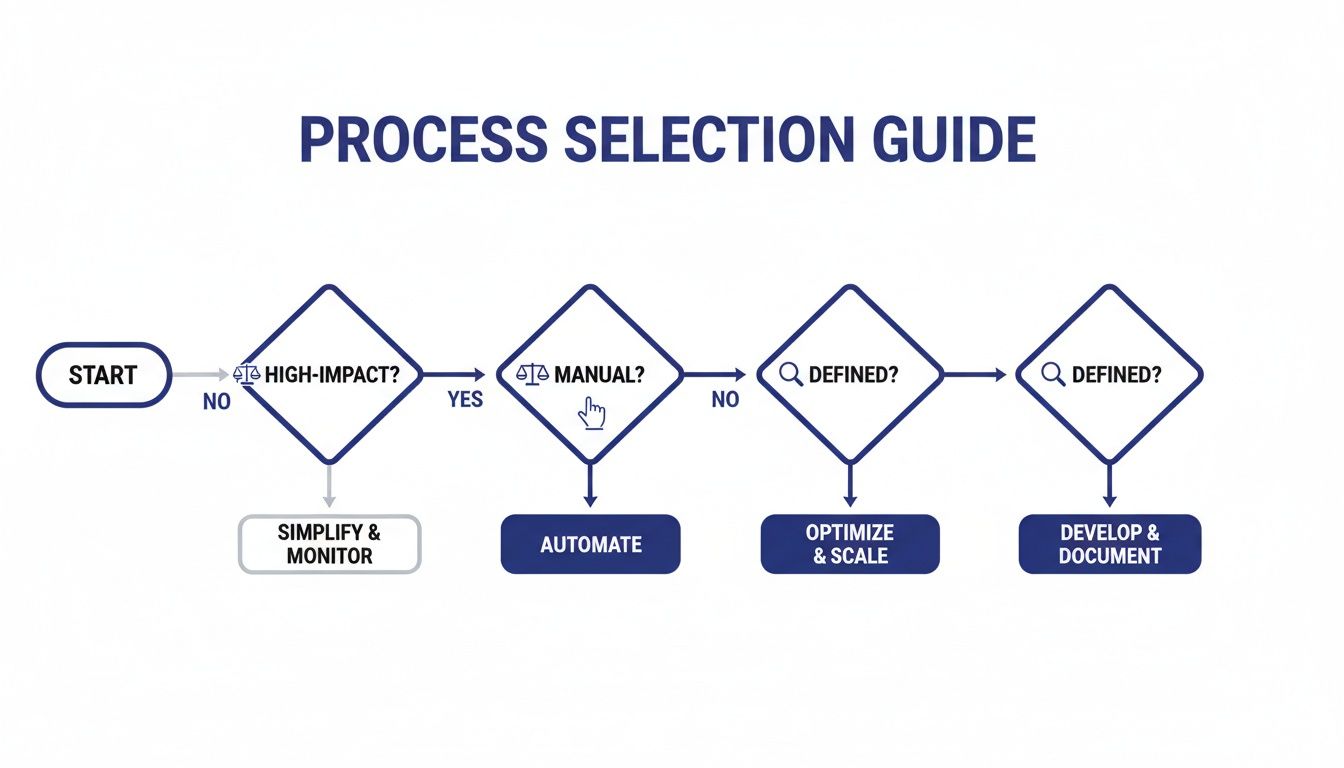
A simple guide like this helps you prioritise by first assessing a process’s business impact, then its reliance on manual work, and finally how well-defined it is.
When You Need More Detail and Precision
When you tackle more complex operations that cross departmental boundaries, you will need something with a bit more muscle. This is where Business Process Model and Notation (BPMN) comes into its own. BPMN is the industry standard for detailed process modelling, offering a rich set of symbols to represent specific events, tasks, gateways, and information flows.
Its precision is vital for processes like the entire procure-to-pay cycle, which might involve the procurement team, finance, and warehouse staff all at once. Using BPMN, you can create “swimlanes” to show exactly who is responsible for each step, map out different potential outcomes, and detail how data moves between systems. This level of detail is essential for business analysts and data analysts looking to pinpoint exact bottlenecks for automation or system integration projects.
It is no surprise that in the UK’s Business Process Management (BPM) landscape, process modelling commanded the largest revenue share of 35.56%. This dominance shows just how fundamental it is: before you can automate or optimise anything, you must first model the process to truly understand it.
A Note on UML
You might also come across Unified Modelling Language (UML). While powerful, UML is primarily used in software development to model systems, objects, and user interactions. For roles in accounts or finance, you will rarely need to create UML diagrams from scratch. However, having a basic awareness of what they are can be useful when you are collaborating with IT departments on new software projects.
Choosing Your Process Modelling Notation
To help you decide, here is a quick comparison of the most common process modelling languages. The best fit really depends on your project’s complexity and your audience.
| Notation | Best For | Key Strengths | Example Use Case |
|---|---|---|---|
| Flowchart | Simple, linear processes and communicating with non-technical stakeholders. | Easy to create and universally understood. Great for high-level overviews. | Mapping a holiday approval process for an Accounts Assistant. |
| BPMN | Complex, cross-functional processes requiring detailed analysis and precision. | Standardised notation, swimlanes for showing responsibility, rich symbol set. | Modelling the entire advanced payroll cycle, including exceptions and system handoffs. |
| UML | Software development and systems design. | Excellent for visualising system architecture, user interactions, and object behaviour. | Designing the database structure for a new accounting software module with IT. |
Ultimately, your choice should always be guided by your goal. A flowchart is for communication, while BPMN is for in-depth analysis and technical implementation.
Choosing the right notation is a strategic decision. Flowcharts excel at simplicity and communication with a broad audience, while BPMN provides the rigorous detail needed for complex analysis and system design. Always match your language to your audience and your objective.
Understanding these different approaches is a core part of a business analyst’s toolkit. For a deeper dive, you might be interested in the tools and techniques taught in Business Analyst training.
Building and Validating Your Process Model

With a clear process scoped out and the right notation chosen, it is time to bring your model to life. This is the practical, hands-on stage where you transform your research into a visual diagram that tells a story about how work gets done.
Fortunately, you do not need expensive software to start. Many excellent and often free tools are available that are perfect for modelling business processes. Platforms like diagrams.net (formerly Draw.io), Miro, and Lucidchart offer intuitive drag-and-drop interfaces that make it simple to get started.
The real skill, however, is not just in using the tool, but in applying the core modelling elements effectively to create a clear and accurate picture. After defining your process, visualising it with tools like workflow diagrams becomes essential for building and validating your model, ensuring clarity across the team.
From Blank Canvas to a Working Model
The key is to build your model piece by piece, focusing on the fundamental components that make a process understandable. Start with the core tasks and then layer in the complexity.
- Map out the tasks: Begin by placing the key activities in sequence. For a VAT return process, this would include steps like ‘Collate Sales Invoices’, ‘Verify Purchase Invoices’, and ‘Calculate VAT Due’.
- Introduce decision gateways: Where does the path split? Add decision points (often shown as diamonds) for questions like, “Are all invoices present?” This creates branches for ‘Yes’ and ‘No’ outcomes.
- Assign responsibilities with swimlanes: This is one of the most powerful features of BPMN. By creating horizontal or vertical lanes, you can clearly show who is responsible for each task—for example, a lane for the ‘Bookkeeper’ and another for the ‘Accounts Manager’.
This structure prevents ambiguity and immediately highlights handovers between different people or departments, which are often where delays and errors occur.
The Crucial Validation Step
Creating the model is only half the battle. A diagram that looks perfect to you might completely miss a crucial workaround that an employee uses every single day. This is why validation is not just a final check; it is an essential part of the modelling process itself.
Once you have a first draft of your model, schedule a walk-through session with the people who actually perform the process. Project the diagram onto a screen and talk through it step by step, from start to finish.
The goal of validation is simple but profound: to ensure the model reflects reality, not just theory. This collaborative feedback loop is where you will discover the hidden complexities, exceptions, and informal steps that are vital for an accurate process map.
During this session, encourage open feedback. Ask questions like, “Is this really what happens next?” or “What have I missed here?” This collaborative review transforms a good model into a great one. It builds buy-in from the team and ensures that any improvements you propose later are based on a solid, shared understanding of the current state. What you learn in these sessions is incredibly valuable, as covered in a well-structured Business Analyst course.
Presenting Your Work for Maximum Impact
Creating a technically perfect process model is a fantastic achievement, but its real value is only unlocked when other people understand it. More importantly, they need to act on it. A brilliant diagram that just sits on a hard drive is worthless.
Your final job is to communicate your findings in a way that actually drives change. This is where you turn your visual diagram into a compelling business case. The model is your evidence, but your presentation and documentation are the arguments that persuade stakeholders to invest time and money.
Just showing a complex BPMN diagram to a busy director is not going to get you very far. You need to back up your visual work with clear, concise documentation that anyone can pick up and understand. This document does not need to be a novel, but it must be precise. Think of it as the user manual for your model, giving it the context the diagram cannot provide on its own.
Crafting Your Supporting Documentation
This document is the vital bridge connecting your technical analysis to the business’s strategic goals. It should be easy to scan and immediately useful to anyone who needs to understand the process, from the official process owner to a new team member getting up to speed.
As a bare minimum, your documentation should always cover a few core elements:
- Process Owner and Scope: Clearly state who is ultimately responsible for the process and briefly restate the start and end points you defined earlier.
- Brief Narrative: Write a short, plain-English summary of what the process actually achieves. Drop the jargon and just focus on the purpose.
- Key Assumptions: Did you make any assumptions during modelling? Note them down here. Things like system capabilities or standard working hours are common examples.
- Identified Pain Points: This is crucial. List the key inefficiencies, bottlenecks, or risks your model has brought to light. This is where you start building the case for change.
This simple framework provides all the essential context, making sure your model can be understood and used long after your initial presentation is over.
Tailoring Your Message for Different Audiences
The secret to getting buy-in is realising that different stakeholders care about different things. It is a classic rookie mistake to present the exact same information to everyone. You have to frame your findings to align with their specific priorities.
When you are presenting to a Finance Director, for example, your language needs to be all about financial metrics.
- Focus on: Cost savings, return on investment (ROI), reduced waste, and improved cash flow.
- Your message: “By improving the bookkeeping & VAT submission process, we can cut down manual data entry by 15 hours per quarter. That saves the business roughly £6,000 a year in administrative costs.”
Your ability to translate a technical process model into a compelling business narrative is what separates a good analyst from an influential one. Speak the language of your audience to turn your insights into tangible action and demonstrate the true value of your skills.
On the other hand, when you speak to an IT Team, their concerns will be far more technical.
- Focus on: System integration points, data accuracy, automation potential, and security risks.
- Your message: “The model of the advanced payroll process shows a critical data handover between the HR system and the payroll software that is currently manual. Automating this could eliminate data entry errors and free up API capacity.”
By tailoring your message like this, you show each stakeholder exactly how your work helps them achieve their goals. That makes them far more likely to get on board and support your recommendations.
Your Process Modelling Questions Answered
As you start getting into the world of business process modelling, it is completely normal for a few questions to surface. This skill is a unique mix of analytical thinking and clear communication, so it is natural to wonder about best practices and where people typically go wrong.
Here are the answers to some of the most common queries we hear. The goal is to give you quick, clear guidance that builds on what we have already covered and helps you feel ready for your next project.
How Detailed Should My Process Model Be?
This is the classic question, and the answer is always the same: it depends entirely on who it is for and what you want to achieve. One of the biggest mistakes people make is cramming in too much detail, which ends up creating a cluttered diagram that confuses more than it clarifies.
A great rule of thumb is to start simple. Only add complexity when it is absolutely necessary to solve a specific problem or answer a particular question.
For instance, if you are presenting to senior management, a high-level flowchart showing the main stages of the final accounts process is perfect. They just need to see the overall flow, not the nitty-gritty of every single task.
On the other hand, if you are a business analyst working with developers to automate a section of the advanced payroll system, you will need a much more detailed BPMN model. That version has to show every single system interaction, data input, and potential exception.
The right level of detail is the minimum amount required to achieve your objective. Always ask yourself: “Who is this for, and what decision do I need them to make?” That single question will guide you to the perfect balance every time.
Can I Model a Process I Do Not Fully Understand?
Trying to model a process you are not familiar with is a recipe for an inaccurate diagram. It is that simple. Your model is only as good as the information you put into it. While you do not need to be an expert in the process yourself, you absolutely must collaborate with the people who are.
Think of your role as a facilitator and a bit of a detective. You use interviews, workshops, and good old-fashioned observation to pull the knowledge out of the subject matter experts—the people who do this work day in and day out.
- For a bookkeeping process: Sit down with the bookkeeper. Ask them to walk you through exactly how they handle VAT returns, step by step. A bookkeeping course gives you the language to ask the right questions.
- For a data analyst workflow: Shadow them as they pull, clean, and analyse a dataset for a management report. Training in data analysis helps you understand the technical constraints they work within.
Your expertise is in making their knowledge visual, not in doing their job for them.
What Is the Biggest Mistake Beginners Make?
Without a doubt, the single most common mistake is creating a process model in isolation. A modeller who sits at their desk and draws what they think the process looks like will almost always get it wrong. What they end up with is an idealised, theoretical workflow, not the messy reality of how the work actually gets done.
This leads to a model that nobody on the front line recognises or trusts. And if the model is flawed, any recommendations for improvement based on it will be met with resistance and are pretty much doomed to fail.
The solution is simple but absolutely critical: validation. Always, always walk through your draft model with the people who are actually involved in the process. This feedback loop is non-negotiable. It ensures your model is grounded in reality and, just as importantly, builds the buy-in you will need to implement changes successfully.
Ready to turn theory into practice and gain the career skills that employers are looking for? Professional Careers Training provides hands-on, expert-led courses in accountancy, business analysis, and data analysis designed to make you job-ready. From bookkeeping and advanced payroll courses to practical job hunting support, we’re here to help you achieve your career goals.
Explore our courses and start your journey today at professionalcareers-training.co.uk.