
If you're training to become a business analyst, or you already work as one, you've probably noticed AI tools turning up in more of your...
That’s the point where many accounts assistants, bookkeepers, payroll staff, and trainee analysts realise they need something stronger. SQL database queries give you a cleaner way to search, combine, update, and analyse business data. You don’t need to become a software developer to use them well. You need to think clearly, ask good business questions, and learn how data sits inside tables.
If you work in bookkeeping and VAT, advanced payroll, final accounts, business analysis, or data analysis, SQL can help you move from manual reporting to reliable, repeatable analysis. It’s one of the most practical skills you can add to your toolkit.
Why Accountants and Analysts Should Learn SQL
Most finance professionals don’t start by wanting to learn databases. They start because their current process has become too fragile.
You may be reconciling invoice data across multiple exports. You may be checking payroll totals by department. You may be building a final accounts working file and finding that every new CSV download breaks your formulas. Excel still matters, but once the volume and complexity rise, manual lookups and copied formulas become risky.
Where spreadsheets start to struggle
A spreadsheet is brilliant for review, presentation, and quick modelling. It’s less brilliant when you need to:
- Match records across systems: Customer names vary, invoice IDs get reformatted, and one missing key can ruin a lookup.
- Track data changes safely: If someone overwrites a cell, there isn’t always a clear audit trail.
- Repeat the same task every month: Manual steps invite small errors that become reporting problems later.
- Work with structured records: VAT, payroll, sales, and supplier data usually behave better when stored in related tables.
SQL gives you a more controlled way to ask questions of data. You can pull only the rows you need, combine tables with clear logic, and save queries so the process stays consistent next month.
Practical rule: If you keep rebuilding the same finance report from exported files, it’s time to learn SQL.
Why the career benefit is real
Learning SQL isn’t about chasing a trendy technical badge. It’s about becoming more useful in the role you already want.
A bookkeeper who can query sales and purchase data can spot VAT issues faster. An accounts assistant who can pull invoice exceptions directly from a database can support month-end more confidently. A business analyst who can join finance and operational data can answer tougher stakeholder questions.
That kind of skill growth matters. A Junior Bookkeeper in the UK can earn an average salary of £25,000, while a Senior Bookkeeper with enhanced skills can earn up to £35,000 according to UK bookkeeping salary and training information.
If you’re already improving your reporting skills, it also helps to see how SQL fits with dashboards and visual analysis. A useful companion read is optimizing finance reporting with Power BI, especially if you want to move from raw data extraction into presentation for managers and clients.
Understanding SQL and Relational Databases
A relational database sounds technical, but the idea is simple. Think of it as a digital library built for business records.
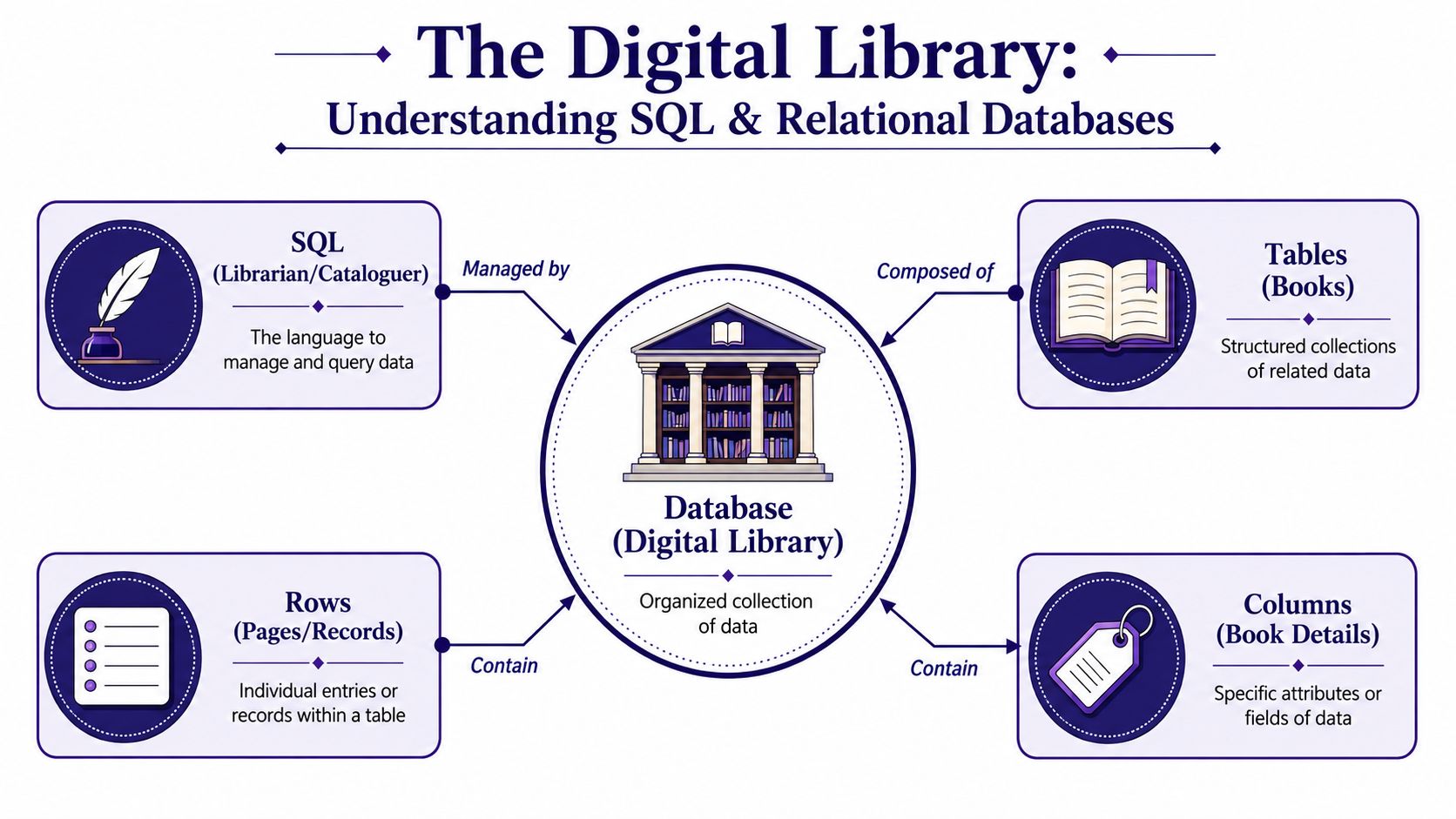
The digital library model
In this library:
- The database is the whole building.
- Tables are the bookshelves or books, each storing one type of information.
- Rows are the individual records.
- Columns are the labelled fields that describe each record.
So an invoices table might have columns such as invoice_number, customer_id, invoice_date, net_amount, vat_amount, and status. Each row holds one invoice.
A customers table might store customer_id, customer_name, credit_terms, and region. The key point is that the data is organised. Instead of one huge sheet full of mixed information, each table holds a defined subject.
What SQL actually does
SQL stands for Structured Query Language. It’s the language you use to talk to the database.
You can ask it to show invoices for a date range. You can add a new supplier record. You can update a VAT code. You can remove test data. The structure stays in the database. SQL is how you retrieve and manage what’s already there.
SQL is far from niche. It was standardised by ANSI in 1986, and it is the core language taught in the UK’s Office for National Statistics Foundations of Structured Query Language course. The same source notes that the SELECT statement is used in over 90% of basic data retrieval tasks in UK public sector systems, which shows how central query writing remains in day-to-day analysis work, as outlined in the ONS SQL training guidance.
Why relationships matter in finance work
The word relational means tables connect through shared keys. That’s what makes SQL so useful in accounting and analysis.
Here’s a simple example:
| Table | Key field | Purpose |
|---|---|---|
customers |
customer_id |
Holds customer details |
invoices |
customer_id |
Links invoices back to customers |
payments |
invoice_number |
Links payments to invoices |
With that structure, you can answer practical questions quickly:
- Which customers have overdue invoices?
- Which invoices have been issued but not paid?
- Which departments have payroll transactions above expectation?
- Which VAT-coded sales fall within a return period?
If you want a broader view of how digital tools support modern finance work, this guide to technology for accounting gives useful context around the systems that often sit around SQL in real workplaces.
SQL becomes easier when you stop seeing it as code and start seeing it as a set of questions asked against organised records.
Mastering the Four Essential SQL Commands
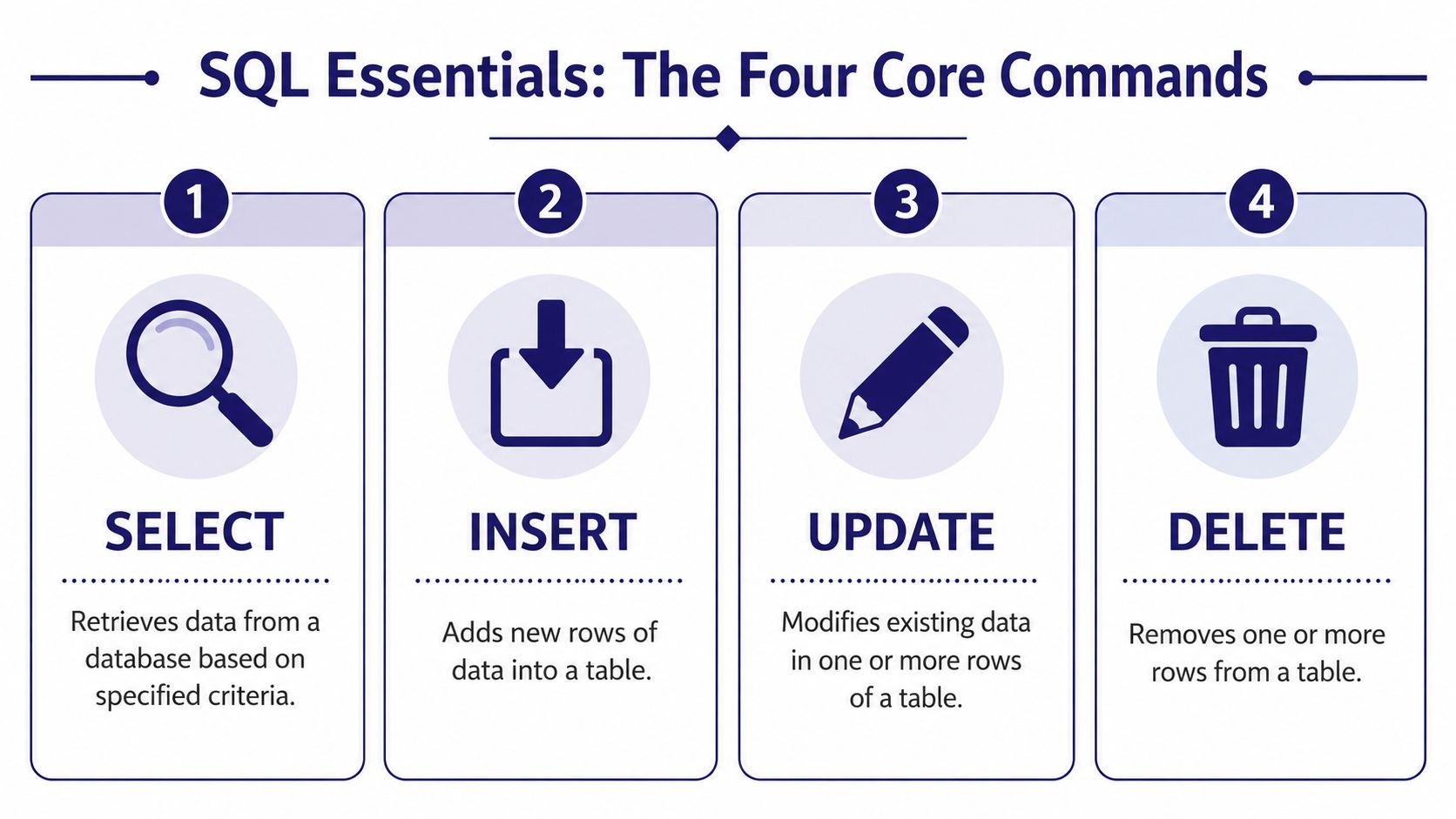
You don’t need dozens of commands to get started. Most beginners build confidence with four core actions: SELECT, INSERT, UPDATE, and DELETE.
Use one recurring table in your practice so the logic stays clear. An Invoices table works well because it feels familiar to anyone in bookkeeping, VAT, payroll support, or accounts administration.
SELECT
SELECT retrieves data. This is the command you’ll use most often.
A simple query might look like this:
SELECT invoice_number, customer_name, net_amount
FROM Invoices
WHERE status = 'Overdue';
That asks the database to return only three columns from the Invoices table, but only for rows where the invoice status is overdue.
For an accounts assistant, this is already useful. Instead of filtering manually in a spreadsheet, you can pull a clean list of overdue invoices in one step.
Why beginners get confused:
Many people think SELECT means “show me everything”. It doesn’t have to. Good SQL asks for the exact fields you need.
INSERT
INSERT adds a new row to a table.
INSERT INTO Invoices (invoice_number, customer_name, invoice_date, net_amount, status)
VALUES ('INV1058', 'Oak Tree Retail Ltd', '2026-09-15', 850.00, 'Open');
This creates a new invoice record. In a live finance system, you’d usually let the application write the record, but learning INSERT helps you understand how data gets into a table.
For trainees, it’s especially useful in practice databases where you’re building sample records for exercises in bookkeeping and VAT training.
UPDATE
UPDATE changes an existing row.
UPDATE Invoices
SET status = 'Paid'
WHERE invoice_number = 'INV1058';
This marks one invoice as paid. The WHERE clause matters. Without it, you could update every row in the table.
That’s one of the first habits to build. Before running an UPDATE, read the condition twice.
Check the
WHEREclause before you press run. In finance data, one careless update can affect every invoice, supplier, or payroll row in the table.
DELETE
DELETE removes rows.
DELETE FROM Invoices
WHERE invoice_number = 'INV1058';
This removes the invoice with that number. As with UPDATE, the filter is the safety control.
In training environments, you’ll use DELETE to clean up test records. In production systems, teams often restrict delete permissions because financial records need tight control.
A quick memory aid
If the four commands blur together, use this table:
| Command | What it does | Finance example |
|---|---|---|
SELECT |
Reads data | Find unpaid invoices |
INSERT |
Adds data | Add a new invoice record |
UPDATE |
Changes data | Mark an invoice as paid |
DELETE |
Removes data | Remove a test invoice |
One practice routine that works
If you’re learning after work or alongside an accounts assistant course, don’t try to memorise syntax in isolation. Use a short sequence:
- Start with a business question: Which invoices are overdue?
- Name the table:
Invoices - Choose the fields: invoice number, customer, amount
- Add the filter:
WHERE status = 'Overdue'
Then repeat the same approach for payroll, VAT, and final accounts examples. That’s how syntax turns into job-ready thinking.
Advanced SQL Queries for Accounting and Finance
Basic commands help you control individual tables. Significant value emerges when you start combining tables and summarising results.
A business analyst in a finance team might get a task like this: produce a report showing overdue invoices by customer, total outstanding balance, and average invoice value. That’s hard to do cleanly with scattered exports. It’s natural work for SQL.

Using JOIN to connect the story
Suppose you have two tables:
customersinvoices
The customers table holds names and terms. The invoices table holds amounts and due dates. A JOIN connects them using a shared field such as customer_id.
SELECT c.customer_name, i.invoice_number, i.due_date, i.net_amount
FROM customers c
JOIN invoices i
  ON c.customer_id = i.customer_id
WHERE i.status = 'Overdue';
That query answers a business question, not just a technical one. It tells credit control or the finance manager which customer owes what, and when the amount fell due.
For someone in bookkeeping and VAT, the same pattern works when connecting transactions to tax codes or suppliers to purchase invoices.
Aggregating for management reports
Managers rarely want a list of every row. They want totals, counts, and averages.
That’s where aggregate functions come in:
SUM()for totalsAVG()for averagesCOUNT()for the number of rows
Here’s a simple example:
SELECT customer_id, SUM(net_amount) AS total_sales
FROM invoices
WHERE status = 'Paid'
GROUP BY customer_id;
Now you’ve moved beyond data retrieval into reporting logic. This is the kind of query a trainee business analyst might use when building a sales summary, or an accounts assistant might use when checking final accounts working papers against transaction data.
If you’re also interested in how those results feed dashboards for finance teams, these accounting reporting insights are a useful complement to SQL practice.
A running total for final accounts work
Some finance tasks need a sequence, not just a total. A running total helps you track cumulative sales, spending, or payroll cost over time.
A window function can do that:
SELECT invoice_date,
       net_amount,
       SUM(net_amount) OVER (ORDER BY invoice_date) AS running_total
FROM invoices;
This is useful when reviewing transaction flow across a reporting period. It helps you spot unusual jumps and understand how balances build through the month or quarter.
Here’s a short explainer before the next example:
How this applies to payroll and VAT
The same logic carries into other finance workflows.
| Workflow | Useful SQL pattern | Typical question |
|---|---|---|
| Payroll | GROUP BY department |
What is total gross pay by department? |
| VAT | Filter by code and date | Which sales transactions fall in the return period? |
| Final accounts | Running totals | How have expenses accumulated over time? |
| Business analysis | JOIN plus aggregate |
Which customer segment drives the highest billed value? |
A strong query answers a business question in a form someone can act on. That’s what makes SQL valuable in finance teams.
Writing Efficient Queries for Peak Performance
A query can be correct and still be poor.
That’s a lesson many learners miss. They get the right answer, but the query scans too much data, pulls unnecessary columns, or ignores the way the database is indexed. On a small practice table, that may not matter. On finance data used for payroll, invoicing, or regulatory reporting, it matters a lot.
Why performance matters
In financial data environments, a single misconfigured SQL query can increase execution time from 150 milliseconds to 8,000 milliseconds, which is a 53x performance degradation, due to inefficient use of database indexes according to this database benchmarking example.
That kind of slowdown affects real work. Reports take longer to refresh. Users rerun jobs because they think the system has frozen. Overnight processes creep into the morning. A finance team waiting for numbers before a deadline feels the delay immediately.
Habits that keep queries lean
You don’t need to be a database engineer to write better SQL. Start with a few practical habits:
- Filter early: Use
WHEREto reduce rows as soon as possible. - Avoid
SELECT *: Ask only for the columns you need. - Know your join keys: Join on the right fields, using consistent formats.
- Respect indexes: If a table is indexed on a key field, write queries that can use it.
- Test on purpose: Run the query, check the result, then review whether you pulled more data than necessary.
A weak query often begins with vague intent. Someone wants “all the data just in case”, so they ask for every column and sort it out later. That habit feels safe, but it wastes resources and slows everything down.
A beginner-friendly view of indexes
An index is a shortcut that helps the database find rows faster. Instead of checking every row one by one, the database can use the index to jump closer to the data it needs.
Imagine using the index at the back of a textbook instead of reading every page to find VAT treatment for a specific topic.
If you’re curious about how larger teams handle these database challenges at scale, this overview of expert enterprise data engineering solutions gives a useful industry perspective.
Efficient SQL is part of professional behaviour. You’re not just getting an answer. You’re protecting the system that everyone else depends on.
Practical SQL Challenges for Your Portfolio
Many learners assume they need more theory when what they actually need is proof of application.
Employers don’t just want to know whether you recognise SQL keywords. They want evidence that you can solve a payroll, VAT, or reporting problem with structured logic. A small portfolio of SQL exercises can do that well.
Challenge one with payroll data
Try this problem:
Calculate the total gross pay for each department from a
payroll_datatable.
Start by unpacking the question.
- You need one table,
payroll_data. - You need the department field.
- You need the pay field to total.
- You need one result row per department.
That points to GROUP BY.
SELECT department, SUM(gross_pay) AS total_gross_pay
FROM payroll_data
GROUP BY department;
This kind of task is useful for advanced payroll training because it shows that you understand both the data and the business question.
Challenge two with VAT checks
Try another:
Find all sales transactions in the quarter that are missing a VAT code.
Your logic matters more than speed. Ask yourself:
- Which table stores the sales rows?
- Which field stores the VAT code?
- Which date field defines the period?
- What counts as “missing”? A null value, a blank, or both?
A starting query might look like this:
SELECT transaction_id, transaction_date, customer_id, net_amount
FROM sales_transactions
WHERE vat_code IS NULL;
In a real system, you may need to adapt that for blank strings or a specific date range. That’s normal. Interviewers often care more about your reasoning than perfect syntax on the first try.
Challenge three with final accounts review
Use this scenario:
| Business question | Likely technique |
|---|---|
| Which expense categories have the highest total value? | SUM() with GROUP BY |
| Which invoices remain unpaid after the due date? | Filter plus date condition |
| Which suppliers appear in transactions but not in the supplier master table? | LEFT JOIN and null check |
For anyone preparing for analyst interviews, it helps to practise those questions in a structured way. These data analyst interview questions are useful because they train the thinking process, not just the final answer.
Build portfolio examples around business tasks. “Wrote a query to find missing VAT codes” sounds far stronger than “Learnt SQL basics”.
Integrating SQL Skills into Your UK Career Path
SQL works best as a supportive specialist skill. That’s the career point many learners need to hear early.
You’re unlikely to build a strong UK career by saying only, “I know SQL.” You become more valuable when SQL supports a broader role such as accounts assistant, bookkeeper, payroll officer, business analyst, or data analyst. In those jobs, SQL helps you extract cleaner data, automate checks, and answer business questions with more confidence.
Where SQL fits in real roles

An accounts assistant might use SQL to reconcile invoice data before month-end. A bookkeeper might use it to review VAT-coded transactions before preparing returns. A business analyst might connect finance records to sales or operations data and then present results in Power BI.
That’s why SQL pairs well with tools such as Xero, Sage, QuickBooks, Excel, and Power BI. In many workplaces, you won’t sit inside the database all day. You’ll pull structured data from it, then shape, review, and present the output elsewhere.
Why employers care
In the UK, 48% of businesses are recruiting for roles requiring data skills, yet 46% struggle to find candidates with the right competencies in areas like database management. The same government report notes that employers seek candidates who can write “strong, efficient SQL” as part of a broader specialist role, which makes SQL a practical differentiator for people moving into finance and analysis work through the UK data skills gap report.
If you want to see how query outputs often move into reporting tools, this explanation of what Power BI is used for is a sensible next step.
The strongest move is to combine SQL with business understanding. Learn how payroll data behaves. Learn the structure of VAT records. Learn how final accounts schedules tie back to transaction-level detail. That combination is what makes you job-ready.
Professional Careers Training helps learners build those practical skills through Professional Careers Training, with accountancy-focused study paths, 1-to-1 support from ACCA qualified Chartered Accountants and CPD approved trainers, flexible evening and weekend options, software training in Sage, Xero and QuickBooks, plus CV preparation, career coaching and job support for people moving into UK accounting, payroll, business analysis and data analysis roles.