If you're training to become a business analyst, or you already work as one, you've probably noticed AI tools turning up in more of your...
A good VLE isn’t just a login page with a few files uploaded to it. It’s the place where your training takes place. It’s where you find your lessons, complete practice work, ask tutors for help, track your progress, and build the habits that help you move into a new role with confidence.
For career-focused study, that matters. If you’re learning final accounts after work, practising VAT entries at the weekend, or fitting SQL exercises around childcare, the platform has to support real life. It has to help you keep moving, even when your timetable is messy.
What Is a Virtual Learning Environment
A virtual learning environment is best thought of as your digital campus. Instead of travelling to a physical classroom, library, tutor office, and assessment room, you access those functions in one online space.
In simple terms, a VLE is the central hub for learning. It usually brings together lesson materials, recorded sessions, assignments, tutor messages, progress tracking, and discussion areas. For someone training for a new job, that means less time chasing emails and more time learning the skills that matter.
A digital campus for modern training
If you’re studying bookkeeping and VAT, your VLE might hold your topic notes, worked examples, software practice tasks, and tutor feedback on a bank reconciliation. If you’re training as a data analyst, the same environment might include Excel exercises, Power BI walkthroughs, project briefs, and recorded explanations of data cleaning.
That’s why the VLE matters so much. It gives structure to your week.
Without that structure, online study can feel scattered. You download one file, miss another, forget where feedback was posted, and lose momentum. A well-organised VLE stops that from happening by keeping your course journey in one place.
A useful way to judge a VLE is simple. Can you log in and know what to do next within a minute?
Why VLEs became standard in the UK
A major shift happened during the COVID-19 disruption. The Office for National Statistics reported that in England, between 23 March and 10 May 2020, 40% of working adults worked from home in the week preceding interview, while around 47% of all workers were doing at least some work from home, according to Jisc’s guidance on reviewing virtual learning environments. That rapid shift pushed education and training providers to rely more heavily on digital platforms for teaching, assessment, and learner communication.
Since then, the conversation has moved on. In the UK, the question often isn’t whether a provider has a VLE. It’s whether the VLE is clear, current, easy to use on mobile, and actively maintained.
What learners often get wrong
Many learners assume the VLE is just an admin tool. They think of it as the place where passwords live and PDFs get stored.
That’s too narrow.
A strong VLE supports your full training journey:
- Learning content so you can study topic by topic
- Practice activity so you can apply what you’ve learned
- Feedback loops so you can improve quickly
- Communication tools so you don’t feel stuck on your own
- Progress records so you can see how far you’ve come
For accountancy and data training, that’s especially important because you’re not just memorising theory. You’re learning how to do things. Enter transactions correctly. Process payroll tasks. Build reports. Analyse datasets. Present findings clearly.
When the VLE works well, it becomes part of your routine rather than another piece of software to manage.
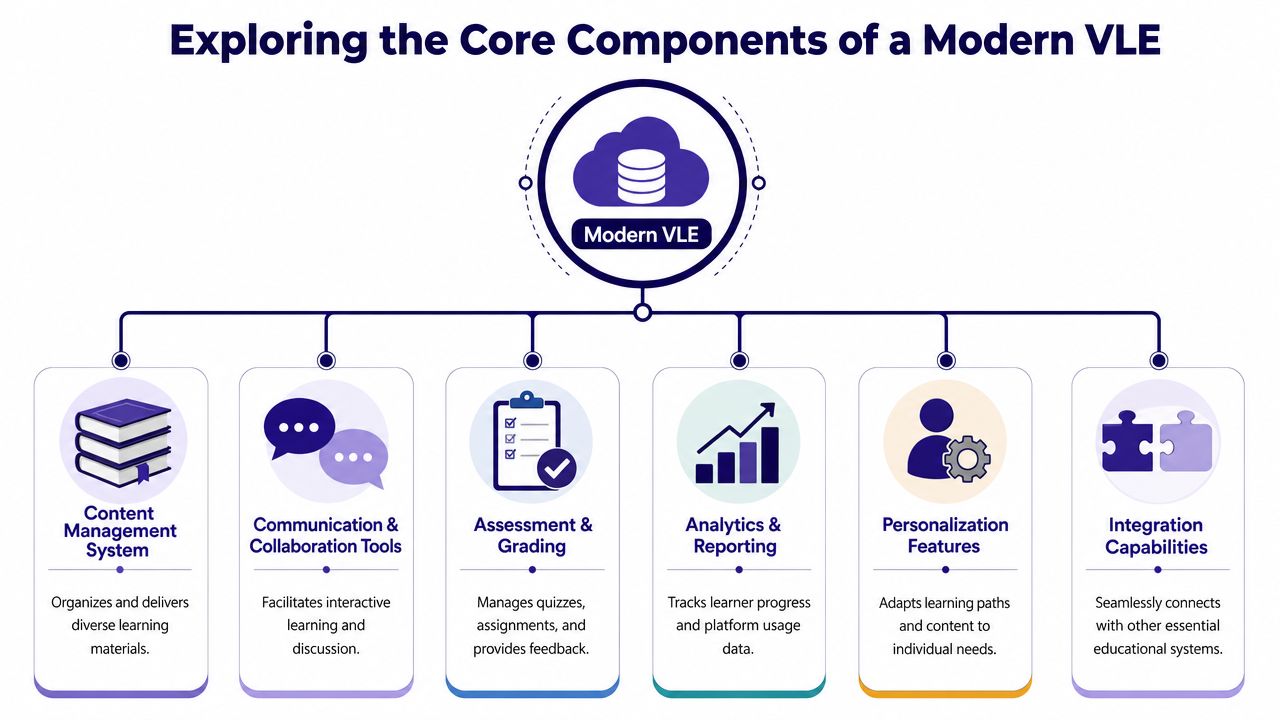
Exploring the Core Components of a Modern VLE
A modern VLE works best when it feels joined up. You shouldn’t have to jump between disconnected systems just to find a lesson, submit work, and ask a question. The strongest platforms bring those parts together so your course feels coherent.
The parts learners use every week
Think of the VLE like a digital training centre with different rooms.
| Component | What it does for you | Why it matters |
|---|---|---|
| Resource area | Holds notes, videos, templates, and guides | Keeps study materials easy to find |
| Communication tools | Supports forums, messages, and class updates | Helps you ask questions and stay connected |
| Assessment tools | Lets you upload tasks and receive feedback | Turns learning into measurable progress |
| Dashboard | Shows completed and pending work | Helps you stay organised |
| Analytics | Tracks engagement and usage | Helps providers spot where learners struggle |
| Integrations | Connects other tools into one workflow | Reduces friction during study |
This joined-up design reflects how UK practice has matured. A modern VLE is less about one stand-alone learning platform and more about a connected system. EdTech Magazine’s discussion of VLE integration describes the learning environment as a core system extended by tools such as gradebooks, authentication, videoconferencing, assignments, and digital collaboration. In practical terms, a mature UK VLE should include telemetry for engagement and integrate conferencing, assignment handling, and progress tracking with accessibility controls.
What this looks like in real study
A learner on an accounts assistant course might open the dashboard, join a live session, download a practice task, upload completed work, and review tutor comments all in the same environment. A business analyst learner might do something similar with requirement-gathering exercises, case-study notes, spreadsheet tasks, and project feedback.
That smooth flow matters more than people realise. If every task sends you into a different tool with a different password, your attention shifts from learning to admin.
Practical rule: The best VLE is often the one that removes the most small frustrations.
Integration matters more than extra features
Some platforms look impressive because they offer endless menus. That doesn’t always help learners. What matters is whether the system connects the right tools clearly.
For training teams, it also helps to track enrollments and student progress in a way that’s visible and easy to act on. When providers can see who’s active, who’s falling behind, and which materials are being used, they can support learners more effectively.
For students heading into accounting roles, integration with software learning is also important. If you want background reading on how digital tools shape modern finance work, this guide to technology for accounting careers gives useful context.
A modern VLE isn’t trying to impress you with jargon. It should quietly make study easier, clearer, and more consistent.
How VLEs Support Accountancy and Data Training
On a wet Tuesday evening, a learner opens their laptop after work. They are tired, they have one hour free, and they need that hour to count. A good VLE gives them a clear next step instead of wasting time with scattered files, missing links, and guesswork.
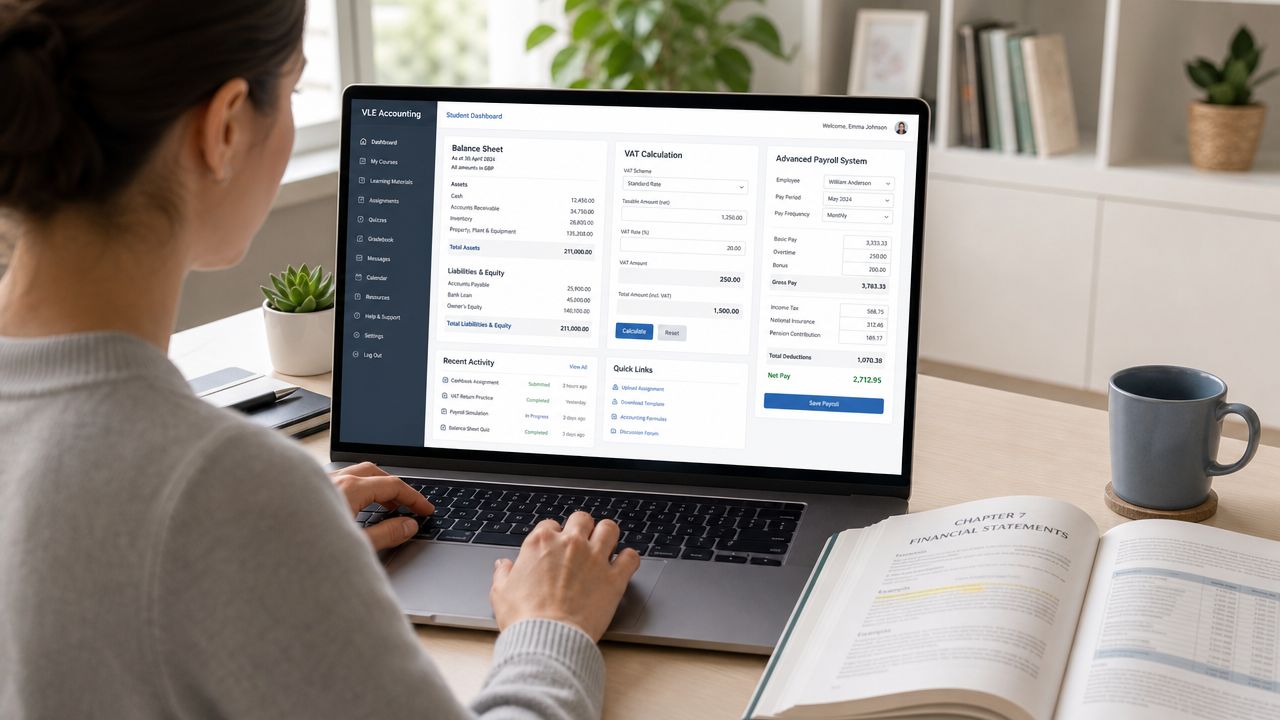
For career training, that difference matters a great deal. In accountancy and data analysis, learners are not only trying to pass assessments. They are building the habits, software confidence, and working methods that employers expect in real roles.
A bookkeeping learner’s day-to-day experience
Aisha is training in bookkeeping and VAT while working part-time. Her VLE works like a study planner, practice area, and feedback folder in one place.
She logs in and sees what needs attention now. One lesson covers sales and purchase ledgers. Another task asks her to process VAT correctly. A recorded class explains bank reconciliation step by step. She can move from the explanation straight into a software exercise built around tools she is likely to meet in work, such as Xero or Sage.
That link between lesson and software practice is where many training platforms fall short. If a learner studies bookkeeping theory in one place and accounting software somewhere else, it becomes harder to connect the two. A stronger VLE brings them together so that posting transactions, checking VAT treatment, and spotting errors feel like part of the same learning journey.
When Aisha gets something wrong, the mistake is useful. She can compare her work with a model answer, post a question to her tutor, and upload a screenshot of the problem. By the weekend, her feedback is waiting in the same platform. She can see what to correct before the habit sets in.
That is how confidence grows. One accurate entry at a time.
A data learner’s day-to-day experience
Daniel is aiming for a junior data analyst role. His VLE supports a different kind of training, but the principle is the same. It turns separate study tasks into a connected routine.
He might start with a short lesson on spreadsheet cleaning, move to a dataset with missing values and duplicates, then finish by writing a short summary for a non-technical audience. Later in the week, he returns to a recorded explanation of SQL logic or dashboard layout and applies it to a new task.
Data jobs extend beyond mere proficiency in tools like Excel, SQL, or Power BI. Employers seek individuals capable of ensuring accuracy, articulating findings clearly, and maintaining organized work habits. A well-designed VLE helps learners practise those habits repeatedly, not just read about them.
It also gives tutors a better view of where learners get stuck. One person may struggle with formulas. Another may understand the analysis but present it poorly. When the VLE captures both the task and the feedback, support can be more specific.
What effective support looks like in practice
The strongest VLEs for professional training do more than store lessons. They help learners move from knowing to doing.
In accountancy training, that often means:
- guided tasks linked to Xero or Sage workflows
- practice files that mirror common bookkeeping errors
- tutor feedback on accuracy, not just completion
- revision materials for topics that need repetition, such as VAT or reconciliations
In data training, it often means:
- downloadable datasets with realistic problems
- project briefs that reflect workplace reporting tasks
- feedback on structure, logic, and communication
- a record of completed work that shows progress over time
A simple comparison helps here. Reading about bank reconciliation is like watching someone else drive. Completing the reconciliation yourself, making an error, correcting it, and understanding why it happened is closer to getting behind the wheel.
The same applies to data work. Watching a tutorial on dashboard design may help you recognise good practice. Building your own report and receiving comments on what is unclear helps you improve.
Some learners also find it useful to improve note-taking with audio apps so they can capture explanations and review them later alongside their VLE materials.
If you are comparing remote study options, this guide to AAT Level 2 distance learning shows how structured online training can support practical accountancy skills, not just theory.
The Practical Benefits for Learners and Employers
You finish work at 6pm, make dinner, and finally sit down to study at 8.30. You need to review a bank reconciliation, check tutor feedback from last week, and submit a short Excel task before midnight. A well-designed VLE keeps all of that in one place, so your study session feels like progress towards a job, not a hunt through emails, folders, and half-remembered links.
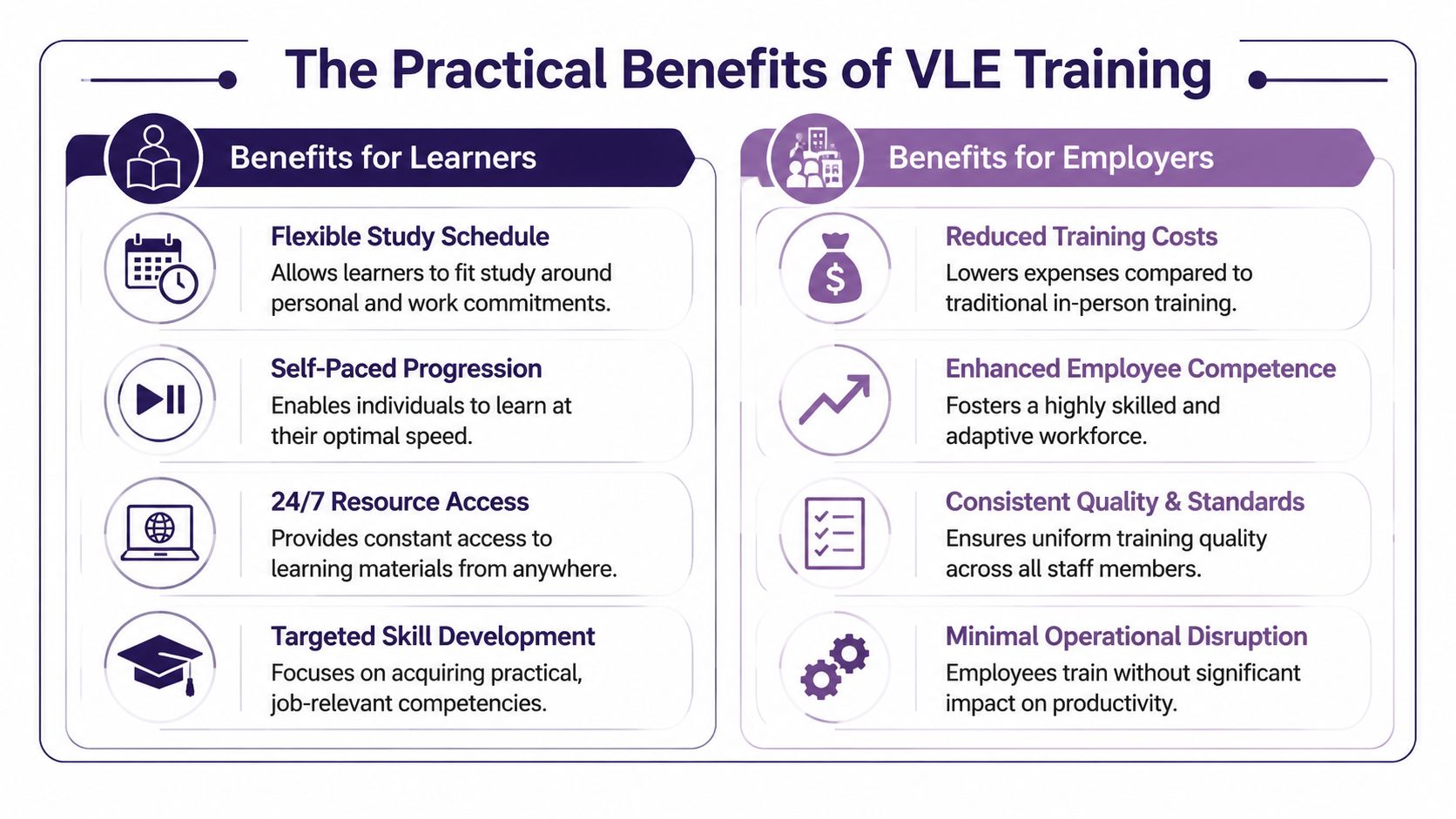
Learner advantages
For adult learners, the first benefit is usually flexibility. The more useful benefit is control. You can see what to do next, what you have already completed, and where you need to improve.
That matters in career-focused training. If you are working towards an accountancy role, you may need to revisit VAT, payroll, or double-entry several times before it clicks. If you are aiming for data analysis work, you may need extra practice with Excel logic, SQL queries, or presenting findings clearly. The VLE becomes your study basecamp. It holds the route, your checkpoints, and the evidence that you are getting closer to the role you want.
A good platform helps learners by giving them:
- Flexible study patterns around work, family, and commuting
- Repeat access to lessons for topics that need more than one attempt
- Visible progress tracking so unfinished work does not get lost
- Stored tutor feedback you can return to before the next assignment
- A record of completed tasks that helps with interview preparation and confidence
There is also a practical confidence benefit. When learners can point to completed bookkeeping exercises, Xero practice activities, spreadsheet tasks, or dashboard projects inside the VLE, it becomes easier to explain their skills in a job interview. You are not only saying, “I studied this.” You can show how you practised it.
Some learners also improve note-taking with audio apps so they can record quick spoken summaries after a lesson and review them alongside their VLE materials before an assessment.
Employer advantages
Employers in accountancy and data teams are looking for more than course completion. They want signs that a candidate can follow a process, meet deadlines, use software carefully, and produce work that stands up to checking.
A VLE supports that in a very practical way. It creates a training trail. An employer or hiring manager may not log into the platform itself, but the outcomes still matter. A learner who has worked through structured tasks, corrected errors after feedback, and built familiarity with tools such as Sage, Xero, Excel, SQL, or Power BI is usually better prepared for the pace and expectations of the workplace.
That preparation often shows up in four areas:
- Consistency. Learners complete work in a planned order rather than skipping foundations.
- Accountability. Submission dates, feedback history, and resubmissions show how the learner handles deadlines and correction.
- Software readiness. Practice linked to real finance and analysis tools builds familiarity that employers value.
- Digital working habits. Using messages, file uploads, task instructions, and online feedback mirrors day-to-day hybrid working.
A simple way to view it is this. The VLE works like a supervised practice office. It is not the same as being in a finance department or analytics team, but it helps learners build the habits those roles require before day one.
This is one reason online study can work well for career changers and working adults, especially when the course design includes software practice and clear tutor support. If you are weighing formats as well as platforms, this guide to online training versus classroom learning can help you compare what suits your routine and goals.
The result is straightforward. Learners get structure, evidence, and a clearer route into a new role. Employers get candidates who have practised the right kind of work in the right kind of environment.
Choosing and Using a VLE Effectively
Not every VLE helps learners in the same way. Some are tidy, intuitive, and well supported. Others feel like a filing cabinet that no one has organised for years. If you’re choosing a course, it’s worth paying attention to the platform as much as the syllabus.
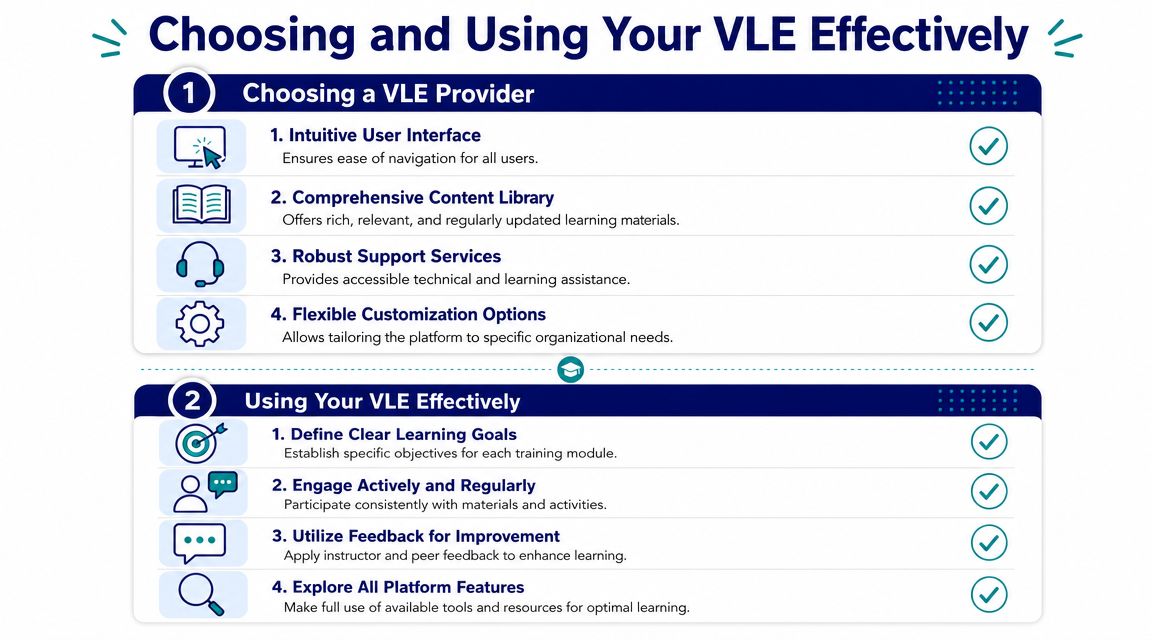
What to look for in a provider’s VLE
A strong platform should feel straightforward from the first login. You shouldn’t need a long induction just to find your next lesson.
Use this checklist when comparing providers:
- Clear layout so lessons, tasks, and messages are easy to find
- Mobile-friendly access if you sometimes study on the move
- Updated content rather than old links and dated files
- Tutor support that’s visible inside the platform
- Integrated tools for live sessions, assignment submission, and progress tracking
- Accessibility options that make study more workable for different learner needs
- Practical software links for tools such as Sage, Xero, QuickBooks, Excel, SQL, Python, or Power BI where relevant
If you’re weighing up delivery style as well as platform quality, this guide to online training versus classroom learning can help you think through what suits your routine.
Why rollout often fails
A surprising amount of VLE trouble has nothing to do with the software itself. The issue is poor adoption.
A longitudinal study found that 79% of VLE-enabled innovations failed to become routine practice for teachers, according to this research on VLE habitualisation. That’s a useful warning for learners too. A platform only works when people use it well, and when the provider supports that use properly.
So when you look at a course, ask practical questions. Will someone show you how to use the system? Is feedback delivered inside it? Are tutors active there? Are resources current and organised?
The platform doesn’t need to be fancy. It needs to become part of your routine.
How to use your VLE well as a learner
Even an excellent VLE won’t do the learning for you. The habits you build matter just as much as the platform itself.
Try these approaches:
-
Set a fixed weekly rhythm
Pick regular study slots. Treat them like appointments you keep. -
Open the dashboard before anything else
Don’t start by browsing random resources. Check what’s due, what’s new, and what needs attention. -
Use the forum early
If something doesn’t make sense, ask while the topic is fresh. Small questions are easier to fix than long periods of confusion. -
Act on feedback quickly
Don’t just read comments and move on. Rework the task or apply the point in your next assignment. -
Revisit active materials
Quizzes, exercises, and worked examples usually teach more than passive reading alone. -
Make revision easier for your future self
Save your own notes clearly. Some learners also explore best AI video tools to turn study notes or explanations into simple recap videos they can revisit before assessments.
A VLE works best when you stop treating it as storage and start using it as your study base.
Your VLE Is a Gateway to a New Career
A virtual learning environment isn’t just an education term. For many learners, it becomes the place where a career change starts to feel real.
It’s where bookkeeping turns from theory into practice. It’s where payroll processes become familiar. It’s where accounts assistant tasks stop feeling intimidating. It’s where final accounts begin to make sense step by step. It’s also where future business analysts and data analysts build the habit of working through problems, presenting findings, and improving through feedback.
That’s why the quality of the VLE matters so much. A strong one gives you structure when life is busy, support when you’re stuck, and a clearer view of your own progress when confidence dips. It helps you keep moving.
It also reminds you that online learning doesn’t have to mean isolated learning. When lessons, software practice, tutor guidance, and progress tracking all sit in one place, you’re not left to figure everything out on your own.
If you’re choosing training in accountancy or data, don’t only ask what qualification is included. Ask how you’ll learn day to day. Ask how practical work is handled. Ask how feedback is given. Ask whether the platform helps you build routines that match the way real jobs now work.
A good VLE won’t replace your effort. But it can make that effort more focused, more organised, and more likely to lead somewhere valuable.
If you want training that combines flexible online study with practical skills, software support, and career-focused guidance, Professional Careers Training offers accountancy and analytics learning designed to help you move towards work with confidence.