If you're training to become a business analyst, or you already work as one, you've probably noticed AI tools turning up in more of your...
The End of the Invoice Pile
Many UK businesses still know the old routine. A supplier sends an invoice by post or email. Someone prints it. Another person keys the details into Sage, Xero, QuickBooks, or an ERP system. Then the invoice waits for approval. It gets chased, misplaced, approved late, or paid twice if controls are weak.
That old process creates stress fast. Suppliers chase payment. Finance staff spend hours checking dates, totals, VAT treatment, and approval status. Managers sign things late because the paperwork is sitting in a tray or buried in an inbox. Month-end gets harder than it needs to be.
The shift away from that model wasn’t only about convenience. In the UK, Making Tax Digital for VAT became mandatory from 1 April 2019 for VAT-registered businesses above the threshold, and the VAT registration threshold remained £85,000 in the 2025/26 tax year, which matters because many smaller firms still juggle payables work alongside digital compliance duties, as noted in Medius on useful AP KPIs. The same source states that 68% of businesses still manually key invoices and that the average manual invoice-processing cost was $15 per invoice, which helps explain why digital AP became a finance priority rather than a nice extra.
Why the old way breaks down
A paper-heavy or inbox-heavy process usually causes the same problems:
- Slow approvals: invoices wait because no one knows who needs to sign them off
- Weak visibility: the finance team can’t easily see what’s due, what’s blocked, or what’s already paid
- Messy audit evidence: finding supporting records takes time
- More manual errors: retyping invoice data creates avoidable mistakes
Practical rule: If a business can’t quickly trace an invoice from receipt to payment, the process is already too manual.
Why this matters for careers
Job seekers frequently misunderstand the role of accounts payable, often perceiving it as merely a junior administrative task. In reality, employers increasingly use AP work to judge whether you understand financial controls, VAT recordkeeping, workflow discipline, and accounting software.
If you’re training for an accounts assistant role, AP knowledge shows that you can handle real finance operations. If you’re moving into bookkeeping and VAT, it shows that you can keep digital evidence clean. If you’re aiming for analysis roles later, AP gives you some of the best raw business data to work with.
Understanding the Automated AP Workflow
A good way to think about an automated AP process is this. It works like a digital post room, a checker, and a traffic controller all at once. It receives invoices, reads them, checks them against rules, sends them to the right people, and stores the evidence in one place.
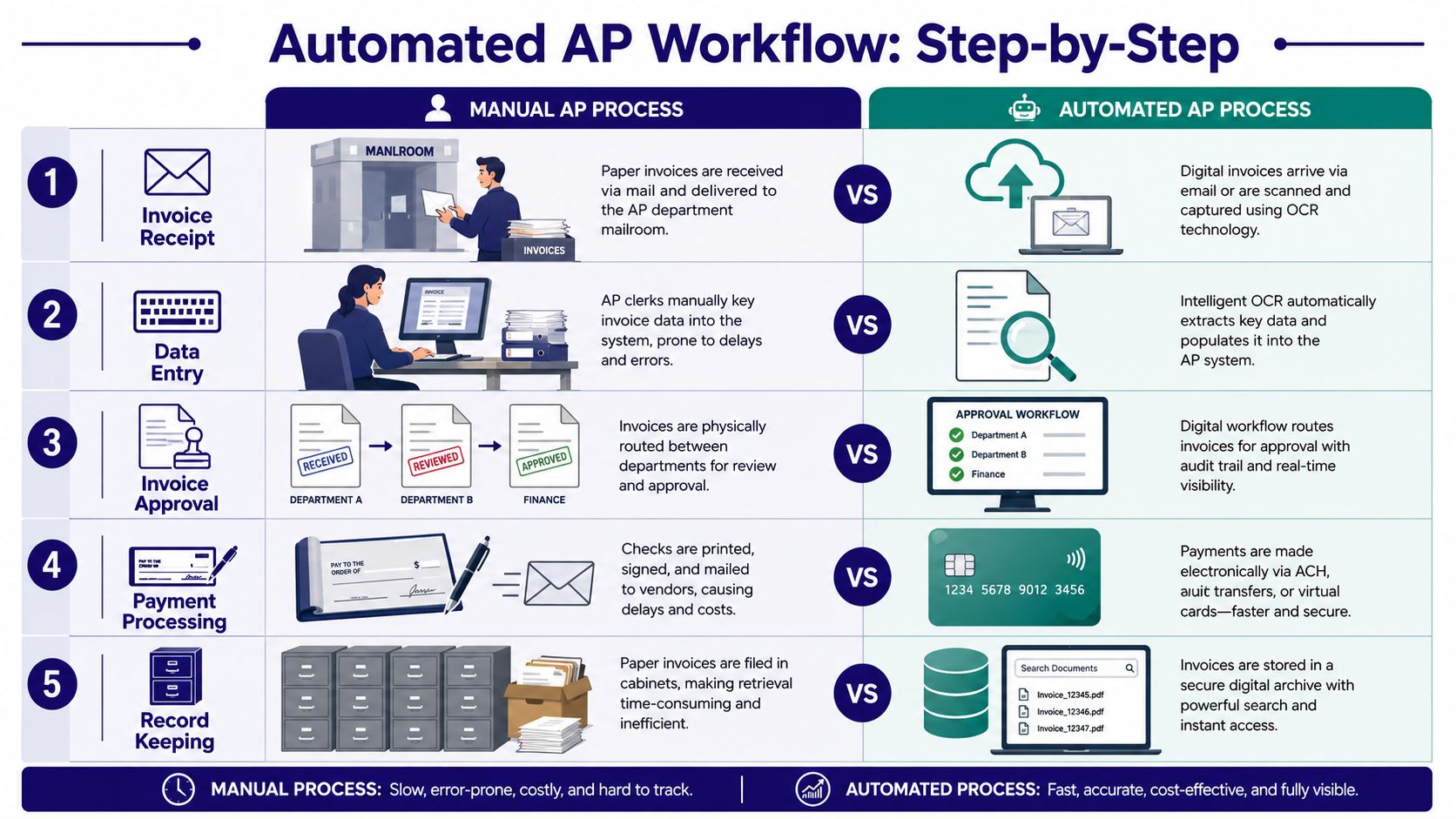
If you’re new to the area, it helps to compare the manual and automated journeys side by side.
What happens in a manual process
An invoice arrives by post or email. A staff member opens it, checks the supplier name, enters the figures manually, codes it, and sends it for approval. If there’s a query, the invoice stops moving. If someone is off sick or working remotely, it may sit untouched. Later, another person arranges payment and files the record.
That process depends heavily on memory, follow-up, and careful typing.
What happens in an automated process
An automated system receives the invoice digitally or scans it into the workflow. OCR reads key fields such as supplier name, invoice number, date, amount, and VAT details. Validation rules then check for duplicates, missing fields, or mismatches. The system routes the invoice to the right approver and records every action.
The payment record and supporting document stay linked, which makes later review much easier.
A simple step-by-step model
-
Invoice receipt
The invoice enters the system through email, upload, or scan. -
Data capture
OCR extracts the data so the team doesn’t need to type every line. -
Validation
Rules check for duplicates, coding issues, and missing information. -
Approval routing
The invoice goes to the correct manager or department. -
Payment processing
Approved invoices move forward for payment at the right time. -
Digital record keeping
The full history stays searchable for reporting, audit, and review.
A useful primer on the AP and AR basics sits in this guide to what accounts payable and receivable means in practice.
Where the real value appears
People often assume AP automation is only about speed. That’s only part of the picture. A bigger question is whether the system helps a business manage cash more intelligently. According to Medius on common accounts payable problems, one of the main challenges is proving AP automation improves working capital, not just efficiency. The same guidance explains that modern AP programs help by giving teams better visibility into cash-flow timing and payment controls.
Better AP systems don’t just move invoices faster. They help finance teams see when cash is leaving the business and why.
That matters in the UK job market because employers increasingly want finance staff who can use software outputs, not just enter data into the software.
The Business Case for AP Automation
For a business owner, the question is simple. Is this worth investing in? For a job seeker, the question is slightly different. Is this worth learning? The answer to both is yes, because AP automation changes output, capacity, and the level of work one person can handle.
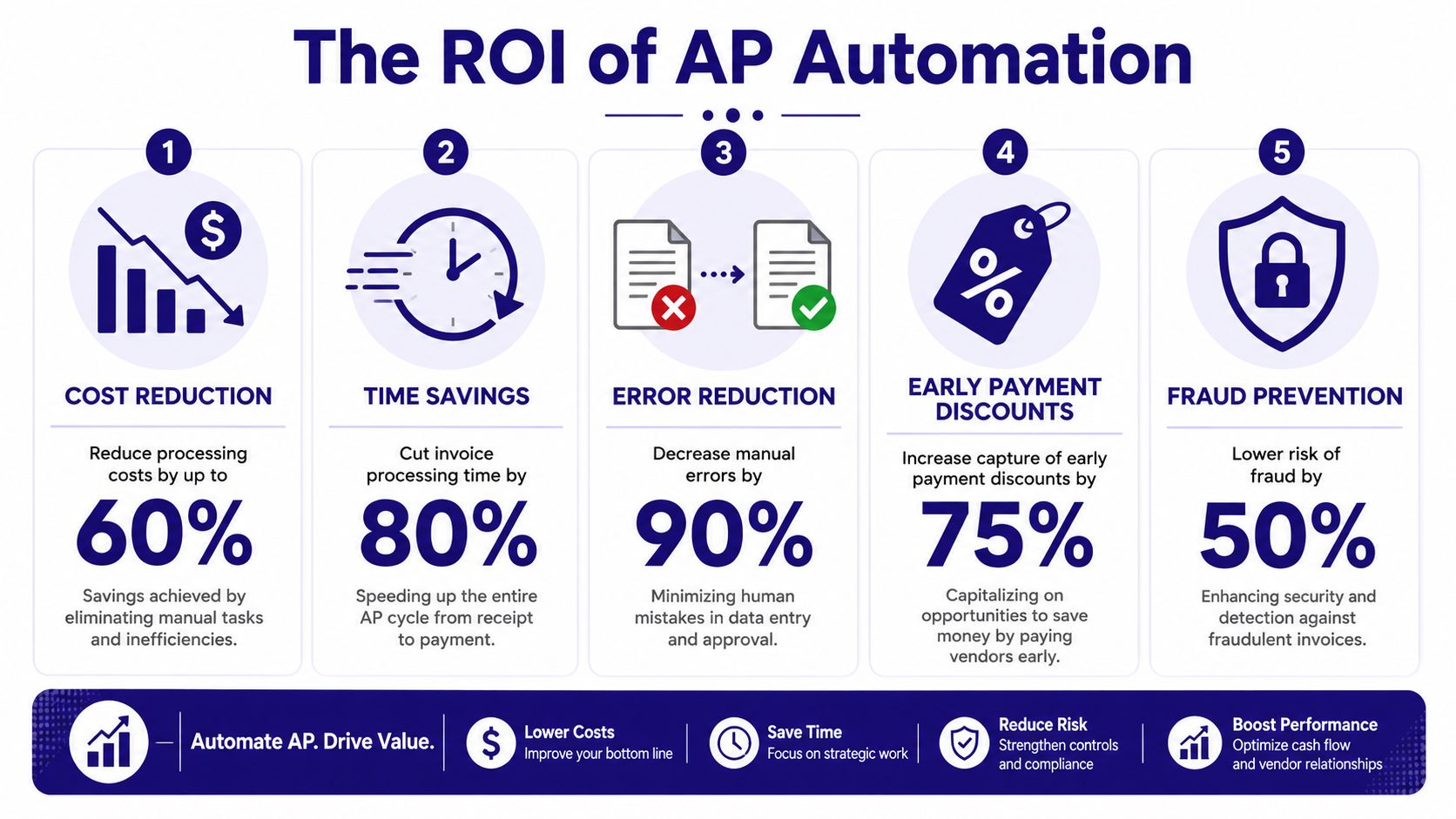
One of the clearest reasons comes from throughput. DocuClipper’s AP statistics summary states that a fully automated process can let one AP full-time equivalent handle 23,333 invoices per year, compared with 6,082 invoices annually in a completely manual process. The same source says 20% of AP teams were already fully automated and 41% planned to automate their payables processes within the next 12 months. It also notes that the global AP automation market was valued at $3.08 billion in 2023 and was projected to grow at a 12.8% CAGR from 2024 to 2030.
What that means in business terms
Those figures matter because they show that AP automation isn’t a fringe tool. It’s becoming part of normal finance operations.
A business gains more than speed:
- Higher processing capacity: one person can manage far more invoice volume
- Better control: the team can track where invoices are and who approved them
- Cleaner supplier handling: fewer delays and fewer status-chasing emails
- Stronger reporting: finance leaders can review liabilities and payment timing more clearly
Why employers care
A hiring manager doesn’t just want someone who can “do invoices”. They want someone who can help reduce friction across finance. If you understand AP systems, you’re closer to being the person who can support month-end, investigate exceptions, help with reconciliations, and explain process problems.
Career note: When finance teams automate routine AP tasks, junior staff don’t disappear. Their work shifts upward into checking, analysis, query handling, and control support.
That shift is good news for anyone building a career. The more manual the role, the easier it is to replace. The more system-aware and process-aware the role, the more valuable you become.
Key Features of Modern AP Programs
Not all accounts payable programs look the same, but the strongest systems tend to share the same core building blocks. If you learn these features, you’ll understand most AP tools much faster, whether the business uses Sage, Xero, QuickBooks, or a larger ERP-led setup.
Capture and validation
The starting point is invoice capture. Effective AP programmes combine OCR-based invoice capture, rule-driven validation, and ERP integration, which replaces manual keying and creates a digital trail from invoice receipt to payment, as explained by Ramp’s overview of AP automation.
That means the system can:
- Read invoice data automatically: supplier, invoice number, date, totals, and VAT fields
- Check for duplicate invoices: a major protection against accidental overpayment
- Spot missing or inconsistent data: before the invoice moves further
- Support matching processes: such as checking invoices against purchase orders or goods received notes
If you’re building your software vocabulary, this guide to accounting automation tools used in finance teams helps connect AP features to wider accounting systems.
Workflow and approvals
After capture comes movement. Workflow automation then matters.
An AP program should be able to send invoices to the right approver based on rules such as supplier, department, amount, or cost centre. It should also flag exceptions, pause where needed, and record comments and status changes.
A simple comparison helps:
| Feature | What it does | Why it matters |
|---|---|---|
| Approval routing | Sends invoices to the right person | Reduces chasing and delay |
| Exception handling | Holds invoices with issues | Prevents bad payments |
| Status tracking | Shows where each invoice sits | Improves visibility |
| Digital comments | Keeps queries in one place | Reduces scattered email trails |
Integration, reporting, and control
The final group of features is where AP becomes part of the wider finance function.
Modern systems usually connect with accounting software or ERP platforms so approved data flows through without re-entry. They also provide reporting dashboards, searchable archives, and a full audit trail.
A strong AP system should answer three questions quickly. What have we received, what have we approved, and what are we about to pay?
For finance staff, these features create practical job skills. You learn how data moves between systems, how to investigate exceptions, and how to support controls. Those are transferable skills for bookkeeping, final accounts support, business analysis, and reporting roles.
How to Choose the Right AP Program
The right AP program isn’t the one with the longest feature list. It’s the one that helps a business stay in control while handling its actual workflow.
That point matters in the UK because finance teams aren’t only processing invoices. They’re also protecting the business through proper approvals, clean records, and reliable audit evidence. According to IBML on key AP software features, businesses should prioritise systems with role-based access, separation of duties, and detailed audit logging, because these support financial governance and reduce the risk of unauthorised payments.
What to check before choosing
A useful buying checklist includes the following questions:
- Access control: Can different users see and do only what their role allows?
- Separation of duties: Can the business stop one person from controlling the whole process?
- Audit logging: Does the system record who changed, approved, or released each item?
- Software fit: Does it integrate properly with the accounting software already in use?
- VAT handling: Can the team maintain clear digital records for tax and review?
- Scalability: Will it still work if invoice volume or approval complexity increases?
Good decisions start with process, not brand
Many buyers start by asking whether a product is popular. A better question is whether it matches the business’s process and risk level.
For example, a small firm using Xero may need straightforward invoice capture, approval routing, and recordkeeping. A larger organisation may need more layered approval rules, deeper ERP links, and tighter segregation of duties. Neither choice is “best” in the abstract. It depends on the workflow, the control environment, and who needs to use it.
Selection rule: If a system looks efficient but makes approval control weaker, it isn’t the right fit.
For job seekers, this section matters because interviews often include scenario questions. Employers may ask how you’d prevent duplicate payments, handle missing approvals, or support audit requests. If you understand the control side of AP software, your answers become much stronger.
Building Your Career with Accounts Payable Skills
At this juncture, accounts payable programs become more than a finance topic. They become a career advantage.
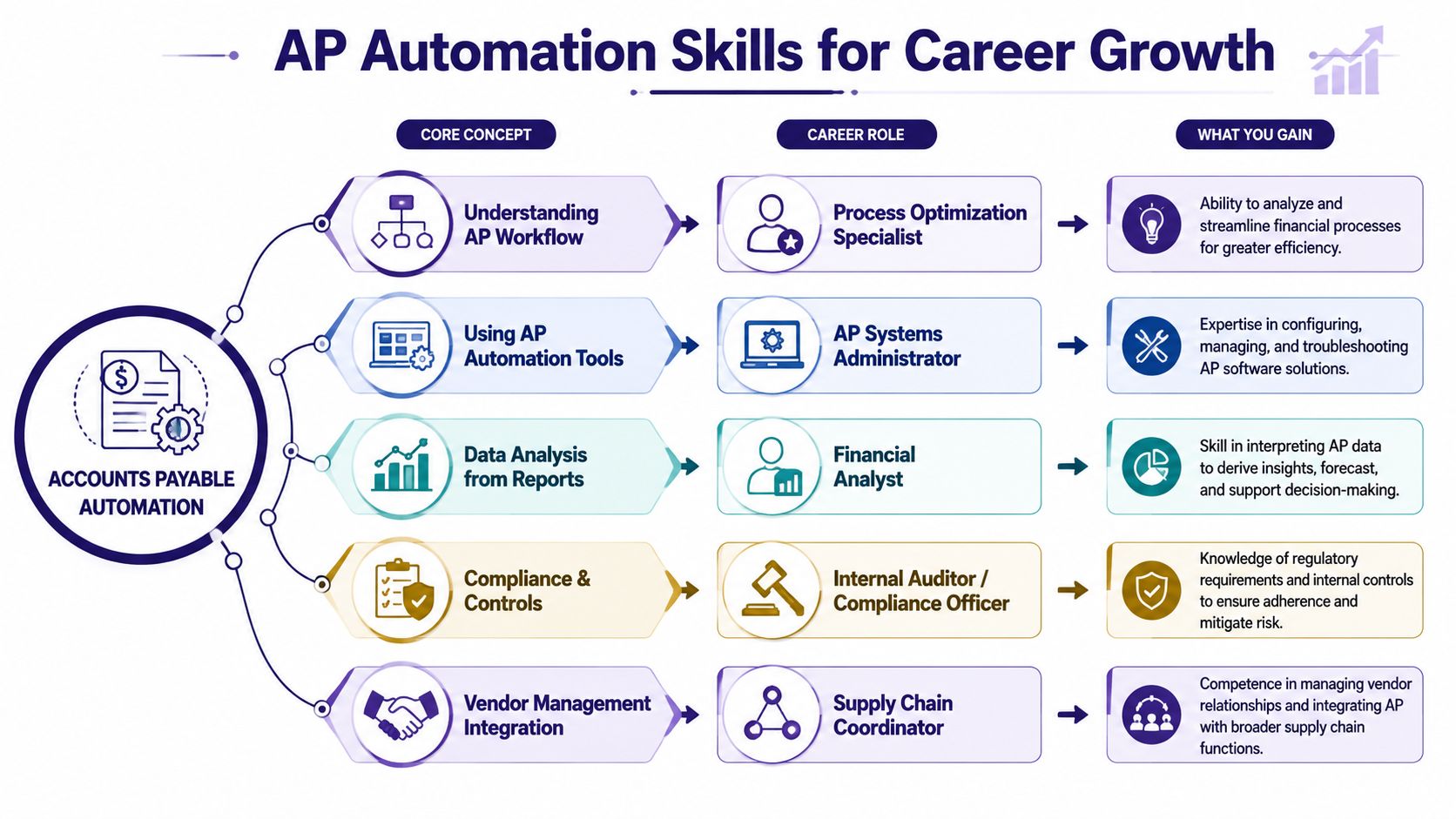
A lot of people enter the job market thinking they need to choose one lane at the start. Bookkeeping or payroll. Accounts assistant or analyst. Finance or data. In practice, AP sits in the middle of all these paths. It gives you operational knowledge, software experience, and process awareness that employers value across multiple roles.
Accounts assistant and bookkeeping roles
If you’re training for an accounts assistant role, AP knowledge is one of the quickest ways to become job-ready. You’ll often be expected to enter invoices, match documents, chase approvals, resolve supplier queries, and help prepare payment runs. If you can do that inside software such as Sage, Xero, or QuickBooks, you’re more useful from day one.
For bookkeeping and VAT, AP knowledge helps you understand how purchase transactions are captured, coded, and evidenced. That’s important because a bookkeeper isn’t just recording spend. They need to maintain records that make sense for review, reconciliation, and VAT handling.
A strong beginner profile often includes:
- Invoice processing skills: entering and checking purchase invoices accurately
- Software confidence: navigating accounting systems without getting lost
- VAT awareness: recognising that purchase records need clean supporting evidence
- Supplier communication: replying clearly to payment and invoice-status queries
Advanced payroll and final accounts support
AP and payroll are different processes, but employers often value people who understand both. Someone with advanced payroll training and AP awareness can understand payment controls, deadlines, approvals, and the wider flow of liabilities through a business. That makes them more adaptable in small and medium-sized finance teams.
For final accounts work, AP matters because purchase records affect expenses, accruals, liabilities, and account balances. If you know how invoices are captured and approved, you can better understand what sits behind ledger entries.
That gives you stronger judgement in tasks such as:
| Career path | How AP knowledge helps |
|---|---|
| Final accounts support | Understands the source of purchase ledger balances |
| Payroll support | Appreciates payment controls and timing discipline |
| Accounts assistant | Handles invoice workflows and supplier queries |
| Bookkeeping and VAT | Keeps digital records organised and review-ready |
Business analyst and data analyst routes
This is the part many learners miss. AP data is rich.
It contains supplier behaviour, payment timing, exception patterns, coding issues, approval delays, and spending trends. If you’re moving into business analyst or data analyst work, AP gives you a practical business process to analyse. You can study where invoices get stuck, which suppliers generate the most queries, and which control gaps create rework.
That makes AP a useful training ground for people learning Excel, reporting tools, SQL, or Power BI. You’re not working with abstract numbers. You’re working with operational data that managers need.
Supplier experience is now a career skill
Good AP work isn’t only internal. It affects the supplier relationship too. HFMA’s discussion of digital finance workflows highlights the growing importance of supplier experience, including timely payments and reducing invoice-status queries. That matters because professionals who can use AP systems to support reliable supplier relationships are increasingly valuable.
In real jobs, that can mean:
- Explaining invoice status clearly: so suppliers aren’t left guessing
- Resolving exceptions quickly: so payment isn’t delayed unnecessarily
- Maintaining trust: by making the process transparent and consistent
You can see how these job-ready finance pathways connect in this guide to getting into accounting in the UK job market.
The strongest candidates aren’t only software users. They understand why the process matters to finance, compliance, and supplier trust.
What skills to build next
If you want to turn AP knowledge into employability, focus on a mix of finance and systems skills:
- Accounting software use: Sage, Xero, QuickBooks, and ERP awareness
- Bookkeeping fundamentals: ledgers, postings, reconciliations, and VAT treatment
- Control awareness: approvals, audit trails, and separation of duties
- Reporting ability: using spreadsheets and dashboards to review AP data
- Communication skills: dealing with suppliers and internal approvers professionally
That combination works well for recent graduates, career changers, and anyone returning to work after a break. It also gives you a stronger platform if you later move into management accounting, analytics, or finance systems work.
If you want practical, job-focused support to build these skills, Professional Careers Training offers flexible accountancy training with 1-to-1 support from ACCA-qualified trainers, CPD-approved learning, software training in Sage, Xero, and QuickBooks, plus career coaching, CV preparation, LinkedIn optimisation, and job-hunting support. It’s a strong option if you’re aiming for roles in bookkeeping and VAT, advanced payroll, accounts assistant work, final accounts, business analysis, or data analysis in the UK.