If you're training to become a business analyst, or you already work as one, you've probably noticed AI tools turning up in more of your...
Why Python Is Transforming Finance Careers

The shift to Python is happening because finance teams handle more data, more checks, and more reporting pressure than older workflows were designed for. A spreadsheet still works well for many tasks, but repeated manual steps become a problem when data arrives from several systems, when files need cleaning, or when managers want answers quickly.
Why employers care
UK employers don’t only want people who can enter numbers correctly. They want people who can organise data, test logic, automate repeatable tasks, and explain results clearly. That matters in entry-level and mid-level roles as much as in specialist ones.
For example:
- Bookkeepers can use Python to clean transaction exports before VAT review.
- Accounts assistants can combine data from sales, purchase, and nominal ledgers for month-end work.
- Business analysts can compare trends across departments without spending hours copying and pasting.
- Data analysts can build repeatable workflows instead of redoing the same cleanup each week.
A good starting point is to understand how finance systems and data tools fit together in daily work. This guide to technology for accounting teams is useful because it places Python within the wider digital toolkit employers now expect.
Why Python fits finance so well
Python is popular because it’s readable. The code tends to look closer to plain English than many other languages, which makes it less intimidating for people coming from Excel, Sage, Xero, or QuickBooks.
It also works well when your job involves:
- Repetition. Tasks like reconciliations, payroll checks, CSV cleanup, and report formatting often follow clear rules.
- Large files. Python handles bigger datasets more comfortably than many spreadsheet workflows.
- Auditability. A saved script gives you a repeatable process. That’s often easier to review than a workbook full of hidden formulas.
- Integration. Python can sit between spreadsheets, databases, and finance systems.
Practical rule: If you do the same finance task the same way every week, Python is probably a good fit for that task.
That’s why Python for finance now matters beyond trading desks. In modern UK finance careers, it helps turn manual effort into a repeatable process, and that’s exactly the sort of change that makes a CV stronger.
The Core Python Toolkit for Finance Professionals
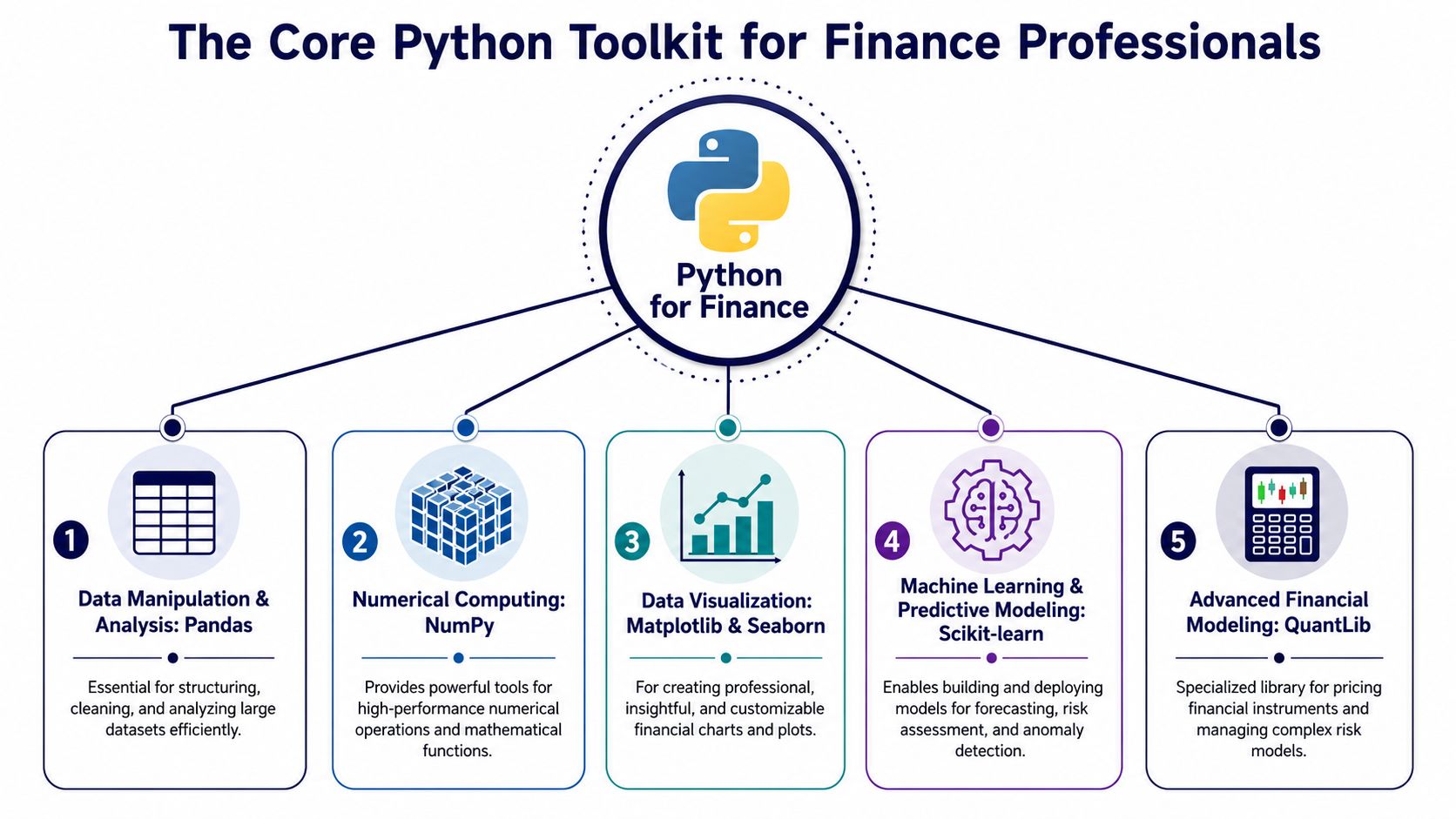
Many beginners get stuck because they hear a list of library names and assume they need to master everything at once. You don’t. Most finance learners need a small, practical toolkit first.
Pandas as super-powered Excel
If Excel is your home base, Pandas is the easiest way to understand Python for finance. Think of it as a super-powered spreadsheet engine. It can import files, filter rows, join tables, clean columns, group transactions, and calculate summaries.
That makes it useful for jobs like:
- Accounts assistant work, where you might merge ledgers from different sources
- Bookkeeping & VAT tasks, where sales and purchase records need cleanup before review
- Final accounts preparation, where trial balance data often needs reshaping before analysis
NumPy and visualisation tools
NumPy is the high-speed calculator behind much of Python’s numeric work. You may not always use it directly at the start, but it supports the calculations that make large financial datasets easier to handle.
Then come Matplotlib and Seaborn. These are your charting tools. They help you turn rows of figures into something a manager can understand quickly, such as:
- a line chart showing monthly sales movement
- a bar chart comparing department costs
- a trend view of overtime, payroll, or overdue balances
If you want a broader non-technical primer on essential data analysis libraries, that resource gives a helpful overview of where each tool sits.
Clean analysis usually starts with simple questions. Which rows are wrong, which categories matter, and what changed over time?
Scikit-learn and QuantLib
Some finance learners move further into forecasting and modelling. Scikit-learn supports predictive work such as classification, pattern finding, and simple forecasting models. A business analyst or data analyst may use it to explore trends or detect unusual behaviour in data.
QuantLib is more specialised. It’s widely associated with advanced financial modelling and pricing work. You won’t need it on day one if you’re focused on bookkeeping, payroll, or accounts assistant roles, but it’s worth knowing that Python can scale into more technical finance paths later.
A simple way to remember the toolkit
| Tool | Plain-English role | Finance use |
|---|---|---|
| Pandas | Super-powered Excel | Clean, join, filter, summarise data |
| NumPy | Fast calculator | Handle numerical operations efficiently |
| Matplotlib / Seaborn | Data storytellers | Create charts for reports and decisions |
| Scikit-learn | Pattern finder | Support forecasting and anomaly detection |
| QuantLib | Specialist modelling tool | Advanced pricing and risk tasks |
If you’re also working with finance databases, basic SQL knowledge makes this toolkit far more useful. This overview of SQL database queries for finance learners shows why Python and SQL often go together in real jobs.
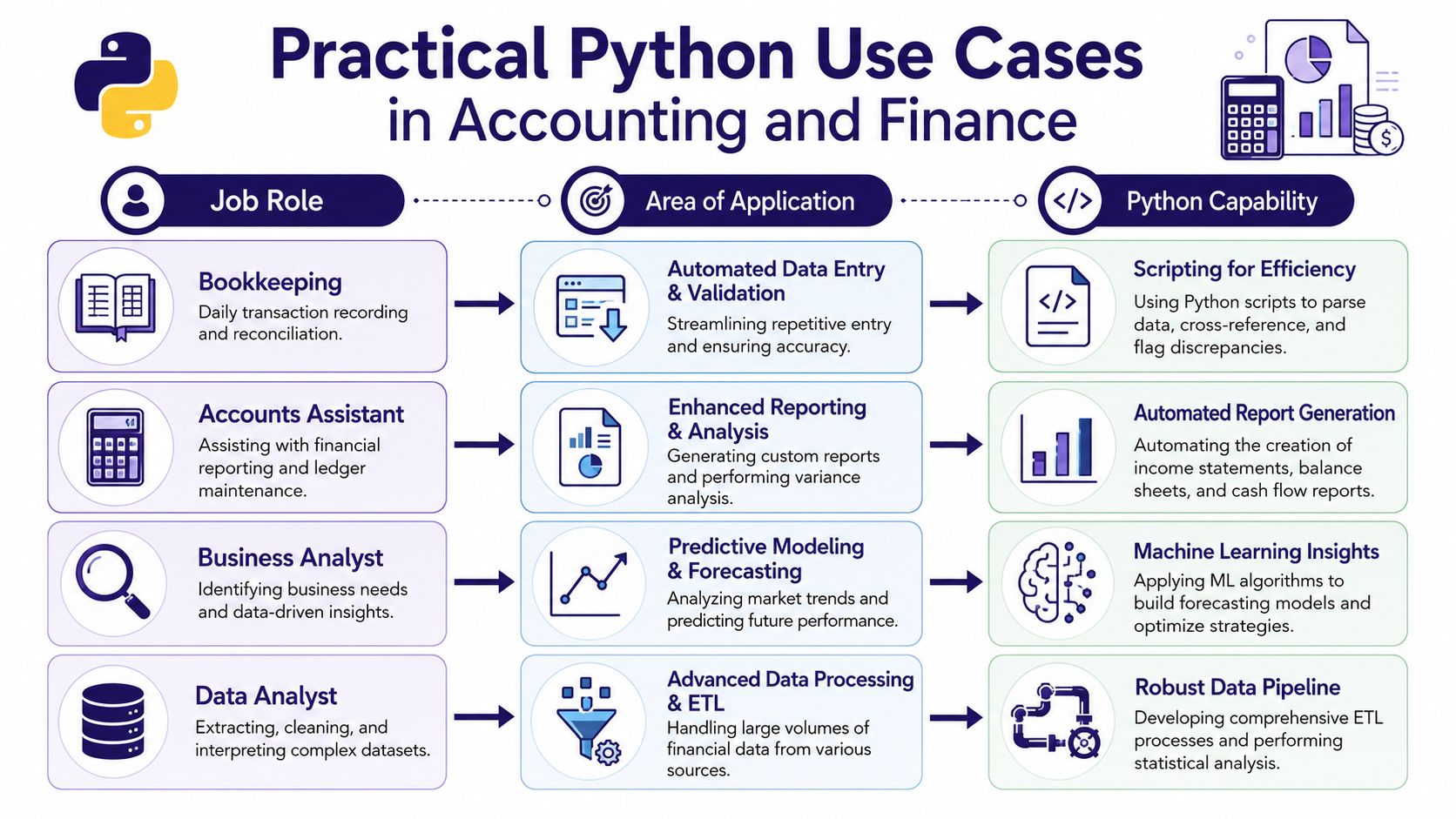
Practical Python Use Cases in Accounting and Finance
A lot of people understand Python once they see it in a job they recognise. That’s where the subject becomes real.
Bookkeeping and VAT work
A bookkeeper often receives transaction files in awkward formats. One file may have dates as text, another may use inconsistent VAT labels, and a third may include duplicate entries. In Excel, fixing that can mean several manual steps and a high chance of missing something.
With Python, a simple script can:
- import the transaction export
- standardise dates and account names
- flag missing VAT codes
- separate standard-rated and zero-rated entries
- produce a clean file ready for review
That doesn’t mean Excel disappears. In many firms, the practical approach is hybrid. Python does the repetitive cleanup, then Excel remains the final review layer because that’s where the team already checks totals and signs work off.
Accounts assistant and final accounts support
Accounts assistants often spend time preparing data for month-end or year-end reporting. The hard part isn’t always the accounting logic. It’s gathering data from several places, checking consistency, and reshaping it into a usable format.
Python is useful when you need to:
- combine nominal ledger exports
- compare this month with prior periods
- check for unusual postings
- produce structured summaries for the senior accountant
A learner who understands this kind of process also tends to understand financial modelling in practical business terms, because both disciplines rely on clean assumptions, organised inputs, and repeatable logic.
Here’s a short demonstration that gives a feel for how Python gets used in a finance setting:
Advanced payroll checks
Payroll work is full of rules, exceptions, and deadlines. A payroll professional may use Python to compare employee records, validate hours, identify missing fields, or check whether deductions look unusual before processing is finalised.
That’s valuable because payroll errors create immediate problems for staff and managers. A script that spots inconsistencies early can reduce stress and improve confidence in the process.
Small automations often have the biggest impact when they remove repetitive checking from deadline-driven work.
Business analyst and data analyst work
Business analysts and data analysts use Python in a slightly different way. Their value often comes from asking better questions of the data.
A business analyst might use Python to explore sales by region, compare customer behaviour, or test whether a process change affected revenue patterns. A data analyst might clean a large export from a finance system, join it to another dataset, and prepare a dashboard-ready table.
Useful examples include:
- Trend analysis for income, costs, and margins
- Variance checks across departments or branches
- Data cleaning for messy exports with missing values
- Recurring reports that pull the same logic each week or month
The common thread is simple. Python helps people stop wrestling with files and start focusing on judgement.
Advanced Applications from Portfolio Optimisation to Algo Trading
Once you’re comfortable with cleaning data and automating reports, Python can take you much further. The subject then becomes aspirational. The same foundations used in bookkeeping, reporting, and analysis can grow into more strategic work.
Where advanced work begins
In higher-level finance roles, Python often supports:
- Portfolio optimisation
- Risk modelling
- Scenario testing
- Derivatives analysis
- Backtesting trading ideas
You don’t need to become a quant to benefit from understanding these areas. Even a business analyst in a financial services setting gains an advantage from knowing how data pipelines, models, and testing frameworks support decisions.
Libraries with specialist roles
A library such as PyPortfolioOpt helps structure portfolio allocation problems in a practical way. In simple terms, it supports the question, “How might we balance return and risk across a set of assets?”
QuantLib, mentioned earlier, becomes more relevant here because it supports complex instrument modelling. If your career eventually moves into treasury, investment analysis, or quantitative support, Python then starts to separate beginners from specialists.
For readers curious about the trading side, this guide to mastering automated trading strategies is a useful companion because it explains the thinking behind rule-based trading in a straightforward way.
Advanced Python for finance isn’t about chasing complexity. It’s about building enough confidence with data, logic, and testing that you can trust your process.
Why this matters for career growth
The career lesson is important. Many people start with routine finance work, then move into stronger analytical roles because they learn how to automate, test, and interpret data. Python creates that bridge.
You may begin by cleaning VAT exports or payroll files. Later, you may help build forecasting models, improve management reporting, or support investment analysis. The tool stays the same. The level of responsibility changes.
Your Job-Ready Python Learning Path
The hardest part for most learners isn’t motivation. It’s knowing how to move from spreadsheets into code without losing confidence.
As of 2026, Python is the standard for CPD-certified upskilling in the UK, with 85% of accounting and finance training providers offering certified Python courses alongside Xero, Sage, and QuickBooks, according to the referenced 2026 training overview. That tells you something useful. Python is no longer being treated as an optional extra. It now sits next to mainstream finance software in structured training.
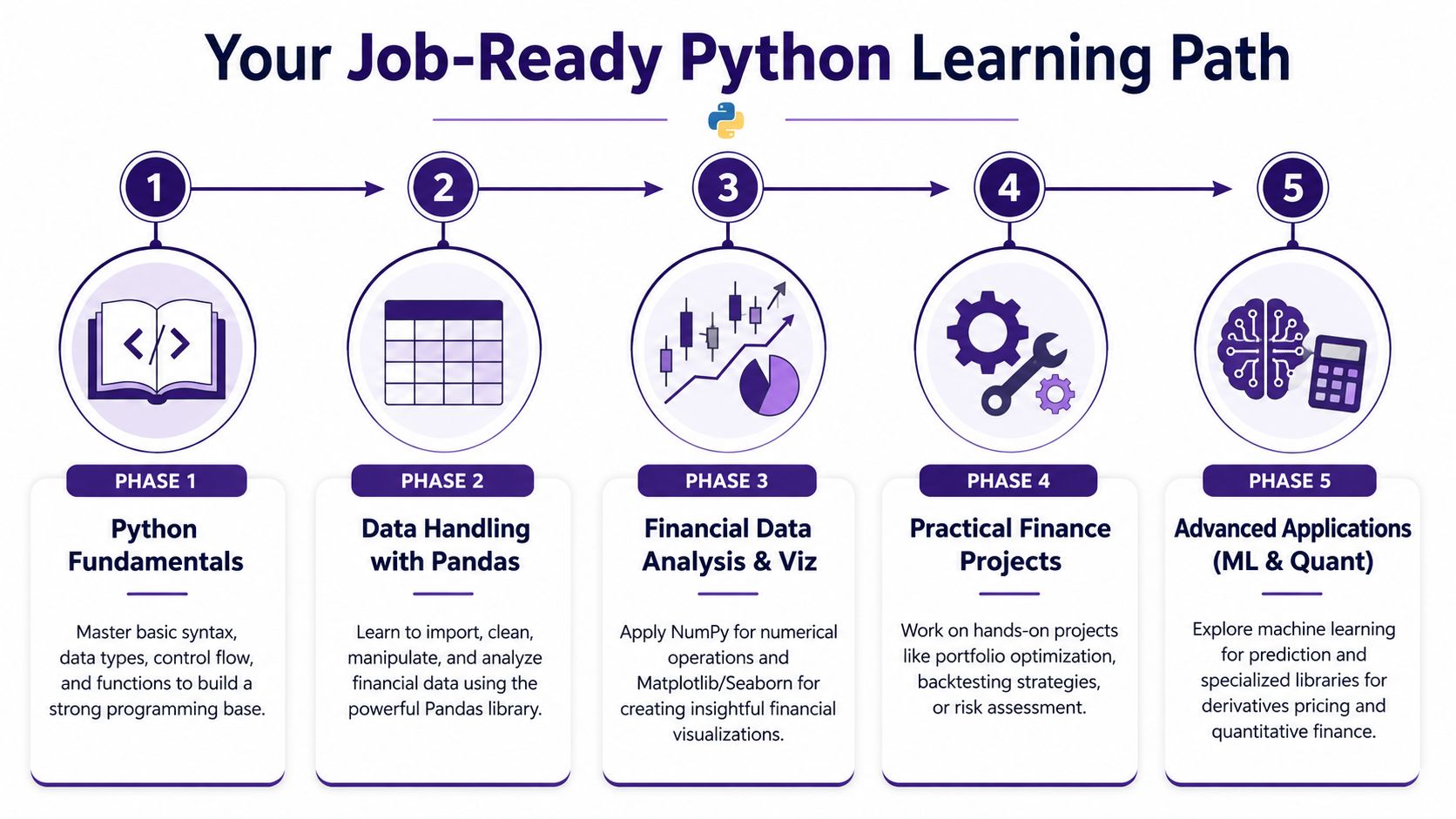
Step one with fundamentals
Start with the basics. You need to know variables, lists, loops, functions, and simple conditions. This stage can feel abstract, but don’t stay in theory too long.
A finance-friendly way to learn is to write tiny scripts that mirror familiar tasks, such as:
- checking whether an invoice date falls within a period
- calculating totals from a list of transactions
- flagging missing values in a payroll file
Step two with Pandas
Many learners suddenly feel progress at this stage. Pandas connects directly to spreadsheet-style work, so it often feels practical very quickly.
Focus on a few core actions first:
| Skill | Why it matters in finance |
|---|---|
| Importing CSV and Excel files | Most finance data starts here |
| Filtering rows | Useful for VAT, payroll, and ledger checks |
| Grouping and summing | Essential for analysis and reporting |
| Merging files | Common in accounts assistant and analyst work |
| Cleaning columns | Necessary before any reliable output |
Step three with charts and explanation
Finance employers value people who can explain numbers, not just process them. Learn to create clear charts and short summaries.
For example, if you can show monthly overhead movement in a chart and explain the reason behind a spike, you’re demonstrating analytical judgement. That matters in business analyst and data analyst interviews.
Career coach’s advice: Build one chart that answers one business question well. That impresses employers more than ten busy charts with no clear message.
Step four with practical projects
Projects turn knowledge into evidence. Keep them relevant to UK job roles.
Strong beginner project ideas include:
- Bookkeeping & VAT project. Clean a transactions file, check VAT code gaps, and export a review-ready summary.
- Advanced payroll project. Validate employee data and highlight missing or inconsistent values before processing.
- Accounts assistant project. Merge monthly ledger files and produce a variance summary.
- Final accounts project. Reshape trial balance data into a clearer reporting format.
- Business analyst project. Analyse sales or cost trends and produce short management commentary.
- Data analyst project. Build a simple pipeline that imports, cleans, and summarises finance data.
Step five with advanced options
Only move here when the basics feel comfortable. This stage may include forecasting, simple machine learning, portfolio tools, or more specialist finance libraries.
The key is sequence. Don’t jump to algo trading examples if you haven’t yet mastered importing a CSV cleanly and checking for missing values. Employers usually care more about reliable practical skills than flashy code.
A job-ready learning path works best when it mirrors real work. Learn the basics, handle data properly, explain what you found, then prove it with projects.
Building Your CV and Preparing for Interviews
A Python skill only helps your career if employers can see it clearly. Many applicants write “Python” on a CV, but they don’t show how they used it. That’s the gap to fix.
According to the 2024 UK Finance Skills Report by the ICAEW, 74% of UK finance professionals still rely on Excel for day-to-day tasks, 61% report anxiety about productivity loss when switching to Python, and only 9% of training programmes offer specialized Excel-to-Python migration methodologies, as summarised in this UK finance training analysis. That explains why hybrid workflow skills stand out. Employers know the transition is real.
How to present Python on your CV
Don’t list Python on its own. Tie it to finance tasks and outputs.
A stronger presentation looks like this:
- Technical skills. Python, Pandas, Excel, SQL, Sage, Xero, QuickBooks, Power BI
- Projects. Automated VAT data cleanup, payroll validation checks, ledger consolidation, monthly reporting analysis
- Results. Focus on what the script did, such as reducing manual steps, improving consistency, or making reporting easier to repeat
What to add to LinkedIn
Your LinkedIn profile should mirror your CV but sound more human. In your headline or about section, combine role direction with tools and finance context.
Examples:
- Aspiring Accounts Assistant with Excel, Python, and ledger reporting skills
- Finance graduate building Python, SQL, and business analysis capability
- Data Analyst focused on financial data cleaning, reporting, and visualisation
Interview questions to expect
Employers often care less about tricky syntax than about your thinking. Be ready for questions like:
- How would you use Python to improve a manual finance process?
- Tell me about a file you cleaned and what problems you found.
- When would you use Excel instead of Python?
- How would you check that your output is correct?
- Describe a project where you turned raw data into a useful report.
A helpful structure for your answers is simple:
- The task you were trying to complete
- The data problem you noticed
- The Python approach you used
- The business value of the result
That format shows practical judgement, which is exactly what hiring managers want.
Taking the Next Step in Your Finance Career
Python for finance has moved into the mainstream of UK career development. For bookkeepers, payroll professionals, accounts assistants, final accounts trainees, business analysts, and data analysts, it offers a practical advantage. You can automate repetitive work, handle data more confidently, and present stronger evidence of analytical ability.
The key point isn’t that Excel has become useless. It hasn’t. The key advantage comes from knowing how to work in a hybrid way. Use Excel where it helps. Use Python where repetition, data cleaning, and repeatable logic create a bottleneck.
That’s why learning Python now is a smart career move. It strengthens your technical range without pulling you away from the finance knowledge employers already value. If you build your skills step by step, with projects that reflect real UK job tasks, you’ll be in a much stronger position for interviews and long-term progression.
If you’re ready to turn Python into a job-ready finance skill, Professional Careers Training offers practical accountancy and finance-focused learning with 1-to-1 support from ACCA qualified Chartered Accountants and CPD approved trainers, flexible evening and weekend study options, software training across Sage, Xero, and QuickBooks, plus CV preparation, LinkedIn optimisation, job hunting strategy, and employer referrals. It’s a strong next step if you want structured support that connects training directly to UK employability.