
If you're training to become a business analyst, or you already work as one, you've probably noticed AI tools turning up in more of your...
In training rooms, I often see the same problem. Students learn bookkeeping, VAT, payroll, final accounts, SQL, and dashboard work as separate skills. Then they join a finance team or analyst role and realise the actual job is joining those skills together. Exception reporting sits in the middle. It helps an accounts assistant spot odd entries early, helps a payroll trainee catch outliers before submission, and helps a data analyst turn raw anomalies into something a manager can act on.
If you’re building a career in bookkeeping and VAT, advanced payroll, final accounts, business analysis, or data analysis, this is one of the most practical habits you can learn. It isn’t only about finding mistakes. It’s about creating a repeatable way to notice, record, review, and resolve unusual items before they become bigger problems.
Understanding the Key Concepts
Exception reporting means pulling out the items that break a rule, fall outside a normal pattern, or need human review. A routine report shows everything. An exception report shows what needs attention.
Think about your bank app. You don’t study every card transaction with the same level of concern. You notice the one payment that looks unfamiliar, the cash withdrawal in the wrong city, or the direct debit for the wrong amount. That’s the basic idea. In accounting and analytics, exception reporting works like that bank alert. It flags the unusual item inside a large pile of normal ones.
Routine reporting versus exception reporting
Routine reporting answers questions such as:
- What happened this month: sales, purchases, payroll totals, VAT due
- What’s the balance: trade debtors, trade creditors, bank, wages control
- How are we tracking: budget versus actual, aged receivables, margin by product
Exception reporting asks a different set of questions:
- What looks wrong: duplicate invoices, reversed dates, missing approvals
- What needs checking: unusual payroll amounts, VAT mismatches, supplier changes
- What might break compliance: missing audit trail, late submissions, unsupported journals
That difference matters. Students often think exception reporting is just another fancy report tab in Sage or QuickBooks. It isn’t. It’s a control method.
Practical rule: If a report helps you focus on the few items that need action, it’s an exception report. If it lists everything, it’s a routine report.
Why definitions matter in training
Teams get confused when they use the same words in different ways. A finance manager may call an exception a control breach. A data analyst may call it an outlier. A payroll administrator may call it a variance. In practice, they can all be talking about the same problem.
A good working definition for students is this:
An exception is any transaction, pattern, or missing step that falls outside an agreed rule and needs review.
That rule might come from VAT treatment, payroll policy, approval workflow, or a dashboard threshold.
If you’re still shaky on matching figures before looking for exceptions, this guide to reconciliation in accounting helps build the right foundation.
Where learners often get stuck
One common confusion is timing. In some sectors, “real-time” exception reporting is treated as urgent and structured. In UK professional training, the guidance is uneven. The available guidance notes that NHS providers are required to submit reports “in real time”, while accountancy trainees using Xero or Sage often have to self-report without a standardised workflow and may face a 14-to-28-day submission window, creating a 90% discrepancy in urgency between sectors and leaving some trainees unaware that delays for software-related exceptions can invalidate CPD certification, as outlined in the HEE exception reporting guidance for education providers.
If you want a simple way to think about dashboards that surface exceptions for learners and managers, LearnStream on LMS reporting dashboards is a useful reference because it shows how reporting views can be structured around action rather than raw data.
Benefits of Exception Reporting for Finance and Analytics
A finance team usually feels the value of exception reporting on a messy day. Payroll is due. One department’s overtime looks odd. A supplier statement doesn’t match the purchase ledger. The VAT return is being reviewed, and somebody notices transactions coded in a way that doesn’t fit the business activity.
Without exception reporting, staff review too much detail manually. They waste time looking at clean entries and may still miss the risky one. With exception reporting, they focus on the transactions that deserve attention first.
Why it matters in real work
For bookkeeping and VAT, exception reporting helps identify duplicate entries, unusual tax codes, and period cut-off issues. For advanced payroll, it highlights changes in gross pay, missing timesheets, or odd deductions. For accounts assistant work, it gives structure to credit control, supplier reviews, and posting checks. In final accounts, it supports cleaner working papers because unusual balances are investigated earlier. In business analyst and data analyst roles, it turns anomaly detection into something operational, not just theoretical.
That’s the hidden advantage. Exception reporting is both a control tool and a communication tool.
A career angle people often miss
There’s also a professional benefit. Exception logs show how you think, how you investigate, and how you escalate. They can become evidence of judgement, not just admin.
The wider UK trend matters here. Reporting in healthcare has shown that employers are increasingly using exception reporting data to audit safe working hours for non-clinical staff. NHS trusts must publish quarterly reports on handling failures, with fines of up to £500 for non-compliance, yet UK finance firms do not face the same transparency requirement. The same source also notes a gap affecting 60% of recent graduates entering the UK market, because trainees often aren’t shown how to use exception data for pay discussions or to demonstrate resilience in interviews, as discussed in the BMA article on making exception reporting work.
What good exception reporting gives you
- Sharper review work: You spend less time scanning normal transactions and more time resolving material issues.
- Better compliance habits: VAT, payroll, and internal controls become easier to evidence when exceptions are documented.
- Stronger conversations: Managers respond better to “these five items breached the rule” than “something looks off”.
- Job-ready evidence: If you’re studying for accounts assistant, bookkeeping, payroll, or analyst roles, exception logs show practical judgement.
A trainee who can explain an anomaly clearly is often more valuable than a trainee who can only export reports.
Types of Exception Reports with Examples
Not all exceptions belong in the same bucket. If you mix everything together, your team won’t know what needs a quick fix, what needs escalation, and what points to a wider process problem.
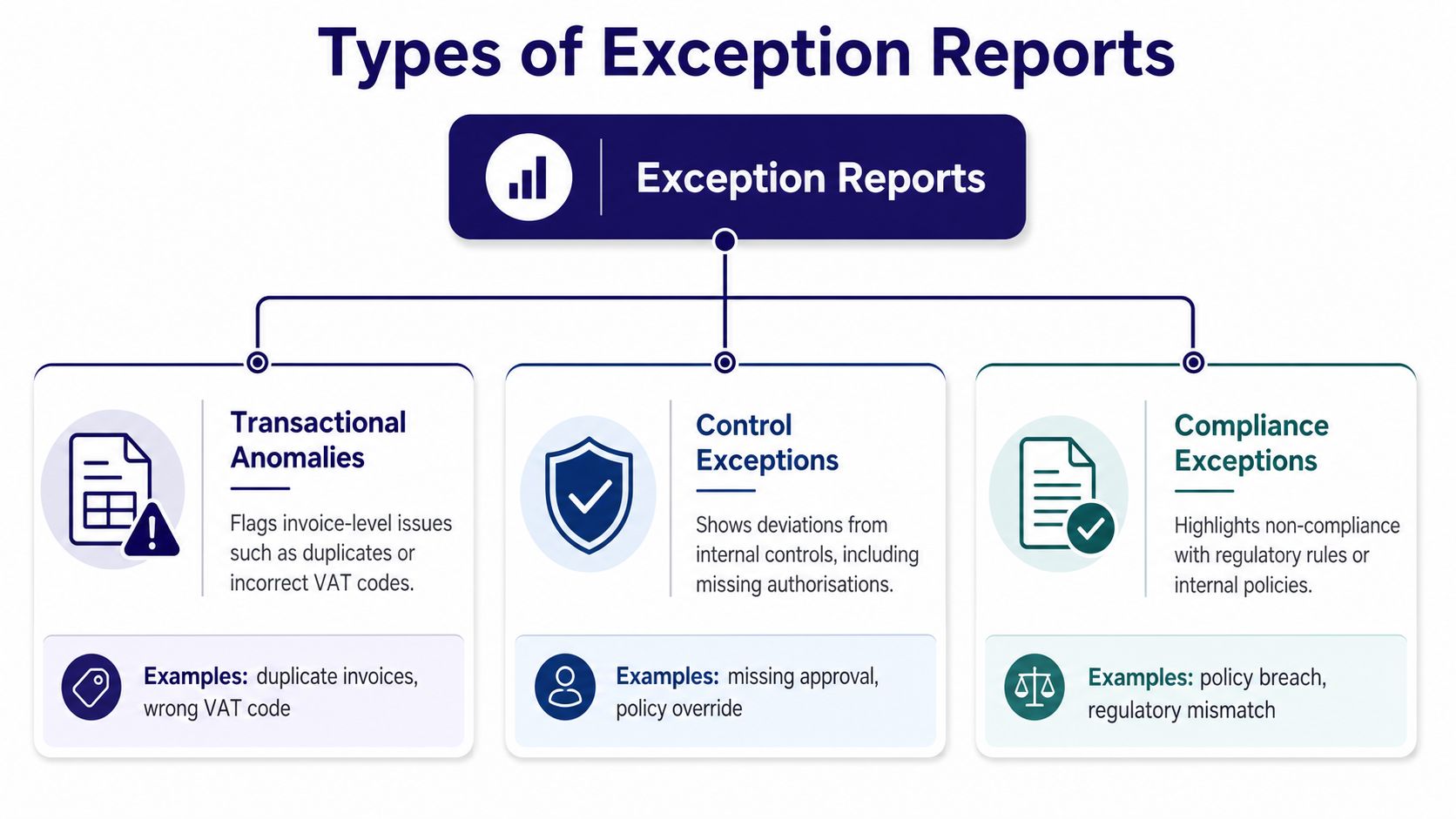
Transactional anomalies
These are the exceptions most trainees notice first. They usually sit at transaction level.
Examples include:
- Duplicate supplier invoices entered in Xero
- Incorrect VAT codes applied to purchases or sales
- Unusual payroll values in Sage Payroll
- Negative stock or cost postings that don’t fit the underlying activity
A simple example is a supplier invoice entered twice with slightly different references. The monthly purchase total may still look believable, so a routine report won’t always make the issue obvious. An exception report can flag same supplier, same amount, similar date, and similar invoice text.
For data-focused learners, a good primer on pattern checks and anomaly logic is Improving ETL data quality, especially if you’re connecting bookkeeping data to Power BI or SQL workflows.
Control exceptions
A control exception is less about the amount and more about the missing process around it.
These often include:
- Missing authorisation for a payment run
- Journal posted without support
- Supplier bank details changed without approval evidence
- Payroll amendment entered after the cut-off without review
An accounts assistant may see a payment that looks numerically fine, but it still breaches internal policy because the approval chain is incomplete. That makes it a control exception, not just a posting issue.
If you’re learning how these sit inside wider reporting logic, variance thinking helps. This guide to variance analysis is useful because many control exceptions first appear as unexplained variances.
Compliance exceptions
These matter when the transaction or process falls outside a formal requirement. In finance, that might relate to VAT, payroll records, audit evidence, or internal policy. In other sectors, the same idea appears in working hours, safety, and formal reporting obligations.
A useful lesson comes from the NHS. One study found that trainees worked beyond rostered hours 12.1 times per quarter, but submitted exception reports only 0.15 times per quarter, which means they reported only 1.2% of the time they worked beyond rostered hours, according to the PubMed study on exception reporting use in the NHS. The lesson for finance trainees is clear. If the reporting process is unclear or awkward, people stop reporting exceptions, even when the issue is real.
A quick comparison
| Type | Main question | Example tool | Typical action |
|---|---|---|---|
| Transactional anomaly | Does this entry look wrong? | Xero, QuickBooks, Excel | Correct, reverse, or investigate |
| Control exception | Was the process followed? | Sage, approval workflow, SharePoint | Escalate or collect missing evidence |
| Compliance exception | Does this breach a rule or requirement? | VAT records, payroll file, policy logs | Document, remediate, and report |
Implementing Exception Reporting in Your Organisation
Many teams fail with exception reporting because they start with software. They should start with rules.
If you don’t define what counts as an exception, the dashboard becomes noise. If you define too much, staff ignore the alerts. The best rollouts begin with a short list of high-value checks tied to actual business risk.
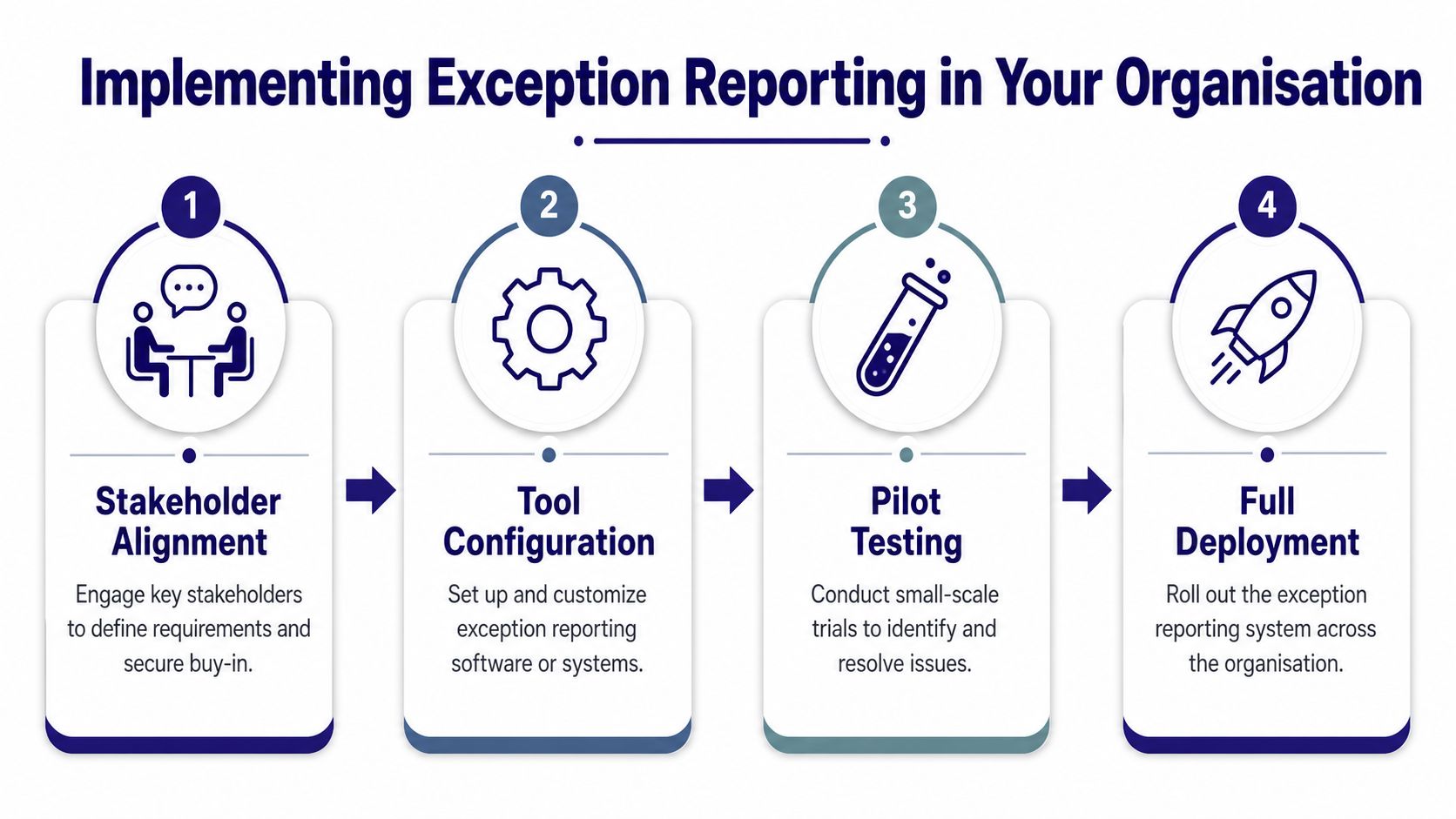
Step one to define the rules
Start with a workshop. Bring together finance, payroll, operations, and anyone who owns the source data. Ask simple questions:
- Which errors hurt most: wrong VAT, duplicate payment, missed payroll amendment
- Which issues happen often: coding mistakes, approval gaps, date errors
- Which items need fast action: payroll changes, compliance breaches, safety concerns
Keep the first list small. A short, reliable ruleset beats a huge, ignored one.
Step two to design the capture fields
A good exception record needs enough detail to be useful later. In training, I tell students to think in terms of an audit trail. What happened, when did it happen, who noticed it, what was done, and what remains unresolved.
A practical field set often includes:
- Reference details: transaction ID, employee ID, supplier name
- Timing fields: date of event, date detected, date resolved
- Exception type: transaction, control, compliance
- Impact notes: VAT, payroll, final accounts, reporting
- Action log: who reviewed it and what they changed
That structure mirrors a more formal approach seen elsewhere. In the NHS DRS4 process, the technical specification requires a structured data schema including supervisor name, precise dates and times of the variance, and a remediation chain, creating an auditable trail. The same guidance also states that safety-concern exceptions must be submitted within 24 to 48 hours, while unverified reports close automatically after seven calendar days, according to the DRS4 technical guide for doctors.
A useful exception log doesn’t just say what went wrong. It records what the team did next.
Step three to configure the tools
This part depends on your stack.
- Excel and Advanced Excel: Build conditional flags, duplicate checks, date gap tests, and lookup validation.
- Xero and QuickBooks: Export transactions regularly and apply exception logic in a control workbook or Power Query.
- Sage and payroll systems: Flag employee-level changes for review before posting or submission.
- Power BI: Use visuals for exception counts by type, owner, and unresolved age.
- SQL datasets: Create views that isolate rule breaks before they feed dashboards.
Step four to pilot before rollout
Test the process on one area first. Payroll is a strong pilot because outliers are easy to explain and the consequences of errors are obvious. VAT coding is another good option because rules are clear enough for trainees to learn quickly.
Review what the pilot produces. If every second row gets flagged, your thresholds are too loose. If nothing gets flagged, your rules are too narrow.
Creating Exception Reporting Templates and Queries
Training becomes practical. A learner understands exception reporting much faster when they can open a workbook, run a query, and see the flagged rows appear.
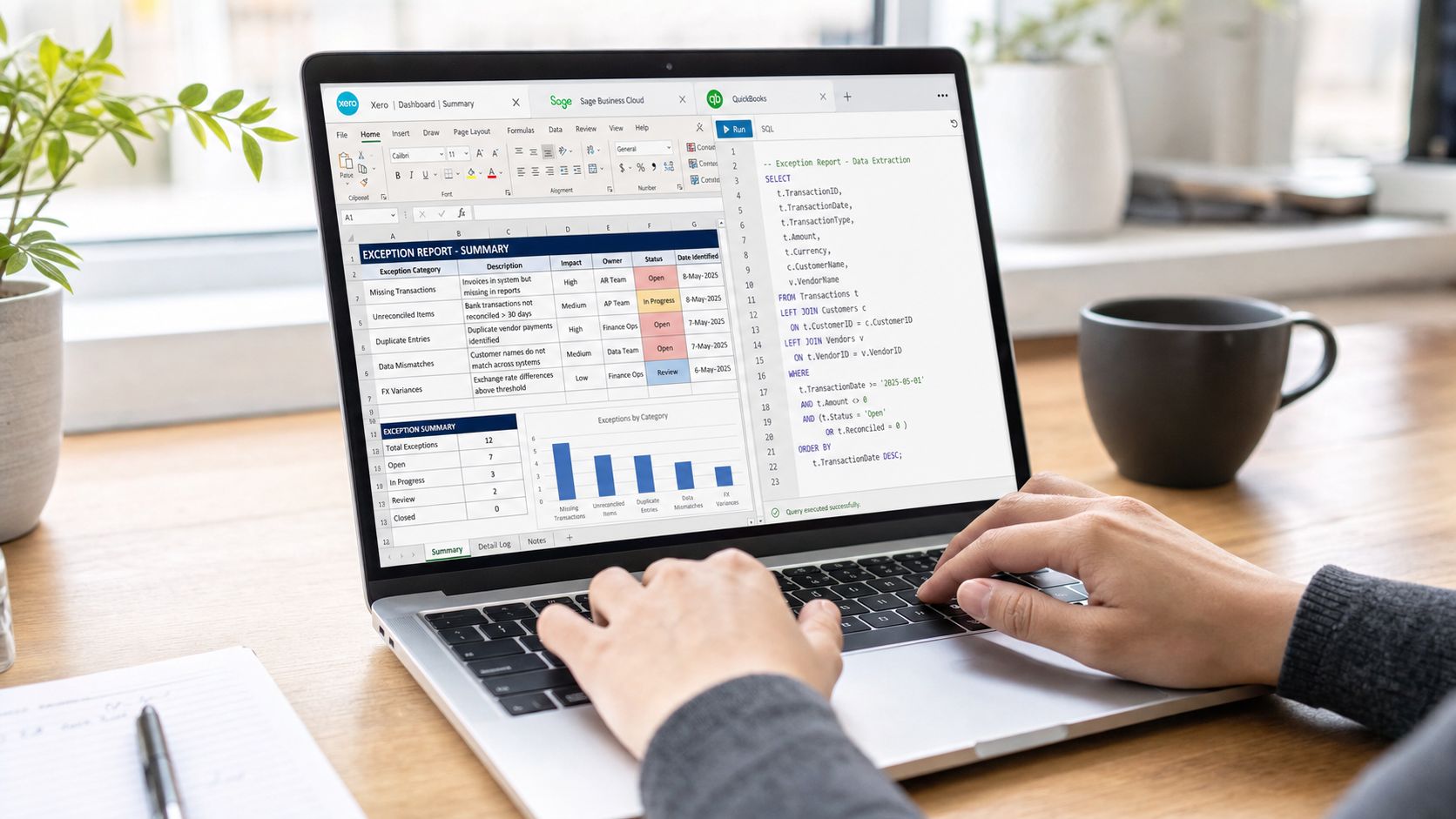
A simple Excel template for bookkeeping and VAT
For bookkeeping and VAT training, start with a monthly exception log that has these columns:
| Field | Purpose |
|---|---|
| Transaction date | Shows when the item occurred |
| Source system | Xero, Sage, QuickBooks, Excel import |
| Ledger area | Sales, purchases, bank, payroll, journals |
| Reference | Invoice number, payment ID, journal ID |
| Exception rule | Duplicate, missing VAT code, unusual amount |
| Owner | Person assigned to review |
| Status | Open, reviewed, corrected, escalated |
| Notes | What was found and what changed |
A practical VAT rule is to flag businesses approaching or exceeding the UK VAT registration threshold. The threshold for mandatory registration is £90,000 in taxable turnover, and businesses above that point must register for VAT and submit quarterly returns through HMRC’s Making Tax Digital system, as described in this our Bookkeeping & VAT Training course. In a workbook, that means adding a rolling turnover check and highlighting cases where turnover review is needed.
A Power Query pattern for duplicate checks
In Power Query, trainees can combine a few fields to create a practical duplicate test. For example:
- supplier name
- invoice date
- gross amount
- invoice reference cleaned for spaces and case
If the combined key appears more than once, the row goes into the exception table. That table can feed Excel or Power BI.
For learners who want to strengthen the database side of this work, this guide to SQL database queries helps connect spreadsheet logic to proper query design.
Query ideas for common software
Students often ask whether they need a developer to start. Usually, they don’t. They can begin with exports and simple rules.
Try these starter checks:
- In Xero: Export bills and payments. Flag same supplier and same amount combinations, then inspect reference text.
- In Sage: Review payroll exports for unusual changes in pay elements, missing departments, or negative adjustments.
- In QuickBooks: Compare VAT-coded transactions against account type to spot coding that doesn’t fit the underlying ledger.
- In Power BI: Build a report page that shows unresolved exceptions by owner and by month.
A ready-to-use template layout
Use a three-part structure:
Intake tab
This is the raw import area. Don’t edit manually if you can avoid it.
Rules tab
List each rule in plain language, such as:
- Duplicate supplier bill
- Missing VAT code
- Payroll amount outside expected pattern
- Journal without support note
Review tab
Show only flagged rows with status, comments, and resolution date.
Trainer’s advice: Keep your raw data separate from your reviewed exceptions. Once learners mix the two, the audit trail usually becomes messy.
How this helps across courses
This approach fits several UK training paths:
- Bookkeeping and VAT: coding, turnover checks, MTD awareness
- Advanced payroll: pay element review, exception sign-off, period changes
- Accounts assistant: reconciliations, purchase ledger checks, escalation notes
- Final accounts: unusual balances, late journals, unsupported adjustments
- Business analyst and data analyst: rule logic, data quality, dashboard design
The template itself doesn’t need to be complex. It needs to be consistent.
Common Pitfalls and Best Practices You Need to Know
The biggest mistake isn’t failing to build an exception report. It’s building one that people stop trusting.
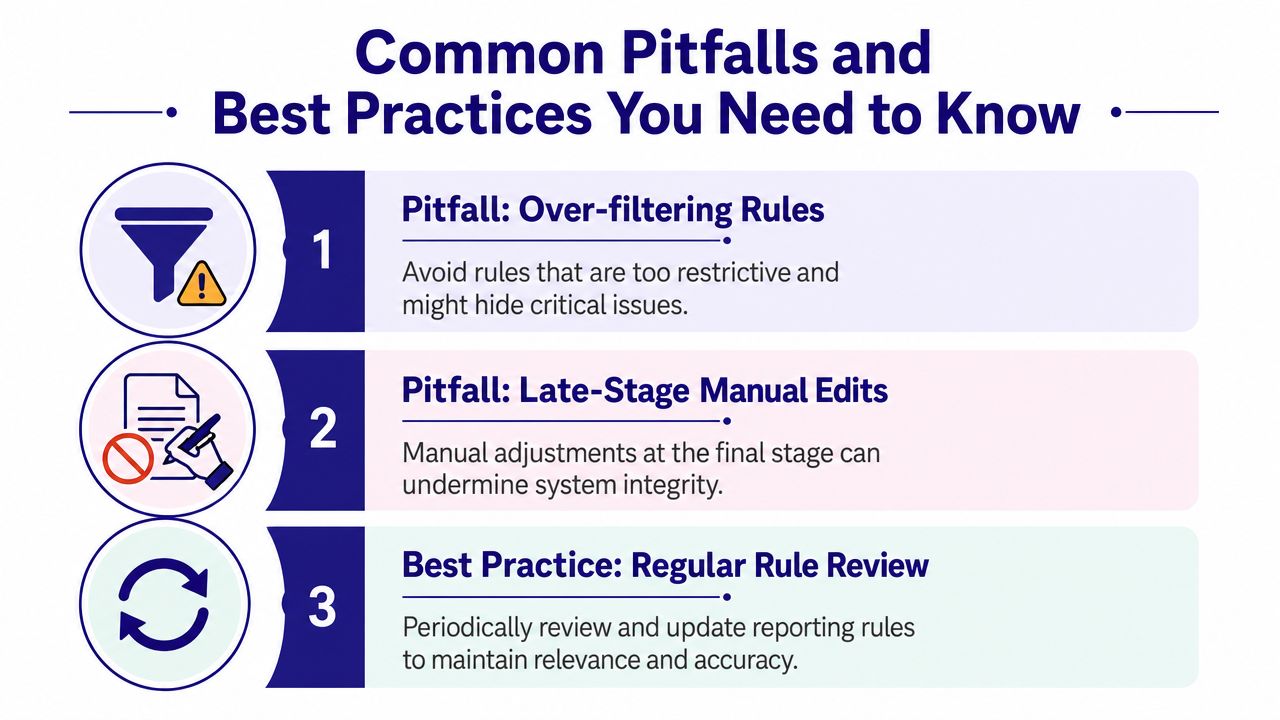
What goes wrong most often
- Over-filtering rules: Teams set thresholds so tightly that real issues disappear from view.
- Late-stage manual edits: Someone “cleans” the flagged list by hand, and the audit trail stops making sense.
- Generic thresholds: A rule that works for one ledger or payroll group creates noise everywhere else.
Better habits
- Review rules regularly: A monthly sense check keeps exception logic tied to real business activity.
- Use timestamps and owners: If nobody owns the exception, it sits unresolved.
- Separate detection from correction: Flag the item first. Then fix it in the source system or through a controlled process.
- Document why the rule exists: Trainees follow rules better when they understand the accounting reason behind them.
A good exception report shouldn’t flood your screen. It should help you trust what’s left after review.
Conclusion and Next Steps
Exception reporting gives you a practical bridge between accounting accuracy and data analysis. It helps you spot unusual items, organise review work, support compliance, and explain issues clearly to managers.
That makes it valuable across bookkeeping and VAT, advanced payroll, accounts assistant work, final accounts preparation, business analysis, and data analysis. It also gives trainees something employers recognise quickly. Evidence of care, judgement, and control.
Your next step is simple. Pick one area of work and build a small exception process around it. Start with supplier invoices, payroll changes, or VAT coding. Define the rule, capture the fields, review the flagged items, and improve the logic after a short pilot.
If you can explain why an item is an exception, how it was checked, and what action followed, you’re already building a stronger professional skill set.
If you want structured, job-focused support, Professional Careers Training offers practical UK accountancy and analytics training with hands-on work in Xero, Sage, QuickBooks, Advanced Excel, SQL, Power BI, payroll, bookkeeping, VAT, and final accounts. Their training is designed for graduates, career changers, and professionals who want real software practice, flexible study options, and guidance that improves employability as well as technical confidence.