If you're training to become a business analyst, or you already work as one, you've probably noticed AI tools turning up in more of your...
£79.4 billion is the size of the UK data economy in 2022, about 4.1% of total UK GVA, according to the ONS and the UK government's National Data Strategy framing of data as a strategic asset (ThinkCloudly's summary of the UK data economy context). For a business analyst, that number matters because SQL is one of the main tools used to pull meaning out of the relational data that drives reporting, forecasting, and KPI tracking across that economy.
If you work, or want to work, in bookkeeping & VAT, advanced payroll, accounts assistant, final accounts, business analysis, or data analysis, SQL gives you a direct route into the figures behind the process. It's the bridge between raw records and decisions, and in UK workplaces that bridge often sits inside finance systems, sales databases, customer platforms, and management dashboards.
Why SQL Matters for UK Business Analysts
SQL earns its place in UK analyst work because analysts are often expected to work close to the data, not only consume finished reports. The ONS estimate that the UK data economy contributed £79.4 billion in GVA in 2022, about 4.1% of total UK GVA. That scale helps explain why employers expect business analysts to query data directly, check what sits behind a KPI, and confirm whether a figure can be trusted before it reaches a manager or client.
SQL sits between the database and the decision
SQL lets you ask a database a business question. You can filter records, join tables, group results, and calculate totals or averages before the output reaches Excel, Power BI, or a dashboard. In a UK workplace, that might mean checking revenue movements for a finance team, identifying exceptions for an operations team, or reviewing performance for senior management. It is the difference between reading a summary and tracing the number back to the source.
The practical point is straightforward. SQL is not about becoming a database engineer. It is about being able to verify numbers, explain where a metric came from, and spot when a report does not match expectation. In UK-facing analyst roles, that self-service skill matters because employers want people who can inspect operational data directly and make sensible decisions about what the data can and cannot show.
For learners building wider analytics capability, Indian professionals: data science online degree is a useful example of how SQL fits alongside broader training in data work. For a practical starting point on query structure, this SQL database queries training resource shows how the core pieces fit together in a way that suits career changers.
Practical rule: if a business question depends on records stored in a relational system, SQL is usually the fastest way to test the answer.
Core SQL Commands Every Business Analyst Should Master
The good news is that business analyst SQL is much narrower than full database administration. One training source says the day-to-day command set of SELECT, WHERE, GROUP BY, JOIN, ORDER BY, COUNT, SUM and DISTINCT covers about 80% of the SQL queries a business analyst writes (TechCanvass). Another source puts the most important areas as SELECT, WHERE, JOINs, GROUP BY with aggregations, and basic date functions, claiming those five areas handle 90% of queries (SQLNoir).
Start with the basic query shape
The core pattern is SELECT … FROM … WHERE …. You use SELECT to choose columns, FROM to name the table, and WHERE to filter rows by a condition. That's the structure behind everyday tasks such as listing only active customers, pulling only unpaid invoices, or checking transactions for one month.
A simple way to think about the common commands is this:
- SELECT, choose the fields you need.
- WHERE, remove rows that don't fit the business question.
- JOIN, combine related tables.
- GROUP BY, turn many rows into summaries.
- COUNT, SUM, and AVG, calculate totals and averages.
- DISTINCT, remove duplicates when you only want unique values.
That's the toolkit most career changers need first. A practitioner guide says four to six weeks of consistent practice on real datasets is enough to reach functional independence, while advanced database optimisation usually sits outside the business analyst remit (Business Analysts Toolkit).
Use the command for the job, not the other way round
A finance trainee checking whether all payroll records loaded correctly does not need clever syntax. They need a clean filter, a join between systems, and a count that matches expectation. The same logic applies in bookkeeping & VAT, accounts assistant work, and final accounts preparation, where the first win is often simple validation rather than complex querying.
The internal SQL learning resource at SQL database queries training is a useful companion when you want to practise the basics in a structured way.
Practical rule: if you can explain why each clause is in the query, you're already thinking like an analyst.
Working with Joins and Aggregations in Real Scenarios
Sales data rarely sits neatly in one table. Customer details may live in one system, orders in another, and product information somewhere else again. SQL matters because it lets a business analyst connect those pieces and turn raw transactions into reporting that a manager can use.
A simple reporting case
A UK sales team may ask for monthly revenue by region and product line. To answer that, you would join the customer table to the orders table, then add the product table so each order line carries the right product name and category. Once the records are linked, GROUP BY lets you summarise the data by region, month, or product family.
Aggregate functions then do the counting and measuring work:
- COUNT shows how many transactions or customers are in the set.
- SUM gives total revenue, total payroll cost, or total invoice value.
- AVG shows average order size, average payment delay, or average staff hours.
- MIN and MAX help you spot the smallest and largest values in a set.
These functions are practical, not theoretical. They support reporting, requirements validation, and stakeholder analysis because they let you ask, “Does this number look right?” before the report reaches a manager.
Reconciling figures across systems
For a business analyst, the highest-value SQL work is often validation at working speed. Use SELECT and WHERE to check completeness, JOIN to reconcile data across systems, then GROUP BY with COUNT, SUM, or AVG to sense-check totals against expectation. A practitioner guide makes the same point about the SQL depth business analysts usually need, focusing on day-to-day use rather than database specialism (Business Analysts Toolkit).
That pattern is especially useful when finance and operations numbers do not match at first glance.
If a sales dashboard shows revenue that feels off, SQL helps you trace the difference back to its source. Some orders may have been excluded. A join may have duplicated rows. A date filter may have used the wrong field. The query does not just produce a number, it helps you explain the number.
For analysts working alongside BI tools, a clear walkthrough of what Power BI is used for helps show where SQL ends and reporting begins.
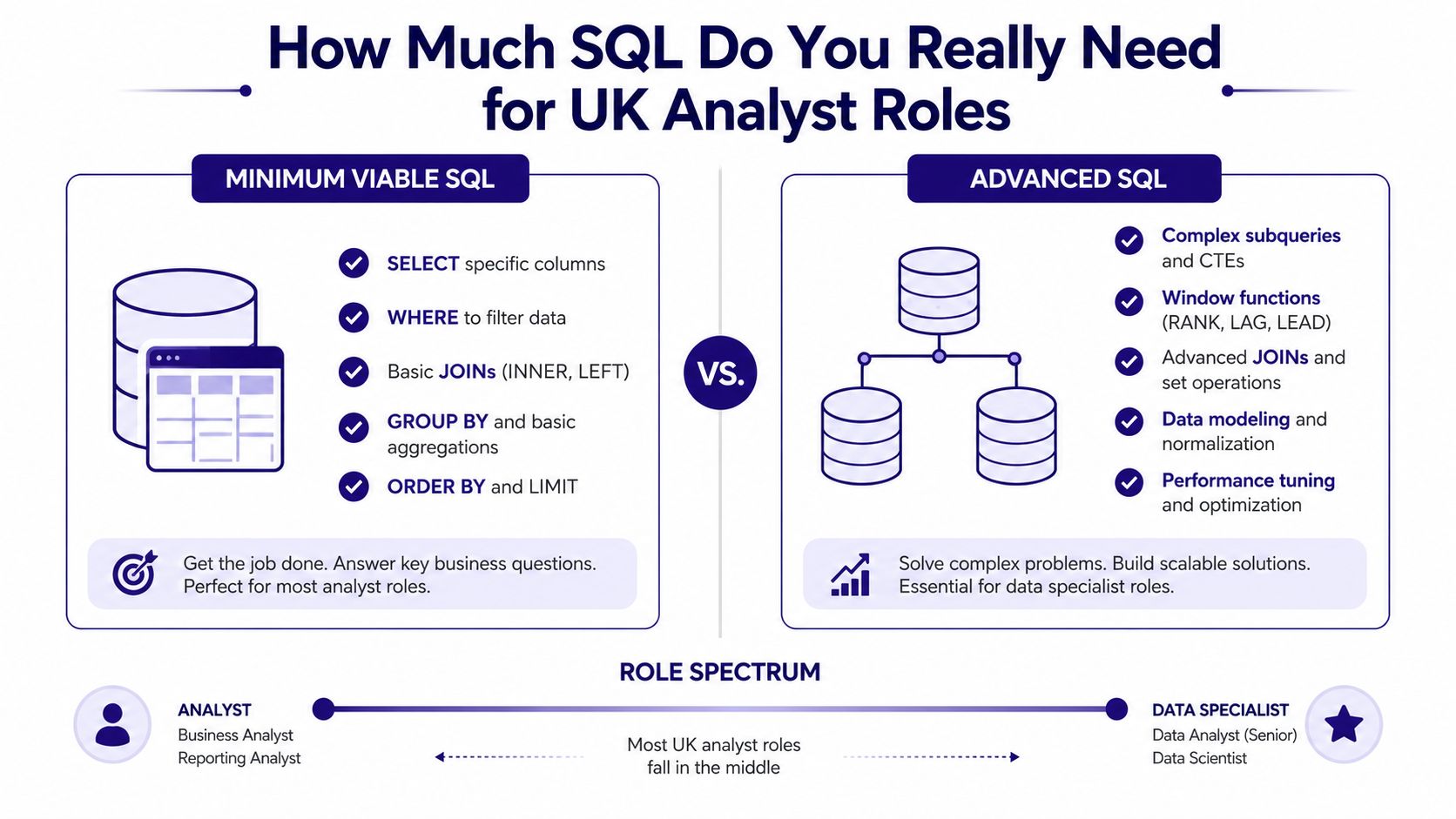
How Much SQL Do You Really Need for UK Analyst Roles
A UK business analyst does not need the same SQL depth in every role. The practical question is whether you are expected to check, question, and explain data, or whether you are also expected to shape the structure behind it. A stakeholder-facing analyst who validates reports needs a different level of SQL from someone working close to BI development or data governance, and many learners go wrong by treating all SQL as one broad subject.
That distinction maps closely onto the wider question of business analyst versus business analytics as career paths — the SQL depth you actually need often comes down to which side of that line your role sits on.
Minimum viable SQL versus deeper querying
Minimum viable SQL means being comfortable with SELECT, WHERE, basic JOINs, and GROUP BY with simple aggregates. That level is usually enough for day-to-day business questions where you are checking data quality, reconciling figures, or pulling a subset into Excel or Power BI for review.
Advanced SQL goes further into complex subqueries, window functions, and data modelling. Those skills appear more often in BI-adjacent or data-specialist roles than in typical business analyst work. If a job advert talks about dashboards, datasets, governance, or warehouse structures, the SQL expectation is usually higher. If it focuses on stakeholder reporting, process analysis, and KPI checks, the basics often cover the work. A practical way to judge your target role is to compare it with what Power BI is used for in the reporting chain, because the SQL depth usually changes once the role moves from checking numbers to building repeatable reporting logic.
The UK labour market context supports that split. The ONS reported 1.3 million vacancies in July to September 2024, and the broader professional, scientific and technical sector remained one of the largest vacancy pools, which makes self-service data skills more valuable in shortage conditions (ONS vacancy data context discussed in UK-facing analysis). The demand sits with data-heavy work, not the job title alone.
How to read a job advert
Look for the verbs. If the advert says extract, validate, reconcile, or report, the role probably expects working-level SQL. If it says optimise, model, warehouse, or govern, the role is moving closer to specialist territory.
The wording matters because it shows where the analyst sits in the workflow. A job that asks you to pull trusted data for finance or operations reporting is asking for a different skill level from one that expects you to design data logic or support technical teams.
For a live example of how senior analyst roles are described in the market, the Version 1 Business Analyst job is a useful benchmark for reading the level of technical expectation.
Integrating SQL with Excel Power BI and AI Tools
UK analysts rarely use SQL on its own. A common workflow starts with SQL to pull a clean dataset, then moves into Excel for spot checks or Power BI for reporting and dashboards. That combination suits accounting, payroll, operations, and business analysis roles because it keeps the analyst close to the numbers while still making the output easy to share with colleagues.
Choose the right tool for the task
Use SQL when the data sits in a relational database and you need a precise extract. Use Excel when you need a quick review, an ad hoc calculation, or a small amount of manual shaping. Use Power BI when stakeholders need repeatable visuals, refreshable reports, and a live connection to the source data.
A practical training guide on what Power BI is used for helps place SQL in that wider reporting chain. SQL prepares the dataset, Power BI presents it, and the analyst decides whether a manual check in Excel is still needed.
AI tools can help with the first draft of a query, but they are strongest when the task is specific. For example, an analyst might ask AI to write a CASE statement for customer segments, suggest a cleaner JOIN for two tables with mismatched keys, or spot why a filter is returning too many rows. The UK Employer Skills Survey 2024 found that 62% of establishments with skills gaps reported staff were not fully proficient, and the most common hard-skill gaps included digital skills and data analysis (UK Government Employer Skills Survey 2024). The same UK context also matters because the ONS reported that 20% of UK businesses were using some form of AI in early 2025, up from 15% in late 2024. In practice, that means analysts need to know how to use AI for drafting, checking, and summarising, while still writing the final SQL themselves and testing whether the result matches the business question.
Keep the human check in place
AI can speed up routine work, but it cannot judge whether a result makes sense for payroll, VAT, or management reporting. If a payroll extract looks wrong, or a VAT report does not reconcile, the analyst still has to trace the logic, confirm the joins, and test the filters.
That is why SQL still sits at the centre of the workflow. It gives the analyst the final check on what the numbers mean, while Excel, Power BI, and AI each handle the parts they are best suited to.
Practical rule: use tools to speed up the first draft, but keep SQL in your hands whenever a number will influence a decision.
For a live example of how this level of technical expectation appears in the market, the Version 1 Business Analyst job is a useful benchmark.
Your Practical Learning Path and Next Steps
Focus your learning on the five areas that show up most often in business analysis work, SELECT statements, WHERE clauses, JOINs, GROUP BY with aggregations, and basic date functions (SQLNoir). That gives you the best return on study time because it covers the queries you're most likely to use in reporting, reconciliation, and stakeholder support.
Build skill through real tasks
Start with a small dataset from a sales, payroll, or finance example. Pull one table, filter it, join it to another table, and summarise it by month or region. Then do the same exercise again using a different dataset, such as invoice records or customer support tickets. Repetition on realistic data builds confidence faster than memorising syntax.
If you want to connect that practice to a broader analyst pathway, the internal guide on how to become a business analyst is a sensible place to see how SQL fits with reporting, stakeholder work, and job applications.
Show competence in interviews
In interviews, describe a time you used SQL to check completeness, reconcile systems, or produce a summary a manager needed quickly. Keep the explanation concrete. Hiring teams want to hear how you chose the query, why you trusted the output, and what you did when the result didn't match expectation.
Training matters too. Structured courses with hands-on practice, career coaching, and support for bookkeeping & VAT, advanced payroll, accounts assistant, final accounts, business analysis, and data analysis can help you move from theory to job-ready performance without wasting time on database theory you won't use.
If you want a structured route into SQL, business analysis, and adjacent accounting and data skills, Professional Careers Training can help you build practical confidence with trainer support and job-focused learning. Visit Professional Careers Training to explore training that fits your career goals and take the next step with a course built around real workplace tasks.