Making Tax Digital for Income Tax is now live. The first sole traders and landlords became mandatory users on 6 April 2026, and HMRC started...
Making Tax Digital for Income Tax is now live. The first sole traders and landlords became mandatory users on 6 April 2026, and HMRC started auto-enrolling people in September 2026.
If you’re self-employed, let out property, or you work with clients who do, this is no longer a future change to plan for. It’s a current compliance requirement with real penalties attached.
This guide sets out exactly who has to join, when, what’s actually required once you’re in, and how it differs from the Making Tax Digital for VAT rules many bookkeepers already know.
The £50,000 threshold was deliberately set at the higher end first. HMRC is phasing this in over three tax years, giving the software, support services and HMRC’s own systems a chance to settle.
That’s before the lower £30,000 and £20,000 thresholds bring in a much larger group of sole traders and landlords over the following two years.
That’s useful context if you’re nowhere near £50,000 today: you’re very likely to be in scope eventually, just not yet.
It’s also why bookkeepers and accountants are getting familiar with this now, rather than waiting for the lower thresholds to land. The clients who need the most help are usually the ones furthest from being ready.
What Making Tax Digital for Income Tax actually is
Making Tax Digital for Income Tax (often shortened to MTD for IT, or MTD ITSA) replaces the old once-a-year Self Assessment return for qualifying sole traders and landlords.
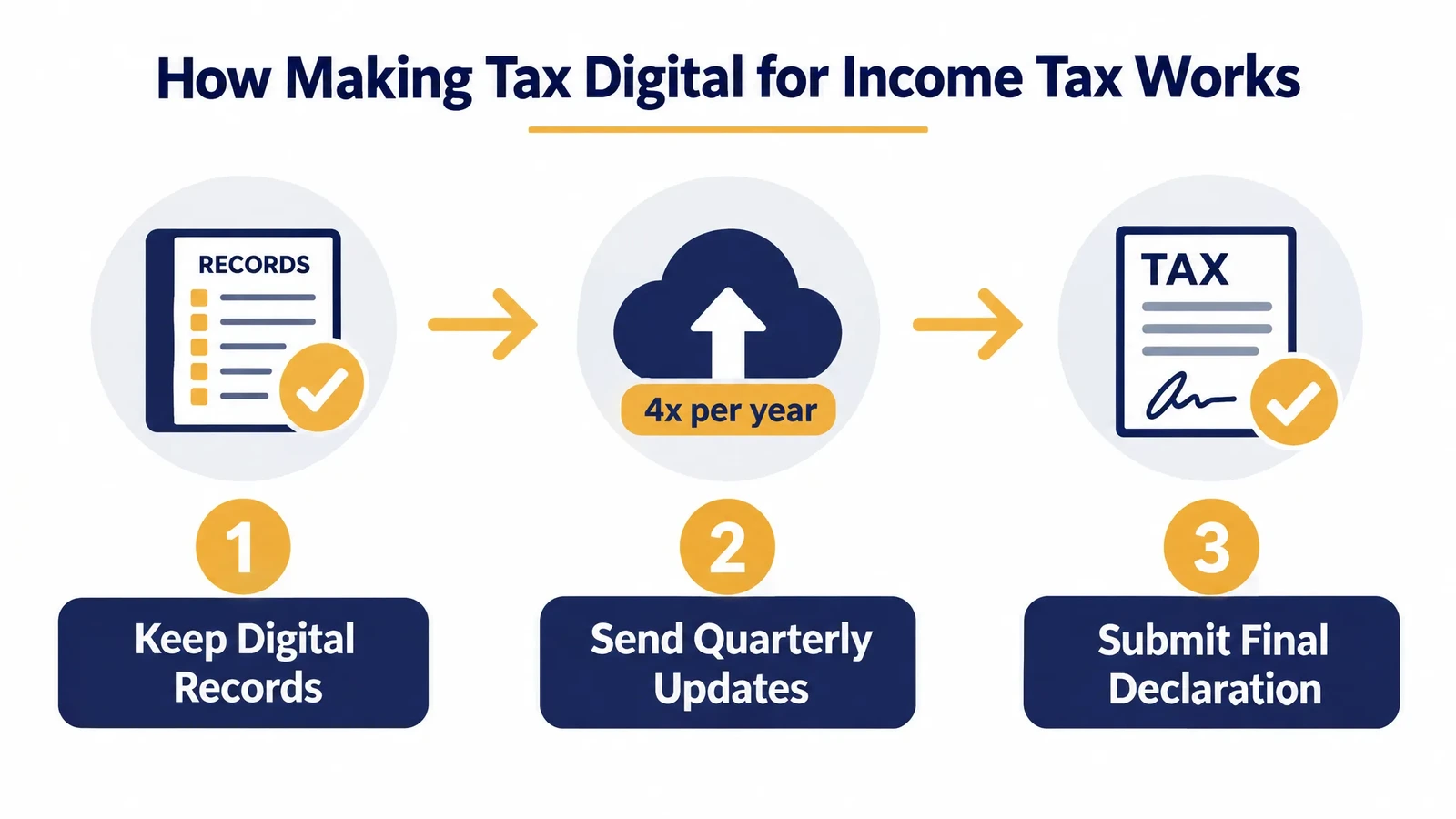
Instead, you keep digital records throughout the year, send HMRC quarterly updates, and finish with a final declaration.
It’s built on the same digital-first principle as Making Tax Digital for VAT, but it applies to a completely different population and a different tax.
MTD for Income Tax doesn’t replace Self Assessment. It changes how you report through the year, replacing one annual submission with digital records, quarterly updates, and a final declaration.
Who has to join, and when
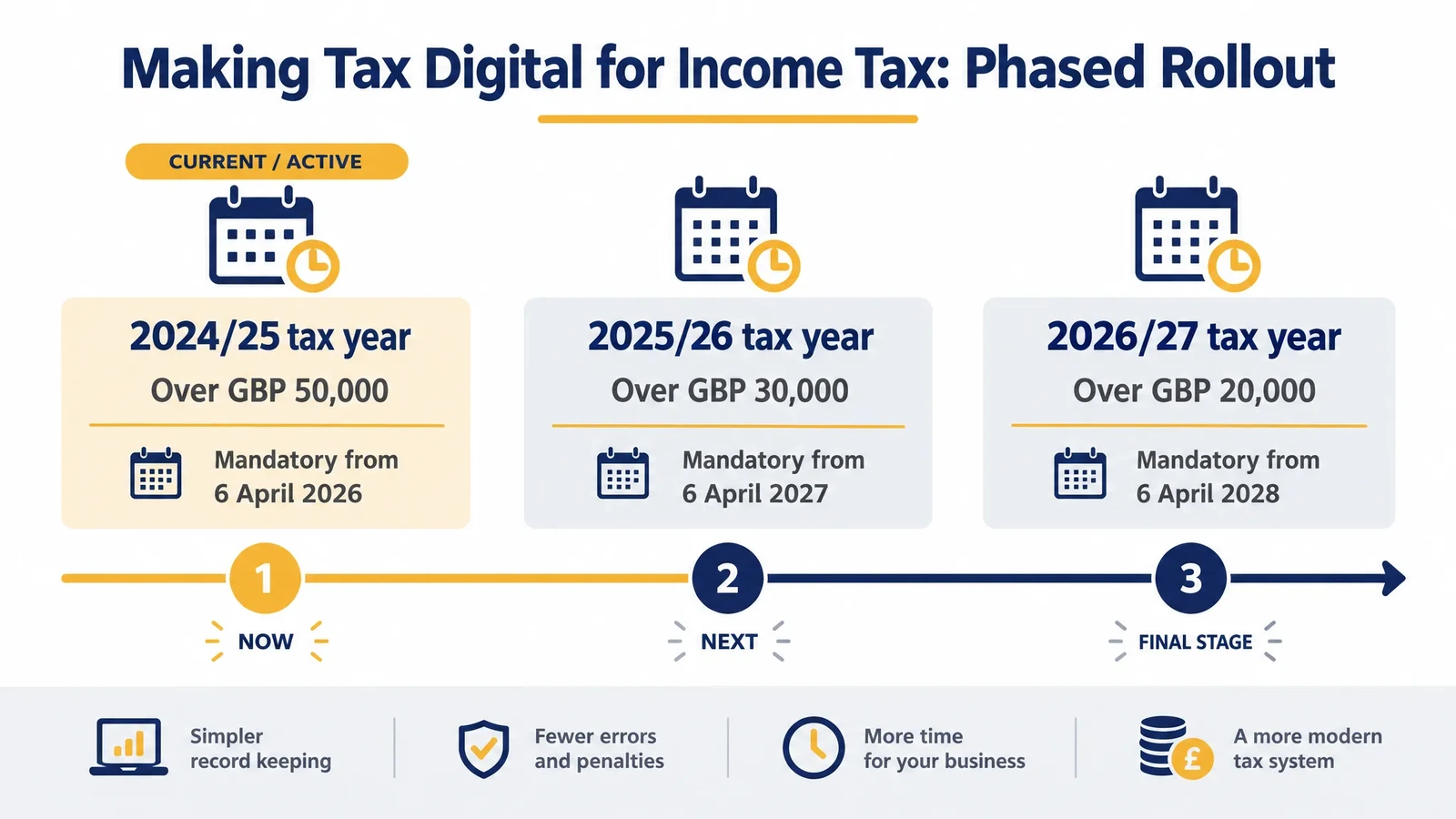
Whether you have to join, and from when, depends on your gross income from self-employment and property, known as qualifying income. It’s measured before expenses, based on an earlier tax year’s return.
| Based on this tax year’s income | Threshold | Mandatory from |
|---|---|---|
| 2024/25 | Over £50,000 | 6 April 2026 |
| 2025/26 | Over £30,000 | 6 April 2027 |
| 2026/27 | Over £20,000 | 6 April 2028 |
Once your qualifying income crosses the threshold for a tax year, you must join from the following start date, even if your income later drops below it.
If you start a new self-employment or rental income source partway through a year, HMRC annualises it to a full 12-month figure before checking it against the threshold. Partnerships aren’t required to join yet; HMRC will confirm a timeline separately.
What you actually have to do once you’ve joined
The requirements fall into three stages, and each one needs HMRC-recognised MTD software rather than a spreadsheet or paper records alone.
Software: what “MTD-compatible” actually means
Compatible software talks to HMRC directly through its systems, rather than you typing figures into the Self Assessment portal by hand.
Some people use one piece of software for everything. Others use separate record-keeping software or a spreadsheet, connected to HMRC through “bridging software” that handles just the submission step.
Either setup is fine, as long as the digital chain from your records to HMRC’s system doesn’t break at any point. That same digital-link principle is what Making Tax Digital for VAT already requires.
Copying a figure out of one system and retyping it into another breaks that chain, even if the number itself is correct.
The whole point of a digital link is that the data moves across automatically, without a manual re-entry step in between.
Keep digital records
You record income and expenses from your self-employment and property digitally, as they happen, rather than reconstructing them at year end from receipts and bank statements.
In practice that means logging each transaction against a category (sales income, materials, travel, rent, repairs and so on) inside your software, close to the point it happens, rather than batching a shoebox of receipts once a quarter.
Send quarterly updates
Four times a year, your software sends HMRC a running total of income and expenses for each business or property source. These are updates, not tax calculations, and you can correct them later.
Submit your final declaration
After the tax year ends, you make any final adjustments (reliefs, allowances, other income) and submit your final declaration through your MTD software, replacing the old standalone Self Assessment return.
Quarterly updates are a running total, not a final tax bill. The real reckoning still happens at the final declaration, after the tax year ends.
Exemptions: who doesn’t have to join
Several groups are automatically exempt, with no application needed:
- Anyone with qualifying income of £20,000 or less, on a permanent basis
- Anyone without a National Insurance number before the tax year starts
- Partnerships, until HMRC sets a separate timeline
- Non-resident companies, trusts and personal representatives filing specific Self Assessment supplementary pages
- Lloyd’s underwriting members meeting specific criteria
- Anyone lacking capacity to deal with HMRC, where a power of attorney, deputy or guardian is already in place
You can also apply for a digital exclusion exemption if it genuinely isn’t reasonable for you to use compatible software.
That covers things like age, health, disability, a religious objection to digital devices, or no realistic way to get internet access.
HMRC is explicit that filing paper returns before, being unfamiliar with software, having few records, or the extra time and cost involved are not accepted as exemption reasons on their own.
If you have more than one business or rental property
Your qualifying income is the combined gross total across every self-employment and property source you have, before expenses. PAYE employment income isn’t included.
So if you run a small carpentry business and also let out a flat, HMRC adds both income streams together when checking you against the threshold, even though neither one on its own might cross it.
Reporting works differently from the threshold check. Each business or property source is reported to HMRC separately, with its own digital records and its own quarterly updates, rather than one combined update for everything.
That means someone with two businesses and a rental property could be sending three separate sets of quarterly updates, four times a year, before everything comes together at the single final declaration.
What happens if you don’t comply
Missing quarterly updates and payment deadlines both carry financial consequences, though the two work differently.
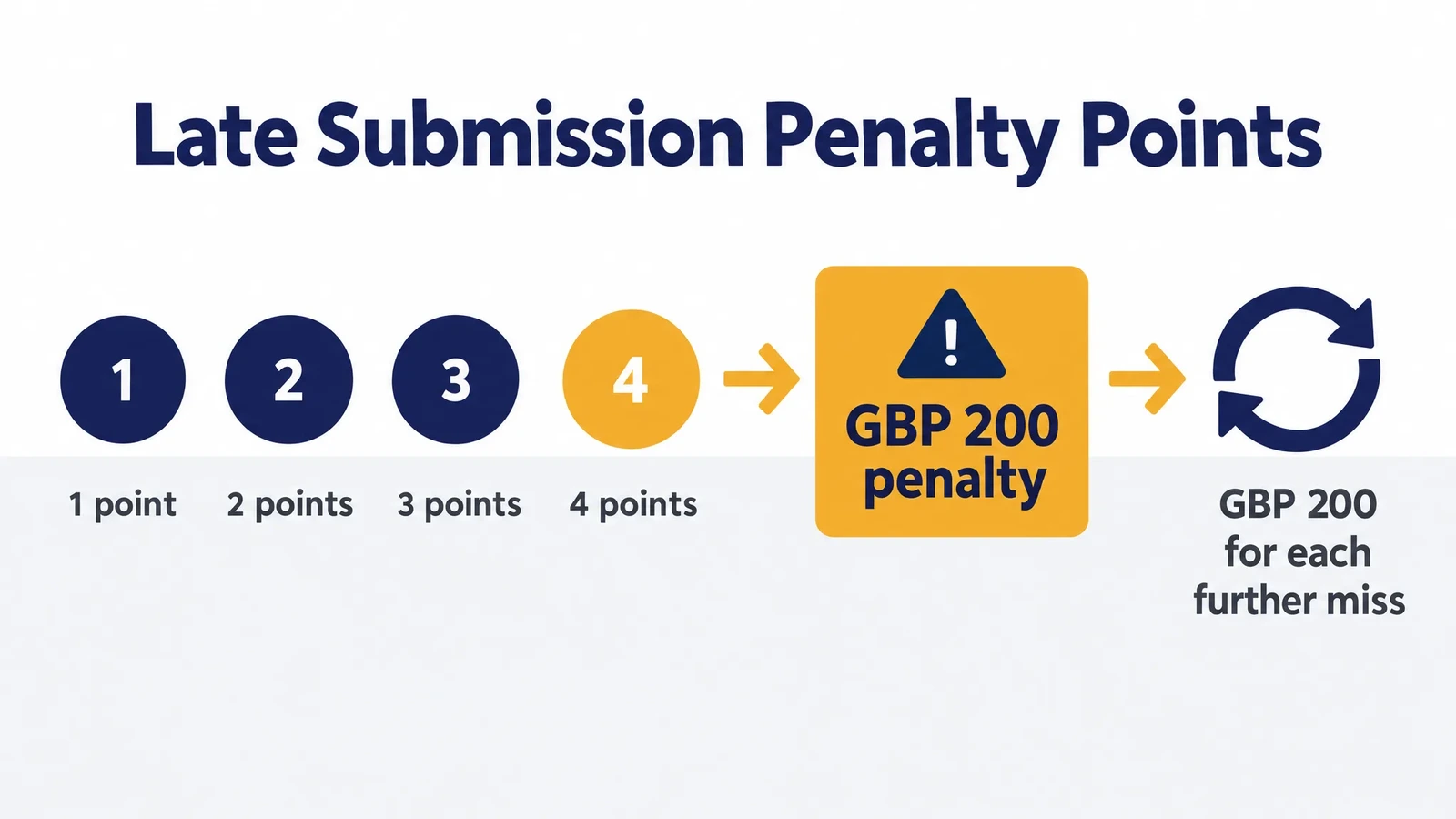
Late submissions build up points rather than an immediate fine. One point per missed deadline, and reaching 4 points triggers a £200 penalty, with another £200 for every further miss after that.
For the 2026/27 tax year specifically, HMRC isn’t penalising missed quarterly updates while the system beds in. That penalty starts from 2027/28.
| Days late | Penalty |
|---|---|
| Up to 15 days | None |
| 16 to 30 days | 3% of the tax owed at day 15 (waived in your first year) |
| 31 days or more | 3% at day 15, 3% at day 30, plus 10% annual interest from day 31 |
Late payment interest applies from the very first day a payment is overdue, regardless of the penalty stage.
Thinking about signing up early
You don’t have to wait for your mandatory start date. If you’re registered for Self Assessment and have filed a return in the last two years, you can volunteer for the current or the next tax year.
Plenty of bookkeepers encourage clients to volunteer ahead of their mandatory date specifically so the first quarterly update isn’t also their first time using the software under pressure.
It also gives you a full practice cycle, record-keeping through to final declaration, before anything you submit actually counts towards a penalty point.
How this differs from Making Tax Digital for VAT
If you already know Making Tax Digital for VAT, don’t assume the income tax version works the same way. The populations, thresholds and penalty details are genuinely different.
MTD for VAT applies to all VAT-registered businesses, regardless of turnover, and has applied since 2022. MTD for Income Tax only applies once your self-employment and property income passes its own, much higher threshold, phased in gradually from 2026.
Our guide to Making Tax Digital for VAT covers that side in full, including what counts as a digital link and the exemption process, which works differently from the income tax rules above.
Getting ready: a practical checklist
If you think you’ll cross a threshold soon, or you already have, these are the steps worth taking in order:
- Work out your qualifying income from your most recent Self Assessment return, before expenses
- Check it against the threshold table above to confirm your mandatory start date
- Choose HMRC-recognised MTD software that covers your situation, whether that’s one business, several, or property income too
- Start keeping digital records now, even before your mandatory date, so the switch isn’t a scramble
- Consider volunteering early if you’re eligible, so your first quarterly update is a trial run rather than your actual deadline
Qualifying income is based on an earlier tax year, so most people already know today whether they’ll be required to join. Working it out now avoids a last-minute scramble later.
Common questions about Making Tax Digital for Income Tax
Do I have to join Making Tax Digital for Income Tax if I’m already doing MTD for VAT?
Yes, if your income meets the separate income tax threshold. The two schemes are assessed independently. Being MTD-compliant for VAT doesn’t exempt you from the income tax rules, and you may need software that handles both.
What counts as qualifying income for Making Tax Digital for Income Tax?
Your total gross income from self-employment and property, before expenses, as shown on an earlier Self Assessment return. Other income, such as employment income or savings interest, doesn’t count towards the threshold.
Can I use a spreadsheet instead of MTD software?
Not on its own. You need HMRC-recognised MTD software to send quarterly updates and your final declaration. A spreadsheet can work as part of a “digital links” setup if it’s properly connected to compatible bridging software, but a standalone spreadsheet isn’t enough by itself.
What happens if my income drops below the threshold after I’ve joined?
You still have to continue with Making Tax Digital, as long as you still have a self-employment or property income source. You only stop being required to use it if that income source ends entirely.
Is there a penalty for missing a quarterly update in 2026/27?
No, not directly. HMRC has confirmed there’s no penalty specifically for missing a quarterly update deadline in the 2026/27 tax year, while the system is bedding in. That penalty starts from the 2027/28 tax year onwards.
Do partnerships have to join Making Tax Digital for Income Tax?
Not yet. Partnerships are currently exempt while HMRC works out a separate timeline for bringing them into the scheme. If you’re a partner with your own self-employment or property income outside the partnership, that income can still count towards your personal threshold.
Where this fits for anyone training in bookkeeping or VAT
Making Tax Digital for Income Tax is exactly the kind of live compliance change that makes bookkeeping and VAT skills genuinely valuable right now.
Self-employed clients and landlords need help getting their records sorted, choosing software, and hitting quarterly deadlines they’ve never had before.
PC Training’s Bookkeeping & VAT Training course covers the practical software and compliance skills this kind of work needs, with guaranteed job placement support once you finish.
For the VAT side of Making Tax Digital, see our guide on VAT registration in the UK and our step-by-step guide to completing a VAT return.
If penalties are what you’re trying to avoid, our breakdown of the VAT points-based penalty system covers the VAT equivalent of the income tax penalties above.
Our wider guide to UK tax planning strategies covers the broader picture beyond Making Tax Digital alone.