AI is already part of the data analyst's job, not a future threat to it. Across UK finance and data teams, AI tools now help...
That matters whether you’re posting supplier invoices, checking quarterly VAT returns, preparing advanced payroll, or building a Power BI report for month-end. Good data validation techniques stop bad entries early, reduce rework, and make reconciliations faster. They also build habits that employers expect in bookkeeping & VAT, final accounts, accounts assistant, business analyst, and data analyst roles.
The practical shift is towards automation. In 2026, 62% of UK respondents identified automating data collection and validation as their top digital transformation initiative, and the same market view notes wide adoption of Power BI, Tableau, AWS Redshift and Snowflake for analytics (UK digital agenda and validation adoption). That mirrors what training providers see on the ground. Candidates who can validate data in Excel, SQL, Python and Power BI stand out because they can move from theory to live systems.
The techniques below are the ones that hold up in real work. Some are simple. Some need stronger process discipline than technical skill. All of them connect directly to job-ready training in bookkeeping & VAT, advanced payroll, accounts assistant work, final accounts, business analysis and data analysis.
1. Range Checks and Limit Validation
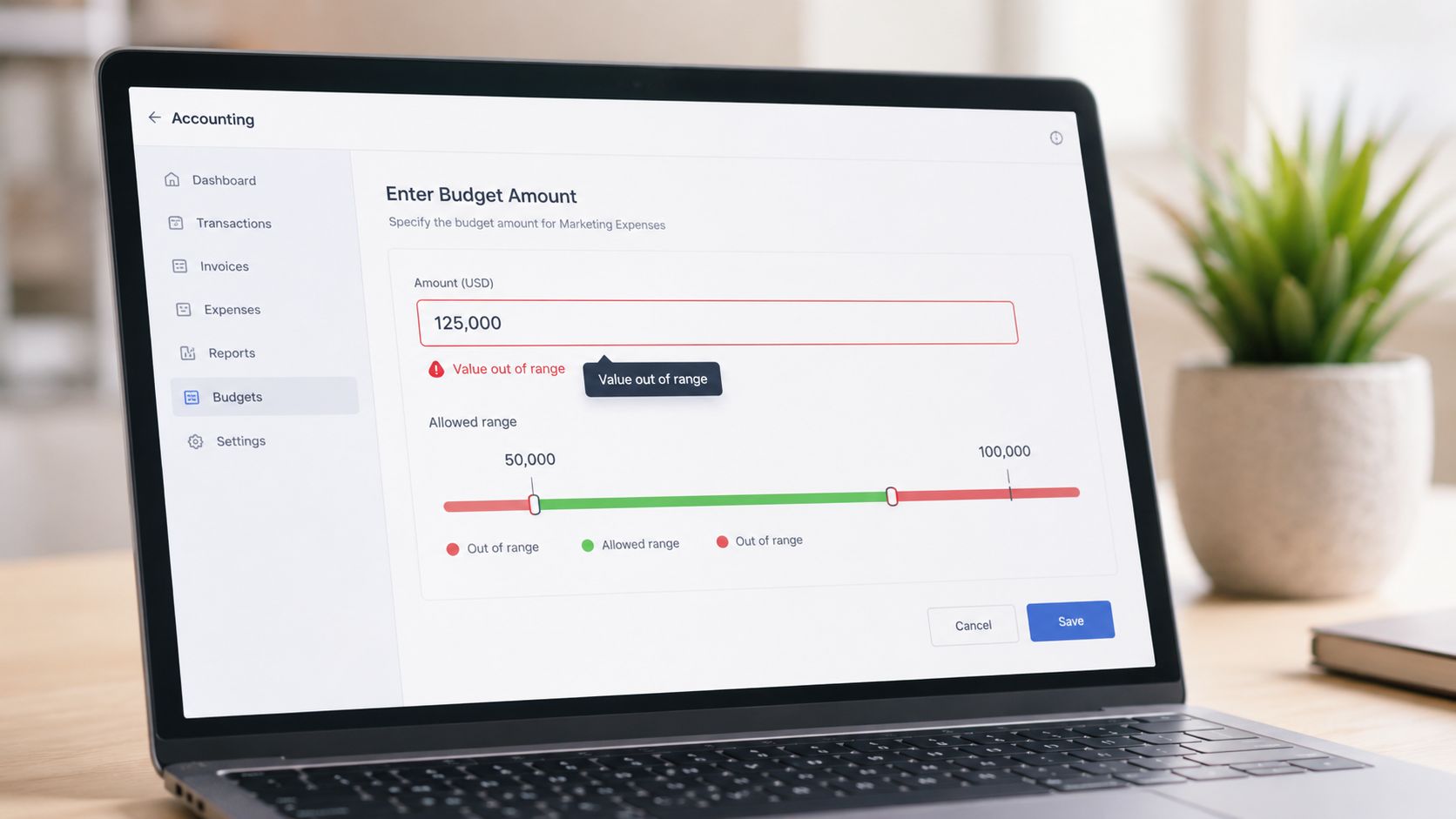
Range checks catch values that are technically numeric but commercially wrong. A negative invoice amount, overtime hours that exceed the number of hours in a week, or a VAT rate entered outside your permitted list should never reach the ledger if the control is set correctly.
This is still one of the highest-value data validation techniques because it works everywhere. In Excel, it’s a first line of defence on trainee bookkeeping sheets. In Sage 50, Xero, and QuickBooks, it helps stop bad entries before they affect returns, reports, or payroll journals.
Where it works best
In bookkeeping & VAT training, range checks are useful for invoice values, net and VAT amounts, discount levels, and stock quantities. In advanced payroll, they help on hourly rates, overtime, pension deduction percentages, and unusual bonus entries. In final accounts work, they help spot balances that are out of pattern before review.
A common mistake is setting one hard limit and forgetting context. Refunds can be negative. Credit notes should reverse values. Seasonal payroll peaks can create valid outliers. Good range validation uses business logic, not arbitrary caps.
Practical rule: Block impossible values. Warn on unusual ones.
Snippets you can use
-
Excel: Use Data Validation on an invoice cell with a decimal range, then add an input message that explains the rule.
Allow: Decimal | Data: between | Minimum: 0.01 | Maximum: 999999.99 -
SQL:
WHERE vat_rate < 0 OR vat_rate > 20 -
Python:
df[(df["hours_worked"] < 0) | (df["hours_worked"] > 168)] -
Power BI DAX:
Invalid VAT Rate = IF([VAT Rate] < 0 || [VAT Rate] > 20, "Check", "OK")
Training application by role
Accounts assistant learners use this early because it builds discipline around clean entry. Bookkeeping & VAT students see quickly why range checks matter when they prepare VAT workings in Sage 50. Data analyst and business analyst learners use the same idea at scale when they scan imports for outliers before producing management information.
The trade-off is simple. Tight limits reduce risk, but poor design creates false positives and frustrates staff. Review the ranges regularly and document why they exist.
2. Format Validation and Data Type Checking
A value can look complete and still be unusable. That’s the problem format validation solves. Dates, tax references, sort codes, invoice IDs, payroll references, and email fields all need a defined structure.
In the UK, formatting errors often appear when teams mix systems or import CSV files from different sources. A US-style date inside a UK payroll sheet is enough to shift a pay period or misclassify a VAT quarter. That’s why format checks belong at entry and import, not just at review.
Practical examples in finance work
For bookkeeping & VAT, common checks include supplier VAT numbers, invoice dates, company references, and sort codes. In advanced payroll, the focus shifts to PAYE references, National Insurance number formats, and payment dates. In accounts assistant roles, consistent invoice numbering and purchase order formats matter because downstream matching depends on them.
In Excel, many learners start with custom formulas and input masks. In SQL and Python, pattern checks are often part of import cleaning. In Power BI, it’s usually better to flag malformed data in Power Query before it reaches the model.
Snippets you can use
-
Excel:
=AND(ISNUMBER(A2),LEN(A2)=8)
Useful for fixed-length numeric references stored without separators. -
SQL:
WHERE invoice_date NOT LIKE '__/__/____' -
Python:
df[df["sort_code"].str.match(r"^d{2}-d{2}-d{2}$") == False] -
Power Query in Power BI:
Change column type first, then add a conditional column that flags conversion errors. -
Payroll scenario:
Reject records where NI numbers don’t fit the expected letter-number pattern before payroll processing.
What doesn’t work well is over-correcting every format automatically. Auto-formatting can hide source problems. It can also convert valid identifiers into the wrong type, especially in Excel where leading zeros disappear if the field is treated as numeric.
A better approach is to separate formatting from business meaning. Validate the structure first. Then confirm that the value belongs to a real employee, supplier, or transaction in later checks.
3. Cross-Field Validation and Logical Consistency Checks
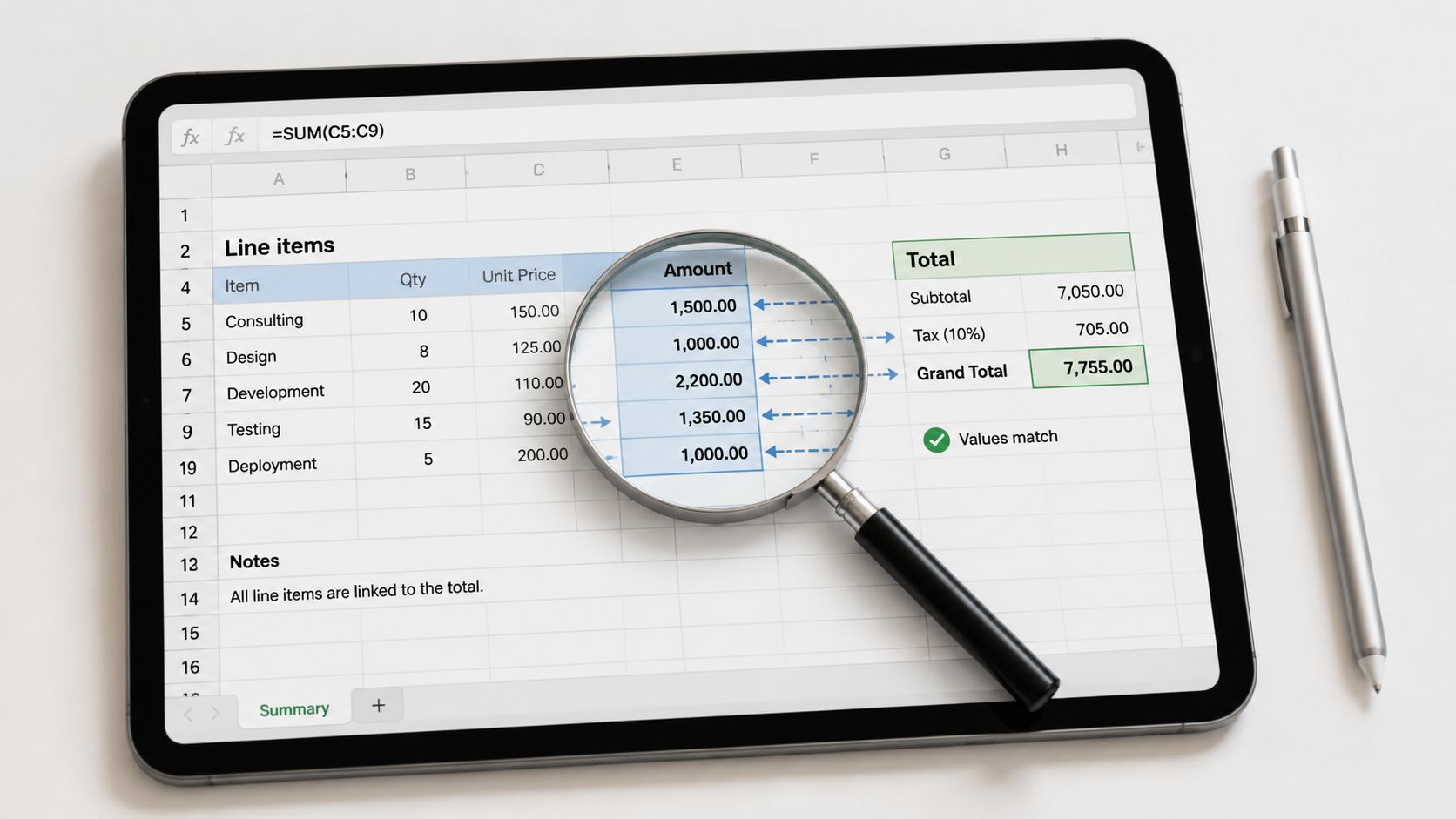
Single-field checks miss the errors that matter most. A VAT amount can be numeric, positive and correctly formatted, yet still be wrong for the taxable value on the same invoice. Cross-field validation catches that.
Many teams improve quickly because the control mirrors how finance staff already think. Gross pay should equal basic pay plus additions, less relevant deductions. Invoice totals should match line totals plus VAT. Balance sheet relationships should make sense across linked fields.
Why this matters in live software
UK-focused training content often skips this area, even though real accounting systems rely on it. One UK-focused discussion of validation in accounting software notes that 74% of UK small businesses report data entry errors that violate cross-field constraints, such as discounts exceeding subtotals, which basic type checks don’t catch (cross-field validation gaps in UK accounting workflows).
That aligns with what trainees see in Xero, Sage, and QuickBooks. The data can pass simple validation and still break business rules.
Snippets you can use
-
Excel:
=IF(ROUND(Net*VAT_Rate,2)=VAT_Amount,"OK","Check VAT") -
SQL:
WHERE invoice_total <> net_amount + vat_amount -
Python:
df[df["gross_pay"] != (df["basic_pay"] + df["overtime_pay"] + df["bonus"])] -
Power BI DAX:
Invoice Check = IF(ROUND([Net Amount] + [VAT Amount],2) = ROUND([Invoice Total],2), "OK", "Mismatch")
Cross-field checks usually find the mistakes users are sure they didn’t make.
Training application by role
For bookkeeping & VAT courses, this is core to invoice processing and VAT return preparation. For advanced payroll, it’s critical on payslip logic and statutory deductions. For accounts assistant and final accounts training, it helps when checking journals, ledgers, and accounting equation consistency. Business analyst and data analyst learners use it in data quality rules and exception reports.
The trade-off is maintenance. These rules need clear documentation because business logic changes. If tax treatment, discount rules, or payroll components change, the validation has to change with them.
4. Referential Integrity and Master Data Validation
A transaction is only as reliable as the record it points to. If an invoice references an inactive supplier, a journal posts to an invalid nominal code, or an expense line uses a deleted department, you get broken reporting and messy audit trails.
Referential integrity is a technical term for a practical finance problem. Every transaction should link to a valid master record. Customer IDs, supplier codes, employee IDs, cost centres, and chart of accounts codes all need checking.
What good control looks like
In Sage 50, that often means preventing posting to codes that no longer belong in active use. In Xero, it means making sure invoices or bills aren’t tied to records that should be archived. In payroll, it means an employee change should not process against a record that has already been closed or made inactive.
This matters in analyst work too. If you’re joining transaction data to customer or employee tables in SQL or Power BI, orphan records will be excluded from reports unless you test the relationships.
The same logic applies in Excel when you are matching data across two tables without a live database link — our guide to using INDEX and MATCH functions covers how to build that kind of reliable lookup.
Snippets you can use
-
Excel:
Use a drop-down list sourced from a maintained master table for supplier codes rather than free text. -
SQL:
LEFT JOIN suppliers s ON t.supplier_id = s.supplier_id WHERE s.supplier_id IS NULL -
Python:
invalid = transactions[~transactions["employee_id"].isin(employees["employee_id"])] -
Power BI:
Create model relationships and inspect unmatched values in Power Query before loading.
Training application by role
Accounts assistant learners need this when entering invoices and allocating costs. Final accounts trainees see the impact when old or misused nominal codes distort reports. Business analyst and data analyst learners use it heavily in data modelling because broken keys break trust in the whole dataset.
One thing that doesn’t work is deleting master records to tidy up lists. Archive them instead. Historical transactions still need a valid link, even if the supplier or employee is no longer active.
5. Duplicate Detection and Matching Algorithms
Duplicate records don’t just clutter a system. They overstate costs, distort revenue, confuse aged reports, and trigger pointless investigations. In finance, duplicate invoices and duplicate payments are the obvious risks. In analytics, duplicate rows break counts, trends and KPIs.
The strongest duplicate controls combine exact matching with targeted fuzzy matching. Start simple. Same supplier, same amount, same date, same invoice number. Then add more intelligent tests for spelling variation or import duplication if the volume justifies it.
What works in practice
In bookkeeping & VAT processes, duplicate detection is strongest during imports and before payment runs. In payroll, it helps on repeated expense claims and duplicate starter records. In business analysis and data analysis, it matters during data consolidation where one customer or supplier may appear in several forms.
The Financial Conduct Authority’s research note on machine learning in UK financial services says data quality validation, including the detection of errors, biases and risks, is the next most frequently used method for validating machine learning applications after pre-deployment validation (FCA machine learning validation in UK financial services). The wider lesson applies beyond ML. If data is live, duplicate and risk checks can’t be one-off tasks.
Snippets you can use
-
Excel:
Conditional Formatting on duplicate invoice numbers, or=COUNTIFS(A:A,A2,B:B,B2,C:C,C2)>1 -
SQL:
GROUP BY supplier_id, invoice_number, invoice_date, amount HAVING COUNT(*) > 1 -
Python:
df[df.duplicated(subset=["supplier_id","invoice_number","amount"], keep=False)] -
Power BI DAX:
Duplicate Flag = IF(CALCULATE(COUNTROWS('Invoices'), ALLEXCEPT('Invoices','Invoices'[Invoice Number])) > 1, "Check", "OK")
Training application by role
This technique shows up early in accounts assistant work and grows in value as volume increases. Data analyst learners should also practise near-duplicate logic, because exact-match rules won’t catch every issue in merged datasets. The trade-off is false positives. Two genuine recurring invoices can look like duplicates if the rule is too broad. That’s why review queues matter.
6. Completeness Checks and Required Field Validation
Missing fields are boring until month-end arrives. Then they become expensive. A supplier invoice without a VAT number, an employee record without a tax code, or a transaction without a cost centre creates rework for the person closing the books, not the person who entered it.
Completeness checks are simple but powerful. They enforce that required data exists before posting, reporting, or submission. The key is deciding what is mandatory and what can wait.
A strong rule set uses context
For bookkeeping & VAT, you might require supplier name, invoice date, invoice number, and tax treatment before a bill is posted. For advanced payroll, employee ID, payment method, tax code, and pay period usually need to be present before processing. For business analyst work, the required fields depend on the output. A dashboard built by department can’t be trusted if department is optional in the source.
The UK Data Service’s quality guidance says projects that use automated validation rules such as schema validation, type checking and range constraints report a 40% reduction in data cleaning time and a 25% decrease in post-collection error rates compared with projects relying only on manual verification (UK Data Service guidance on data quality). That’s a good reminder that required-field checks save time later, not just effort now.
Snippets you can use
-
Excel:
=IF(OR(A2="",B2="",C2=""),"Missing required data","OK") -
SQL:
WHERE customer_name IS NULL OR invoice_date IS NULL OR payment_terms IS NULL -
Python:
df[df[["employee_id","tax_code","pay_date"]].isnull().any(axis=1)] -
Power BI DAX:
Completeness Flag = IF(ISBLANK([Customer Name]) || ISBLANK([Invoice Date]), "Incomplete", "OK") -
Useful implementation choice:
Let users save drafts, but don’t let them post incomplete records.
This technique ties closely to training. Recent graduates and career changers can start immediately with practical bookkeeping and VAT training because some UK courses have no formal entry requirement, including the our Bookkeeping & VAT Training course. That’s useful because completeness checks are easiest to learn by entering real transactions, not by reading policy notes.
7. Reconciliation Validation and Three-Way Matching
Reconciliation is where validation becomes evidence. You aren’t just checking fields. You’re checking whether records agree across systems and documents. In finance, that means matching what was ordered, what was received, what was invoiced, and what was paid.
Three-way matching is one of the most practical controls in purchase-to-pay. It reduces overpayment risk and catches quantity, price and timing differences before money leaves the bank.
For a clear grounding in the basics, this guide to what reconciliation means in accounting is worth reading alongside any software practice.
How to apply it
In Sage 50, compare purchase orders, goods received notes and supplier invoices before approval. In Xero or QuickBooks, reconcile bank entries against ledger transactions and supporting records. In payroll, reconcile the payroll register to pension submissions and tax liabilities before final sign-off.
If your focus is purchase ledger control, this explanation of optimizing AP fraud prevention gives a useful process view of three-way matching in accounts payable.
A short visual walkthrough helps if you’re new to the flow:
Snippets you can use
-
Excel:
=IF(AND(PO_Amount=GRN_Amount,GRN_Amount=Invoice_Amount),"Match","Exception") -
SQL:
Join PO, receipt and invoice tables on supplier and document reference, then filter mismatches. -
Python:
Merge three datasets and flag rows where ordered, received and invoiced values differ. -
Power BI:
Build an exception page that highlights unmatched invoices, missing receipts and tolerance breaches.
Reconciliation should happen before payment and before submission, not after a problem appears.
Training application by role
Bookkeeping & VAT learners need this for bank recs and purchase ledger control. Accounts assistants use it daily. Final accounts learners use reconciliations to support year-end balances. Data analysts can turn reconciliation exceptions into dashboards that finance teams find practical.
8. Approval Workflow and Authorization Level Validation
Some data is valid but still shouldn’t be processed without review. That’s where approval validation matters. It checks whether the right person approved the right transaction at the right level.
This is less about field quality and more about control design. A large expense claim, a payroll amendment, a journal to a sensitive account, or a late VAT adjustment may all be logically correct. Without authorisation, they still create risk.
What this looks like in practice
In accounting software, approval routing can depend on amount, transaction type, cost centre, or ageing. In payroll, changes to salary, bank details, and leaver payments should move through a separate approval path from ordinary monthly runs. In analytics environments, approval can mean sign-off on data refreshes or adjustments to source mappings.
Strong workflow validation doesn’t need to be complicated. It needs clean roles, clear thresholds, and visible exceptions. If managers can approve anything, or if approvals happen by email with no system trace, the control is weak.
Snippets you can use
-
Excel:
Add a status field with controlled values such as Draft, Reviewed, Approved, Rejected. Lock posting formulas unless status is Approved. -
SQL:
WHERE amount > approval_limit AND approved_by IS NULL -
Python:
df[(df["amount"] > df["approval_limit"]) & (df["approved_flag"] != True)] -
Power BI DAX:
Approval Check = IF([Amount] > [Approval Limit] && ISBLANK([Approved By]), "Needs approval", "OK")
Training application by role
Advanced payroll learners should practise workflow controls, not just payroll calculation. Accounts assistant learners benefit from seeing how approval affects invoice timing and payment runs. Business analyst learners can map approval routes and identify where controls fail in real processes.
What doesn’t work is building a strict approval chain without exception handling. Staff will bypass it if urgent transactions get stuck. Good workflow validation includes escalation and audit trail, not just blockage.
9. Business Rule Validation and Automated Exception Reporting
Business rules are where validation stops being generic and starts reflecting how a company operates. These rules go beyond type, range or format checks. They enforce policy.
Examples are everywhere. A user shouldn’t post to a control account without authority. A supplier outside the approved list shouldn’t receive a purchase order without review. A customer over credit limit may need a hold. A transaction shouldn’t post into a locked period.
For anyone moving into analyst roles, process knowledge matters here as much as technical skill. This resource on modelling business processes helps connect validation rules to actual workflow design. If your rule doesn’t match the existing process, users will either ignore it or work around it.
Why this area is often weak
Generic validation tutorials usually stop at schema, format and duplicates. Real business systems need more. They need controls tied to budget, credit policy, tax treatment, period close, and role permissions.
That is also why exception reporting matters. Blocking every issue is a bad idea. Some rules should warn, some should route for approval, and some should stop processing immediately. The system has to distinguish between them.
If your work touches procurement, this overview of an automated purchase order system is a useful reference point for how business rules fit into approval and purchasing flow.
Snippets you can use
-
Excel:
=IF(AND(Customer_Balance>Credit_Limit,Order_Value>0),"Hold order","OK") -
SQL:
WHERE posting_period IN (SELECT period FROM closed_periods) -
Python:
df[(df["supplier_approved"] == False) & (df["transaction_type"] == "PO")] -
Power BI DAX:
Rule Exception = IF([Actual] > [Budget] && [Approval Status] <> "Approved", "Exception", "OK")
Training application by role
This is especially relevant for business analyst and data analyst courses because exception logic often becomes dashboard logic. For accounts assistant and final accounts work, business rules reduce month-end surprises by stopping poor postings earlier. The trade-off is maintenance. Policy changes mean rule changes, and someone must own them.
10. Monitoring, Exception Reporting and Continuous Improvement
Validation rules aren’t finished when they’re built. They need monitoring, tuning, ownership and review. Otherwise teams collect alerts, ignore them, and stop trusting the whole process.
This final layer turns controls into an operating system for data quality. It tracks which exceptions recur, who resolves them, how long they stay open, and whether the rules are still useful.
What to monitor
Use a short list of quality indicators. Exception volume, repeat exceptions, unresolved ageing, and false positives are good starting points. Finance teams usually care less about technical elegance and more about whether the same supplier issue keeps delaying close or whether a payroll exception keeps reappearing.
A useful benchmark comes from public-sector practice. In the UK’s 2001 Census, the validation framework used double-entry verification, automated consistency checks and manual cross-referencing across high volumes of data, reducing capture and coding errors to less than 1.5% across 4.8 million household returns processed, while 98.7% of the final dataset met required accuracy standards for policy formulation (NISRA census data validation report). The scale is different from a finance team, but the principle is the same. Layered validation works best when someone monitors the results.
Snippets you can use
-
Excel:
Build an exception log with owner, date raised, status, and root cause. -
SQL:
Aggregate exceptions by rule, owner and month to spot recurring issues. -
Python:
Export validation results to a ticket list for triage and trend review. -
Power BI:
Create a dashboard for open exceptions, repeat failures, and ageing by owner.
For accountants moving into more digital roles, this guide to technology for accounting helps place validation monitoring within the broader finance systems context.
Training application by role
Data analyst learners can turn validation logs into actionable dashboards. Business analyst learners can use trend data to improve process design. Bookkeeping, VAT, payroll and final accounts learners benefit because the same recurring issues become teachable patterns rather than monthly firefights.
The practical lesson is simple. If nobody owns the exceptions, the validation rule isn’t a control. It’s noise.
Comparison of 10 Data Validation Techniques
| Technique | Implementation complexity 🔄 | Resource requirements ⚡ | Expected outcomes 📊 | Ideal use cases 💡 | Key advantages ⭐ |
|---|---|---|---|---|---|
| Range Checks and Limit Validation | Low, simple rules and thresholds 🔄 | Low, minimal compute, config ⚡ | Quickly prevents impossible/outlier values; reduces reconciliation time 📊 | Real-time data entry, VAT limits, payroll bounds 💡 | Prevents impossible figures; easy to implement ⭐⭐⭐ |
| Format Validation and Data Type Checking | Low–Medium, regex/masks needed 🔄 | Low, pattern libraries, input masks ⚡ | Reduces malformed data and filing rejections; standardises inputs 📊 | Dates, VAT/NINO/PAYE formats, imports and integrations 💡 | Ensures compatibility and consistent data ⭐⭐⭐ |
| Cross-Field Validation and Logical Consistency Checks | High, multi-field rules and business logic 🔄 | Medium–High, complex rules, testing ⚡ | Detects logical errors missed by single-field checks; reduces material misstatements 📊 | Invoice totals, payroll calculations, trial balance reconciliation 💡 | Catches contextual errors and fraud indicators ⭐⭐⭐⭐ |
| Referential Integrity and Master Data Validation | Medium, FK constraints and governance 🔄 | Medium, master data management, indexing ⚡ | Prevents orphaned transactions; improves traceability and consolidation 📊 | Customer/supplier references, migrations, multi-system integrations 💡 | Ensures data lineage and consistent entity use ⭐⭐⭐ |
| Duplicate Detection and Matching Algorithms | Medium–High, fuzzy logic/ML possible 🔄 | High, compute for fuzzy/ML, review workflows ⚡ | Reduces duplicate payments/claims; improves analytical accuracy 📊 | High-volume imports, expense claims, customer/supplier dedupe 💡 | Prevents overstatements and uncovers fraud ⭐⭐⭐⭐ |
| Completeness Checks and Required Field Validation | Low–Medium, mandatory/conditional fields 🔄 | Low, schema rules, UI prompts ⚡ | Fewer incomplete records; stronger audit trails and faster close 📊 | Mandatory invoice fields, payroll entries, data load validation 💡 | Ensures auditability and reduces rework ⭐⭐⭐ |
| Reconciliation Validation and Three-Way Matching | High, matching logic and tolerances 🔄 | High, data feeds, matching engine, exception handling ⚡ | Prevents incorrect payments; ensures transaction-level accuracy 📊 | Purchase-to-pay, bank reconciliations, payroll/provider matching 💡 | Strong payment controls and audit evidence ⭐⭐⭐⭐ |
| Approval Workflow and Authorization Level Validation | Medium–High, workflow engines & matrices 🔄 | Medium, role management, SLAs, escalation ⚡ | Reduces unauthorised transactions; creates accountability and audit trail 📊 | High-value expenses, journals, payroll changes, supplier payments 💡 | Enforces segregation of duties and governance ⭐⭐⭐ |
| Business Rule Validation and Automated Exception Reporting | High, rules engine and policy mapping 🔄 | High, rule config, integration, maintenance ⚡ | Operationalises policy enforcement; reduces manual reviews and compliance risk 📊 | Related-party checks, budget limits, supplier policy enforcement 💡 | Consistent policy application and clear exceptions ⭐⭐⭐⭐ |
| Monitoring, Exception Reporting and Continuous Improvement | Medium, dashboards and feedback loops 🔄 | Medium–High, tooling, analysts, workflows ⚡ | Visibility on rule performance; reduces recurrence via tuning 📊 | Ongoing operations, governance reviews, rule tuning cycles 💡 | Enables continuous improvement and auditability ⭐⭐⭐ |
Putting Validation into Practice
These ten data validation techniques cover the controls that matter most in real finance and analytics work. Range checks, format validation, cross-field logic, referential integrity, duplicate detection, completeness checks, reconciliation, approval controls, business rules, and continuous monitoring all solve different problems. Together, they create a cleaner process from data entry through reporting.
The strongest implementations don’t rely on one tool. They combine front-end controls in Excel or accounting software with backend checks in SQL and Python, then surface issues in Power BI. That’s the combination employers increasingly value because it reflects how teams operate in practice. A trainee who can validate invoice imports in Excel, test joins in SQL, clean files in Python and publish an exception dashboard in Power BI is far more useful than someone who knows only the theory.
Training matters because proficiency in this area is not easily gained from generic articles alone. It is achieved by processing transactions, correcting errors, reconciling ledgers, and seeing how a bad source field affects VAT, payroll, final accounts, or reporting. That’s why role-specific practice is so important. Bookkeeping & VAT learners need supplier invoices, bank recs and HMRC-style workflows. Advanced payroll learners need payslip logic, deductions, and approval controls. Accounts assistant learners need purchase ledger, sales ledger and month-end checks. Final accounts learners need reconciliations, journals and ledgers that stand up to review. Business analyst and data analyst learners need SQL, Python and Power BI tied to realistic business rules.
That hands-on route is accessible. If you’re targeting accounts assistant work, the AAT Level 3 Certificate in Bookkeeping is a recognised UK pathway that aligns with industry expectations. If you want more applied bookkeeping and VAT practice, our Bookkeeping & VAT Training course offers hands-on, office-based support and software procedures. UK VAT return training also commonly uses approved software such as Sage 50 and aligns with Making Tax Digital workflows, with the broader rollout for most businesses noted as April 2026 in the course context described earlier.
There is also a wider lesson for modern finance teams. Validation now includes AI-assisted work, cloud accounting platforms, ETL pipelines and dashboard reporting. That means the old habit of checking figures only at the end isn’t enough. Validation has to sit at entry, transformation, approval and reporting stages. If a team relies on AI extraction from invoices or statements, they still need to compare outputs to source records. If a team imports data from multiple systems, they still need referential and duplicate checks. If a team depends on dashboards for decisions, they still need monitoring and exception review.
Good validation isn’t glamorous, but it’s one of the clearest ways to improve performance. It reduces rework. It supports compliance. It makes month-end less chaotic. It also gives junior staff a visible way to add value quickly because validation skills are practical, teachable and easy to demonstrate in interviews and tests.
If you want a broader software perspective, Bridge Global on software validation offers useful background on validation thinking beyond finance-specific systems.
Professional application is the next step. Learn the rules, then build them in software. Test them on realistic files. Document the trade-offs. Explain why a rule blocks, warns or routes for review. That’s how data validation techniques move from classroom topic to employable skill.
Professional Careers Training helps recent graduates, career changers and working professionals turn validation theory into job-ready practice through bookkeeping & VAT, advanced payroll, accounts assistant, final accounts, business analyst and data analyst training. Learners get 1-to-1 support from ACCA-qualified Chartered Accountants and CPD-approved trainers, flexible weekday, evening and weekend options, official certification pathways for Sage, Xero and QuickBooks, plus software support, CV preparation, career coaching, LinkedIn optimisation and employer referrals. If you want practical experience with Excel, SQL, Python and Power BI in a UK accounting and analytics context, it’s a direct route into stronger employability.