
If you're training to become a business analyst, or you already work as one, you've probably noticed AI tools turning up in more of your...
Moving Beyond Spreadsheets and Paper Receipts
Monday morning in a small UK finance team. A new accounts assistant is asked to clear a backlog of employee claims before month end. The receipts sit in email threads, on phones, and in wallets. The spreadsheet has broken formulas in two columns, one train fare has no VAT detail, and a manager has approved a claim verbally but not in writing.
That kind of work teaches a hard lesson early. Manual expense handling is not a harmless admin task. It affects audit trails, VAT treatment, reimbursement timing, and the quality of the ledger that senior staff rely on.

Graduates often arrive with solid Excel practice and assume that will carry them through junior finance work. Excel still has a place. But expense processing puts pressure on every weak point in a manual system. Version control slips. Receipt evidence goes missing. Categories get miscoded. Reimbursement records drift away from the accounting entry. UK finance employers know this, which is why they increasingly look for candidates who can handle digital workflows rather than only worksheets.
A projection for 2025 from ACCA highlights a continuing accounting skills gap in areas such as digital capability and practical finance operations, not just technical theory. For a job seeker, that matters. The market is rewarding people who can keep records accurate inside real systems, under real deadlines, with controls that stand up to review.
Why manual expense work slows your development
Early career finance roles are supposed to build judgment. You should be learning how to code transactions correctly, spot policy breaches, follow approval rules, and prepare clean data for month end. If too much of your week is spent retyping numbers from faded receipts and chasing managers for missing evidence, your learning stays stuck at the least valuable level.
That has direct consequences across common UK roles:
- Accounts assistants need organised claims and approval records so month-end close is faster and cleaner.
- Bookkeepers need correct categories and VAT evidence to maintain reliable books.
- Payroll administrators need approved staff reimbursements separated from taxable pay items.
- Assistant accountants and final accounts staff need expense data posted correctly before they review ledgers and accruals.
- Data analysts and finance analysts need consistent spend data to compare departments, suppliers, and trends.
A simple rule helps here. If the process depends on email chasing, manual re-entry, and a spreadsheet that only one person understands, your skills are staying too close to clerical recovery work and too far from the digital finance work employers want to hire for.
Clean follow-through matters after submission too. If you want to see how stronger matching and reconciliation improve control after an expense enters the process, this guide on how to track payments and gain clarity complements expense workflow training well.
What changes when a system replaces the spreadsheet
A good expense system works like a controlled handover at each stage. The employee submits the claim digitally. The receipt is attached at source. Policy checks happen before finance has to clean up the problem. Approval is recorded in the system. The transaction can then move into bookkeeping or accounting software with far less repair work.
Your role changes with that process.
Instead of acting like a detective at month end, you start acting like a finance professional who prevents errors at the point of entry. That is a better training ground for UK careers in accounting, bookkeeping, and data analysis because it builds the habits employers ask about in interviews: accuracy, control awareness, system confidence, and the ability to keep financial data usable from the start.
For someone starting out, that shift is more than convenience. It is employability.
What Exactly Are Expense Management Systems
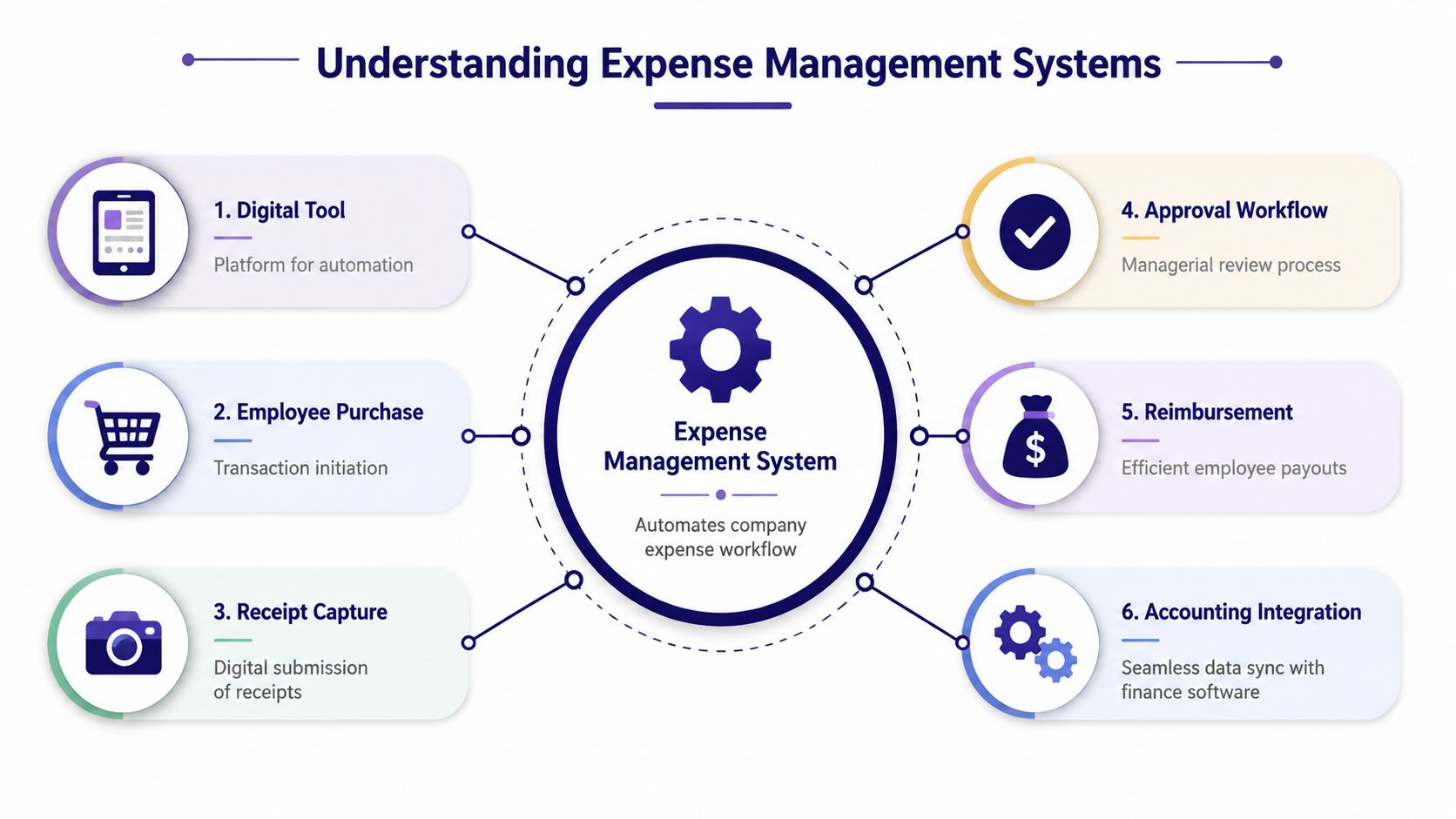
An expense management system is a digital tool that manages the full journey of employee spending. Think of it as a structured pipeline. A purchase happens, proof is captured, checks are applied, approval is recorded, reimbursement is arranged, and the accounting record is updated.
That’s why these systems matter. They don’t only store receipts. They connect operational spending with finance control.
The four core functions
Most platforms make sense once you see the workflow in four parts.
-
Capture
An employee buys train travel, parking, software, or client refreshments. They upload the receipt through a mobile app or browser. Good systems reduce typing by reading key receipt fields automatically. -
Process and approve
The claim is checked against company rules. Is the category correct? Is VAT recorded properly? Is a receipt attached? Does the amount need manager approval? Instead of informal email chains, the workflow is built into the platform. -
Reimburse or reconcile
If the employee paid personally, finance can reimburse them after approval. If a company card was used, the system helps reconcile the spend against card records. -
Analyse and report
Once data is standardised, finance teams can review spend by department, cost centre, project, employee, or category. That helps with budgeting, compliance, and month-end review.
Why graduates often get confused
Many learners mix up expense management with bookkeeping software. They’re connected, but they aren’t the same thing.
Here’s a simple comparison:
| Tool | Main job |
|---|---|
| Expense management system | Captures, checks, routes, and prepares employee spend data |
| Accounting software | Records the financial impact in the ledger and reporting structure |
| Payroll software | Handles wages, statutory calculations, and sometimes reimbursements |
The best way to think about it is this. Expense management systems organise spend before it reaches the books.
Why control matters
Automation only helps if the process stays transparent. Finance staff still need to understand category rules, approval logic, audit trails, and exception handling. If you want a useful primer on balancing automation with oversight, this article on control in automated data processing adds good context.
For a recent graduate, learning the workflow is more important than memorising one brand interface. Once you understand capture, approval, reimbursement, and reporting, you can move between tools with far more confidence.
Benefits for Your Career and the Business Bottom Line
On a busy month-end, two finance juniors can look equally productive from a distance. One spends hours chasing missing receipts, correcting miscoded claims, and answering the same reimbursement questions. The other reviews exceptions, spots unusual spend patterns, and gives the finance manager clean information to post. The difference often comes down to how well they understand an expense management system.
That matters for your career because UK employers rarely want a trainee who only types data into a screen. They want someone who can help keep records accurate, support VAT treatment, follow approval rules, and reduce avoidable rework. In practical terms, that means stronger performance in roles such as Accounts Assistant, Finance Assistant, Bookkeeper, Assistant Management Accountant, and junior Data Analyst working with spend data.
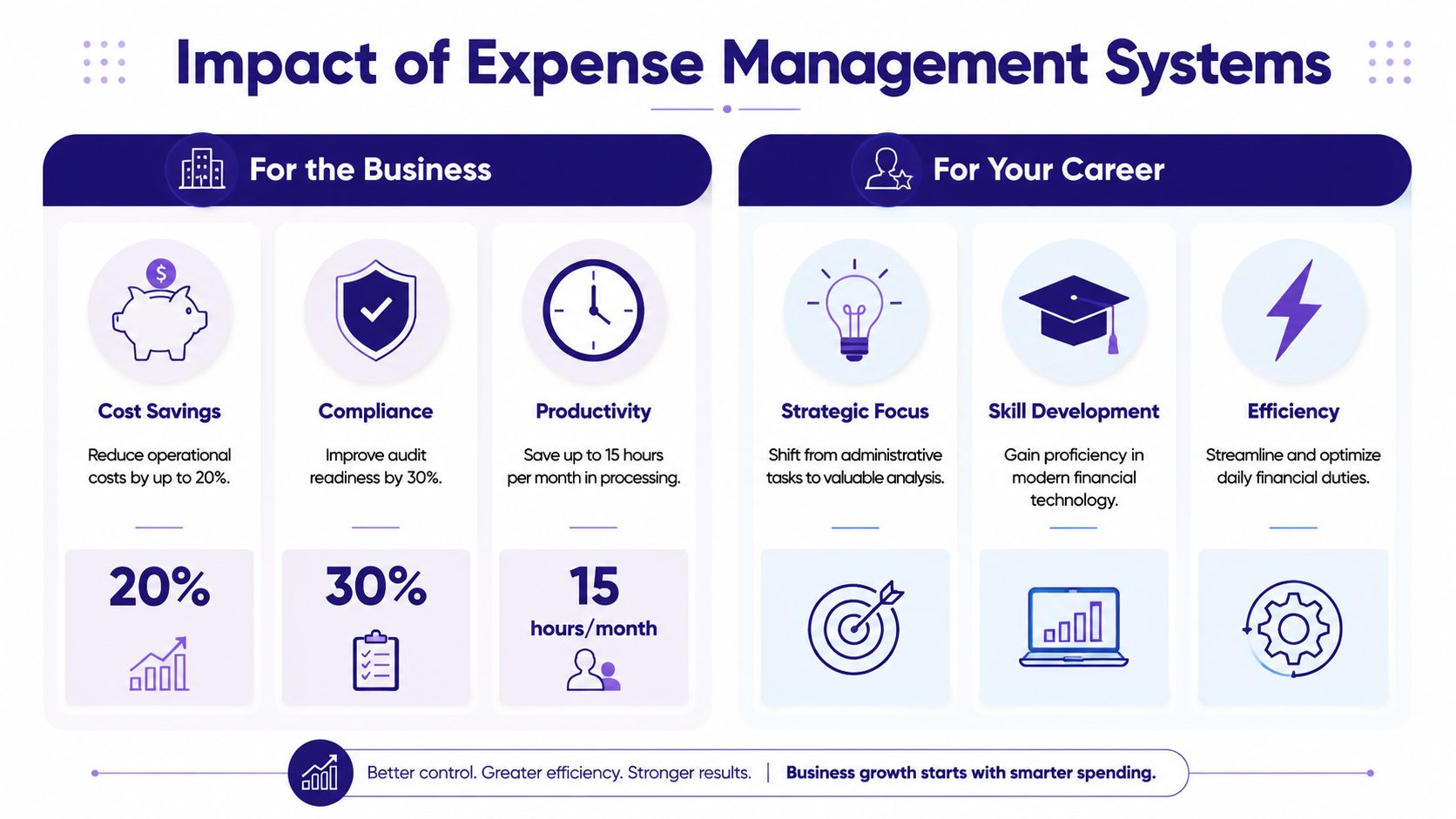
For the business, the gains are easy to see. Work moves faster, fewer claims bounce back for correction, and managers can approve spend with better context. Finance teams then spend less time repairing records and more time checking policy exceptions, cash impact, and reporting quality.
For you, the gain is different. You become more employable.
A good expense process works like a sorting desk before documents reach the main filing system. If claims are coded correctly, backed by receipts, approved by the right manager, and matched to policy, the accounting team can trust what reaches the ledger. If that front-end process is weak, problems spread into reconciliations, VAT review, and month-end close.
What the business gains
Employers value expense systems because they improve everyday control, not because the software looks modern.
- Faster reimbursements reduce staff queries and help maintain trust in the finance team
- Cleaner coding improves the quality of ledger entries and management reports
- Stronger audit trails make it easier to check who submitted, approved, and amended each claim
- Better policy compliance reduces out-of-policy spend and repeated exceptions
- Lower admin pressure gives finance staff time for review, analysis, and support work
For a finance manager, that means better visibility over departmental spending. For a bookkeeper, it means fewer messy records to tidy up later. Finally, for a business owner, it means more confidence in the numbers being used for decisions.
A short explainer can help make the practical impact more concrete:
What your career gains
Graduates often underestimate how much this skill signals to an employer. If you can work confidently with expense categories, receipt checks, approval routes, and exception handling, you are showing process awareness, attention to detail, and commercial judgement.
Here is how that shows up in specific UK roles:
- Accounts Assistant. You help keep postings accurate, reduce recoding work, and support cleaner supplier or employee balances.
- Bookkeeper. You maintain better digital records and make VAT treatment easier to review.
- Assistant Accountant. You reduce errors that would otherwise create month-end adjustments or suspense items.
- Management Accounts trainee. You can explain spending trends by team, project, or cost centre, rather than just listing transactions.
- Junior Data Analyst. You get more reliable spend data for dashboards, KPIs, and variance analysis.
This is why training in expense systems improves employability. It shows that you can handle the point where operations and finance meet.
Clean expense data gives you more time for analysis and review. Poor expense data keeps you stuck in correction work.
The shift employers notice
The strongest career benefit is the move from processor to reviewer.
Once routine capture and routing are handled well, your role starts to change. You are more likely to notice repeated overspend, weak policy compliance, duplicate claims, or departments that submit expenses late every month. That is the beginning of commercial awareness, and hiring managers in the UK finance market look for it early.
If you want to strengthen that skill set, it helps to understand how expense data connects with the accounting platform used by the employer. This comparison of Xero, Sage, and QuickBooks for finance trainees gives useful context, and this guide to streamlining accounting system integration explains why that connection affects data quality and reporting.
In other words, learning expense management systems is not just software practice. It is training for the kind of disciplined, reliable finance work that helps you progress beyond entry-level administration.
Mastering Integration with Xero Sage and QuickBooks
You are in your first month as an accounts assistant. A manager asks why employee mileage claims have appeared twice in QuickBooks, while two hotel receipts are still missing from the VAT report. That moment is not really a software problem. It is a process problem, and employers notice who can trace it calmly.
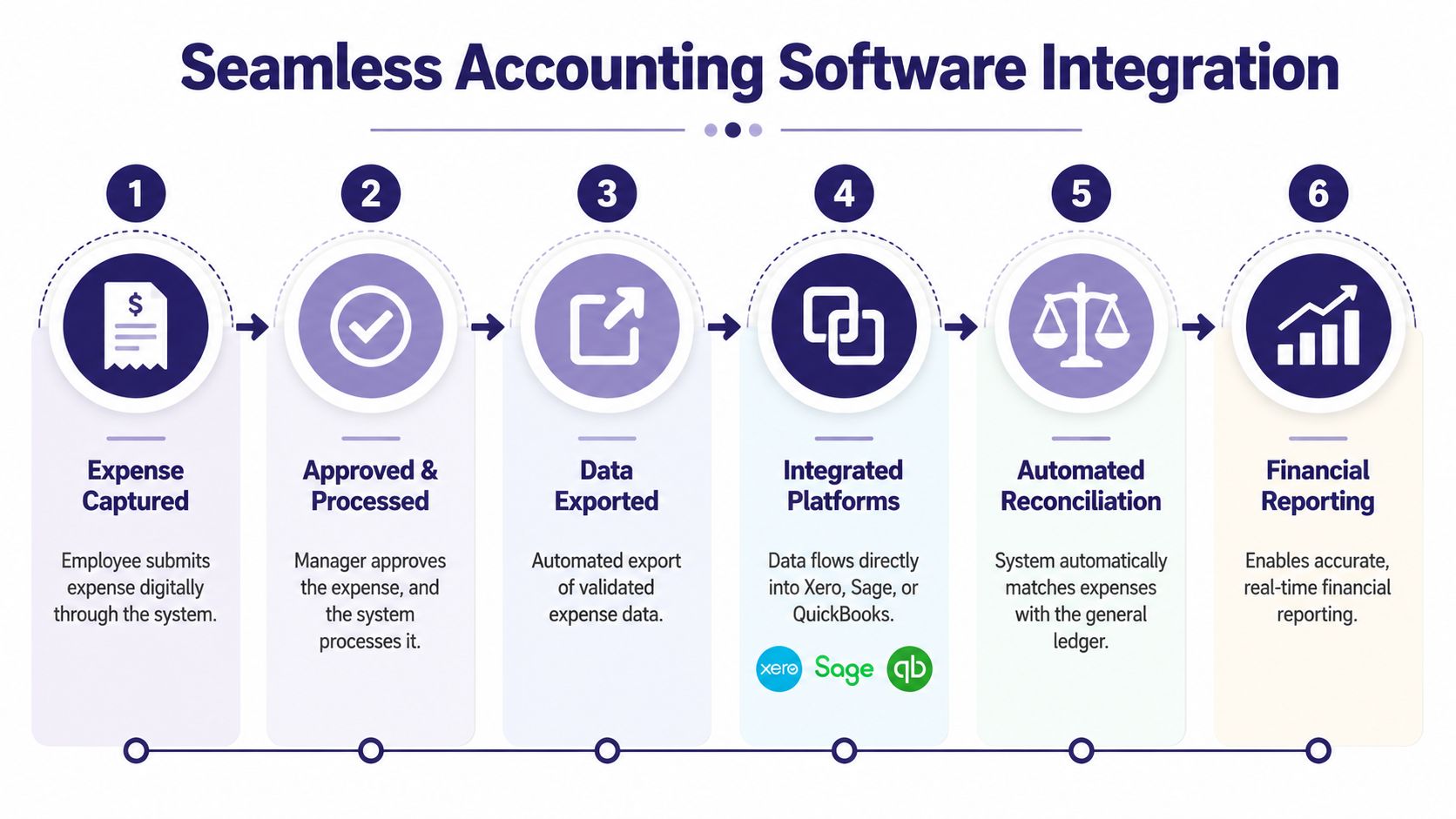
An expense system becomes far more useful when it connects properly to Xero, Sage, or QuickBooks. For UK finance trainees, that connection is part of the job, not a technical extra. If you want to work in bookkeeping, accounts payable, management accounts, or finance analysis, you need to understand how expense data travels from claim to ledger. Our dedicated guide to accounts payable programs goes deeper into that specific workflow, from invoice receipt through to payment run.
Many new starters hear API and assume it belongs to IT. In practice, it is a finance workflow term too. An API is the structured connection that lets one system pass data to another without rekeying, spreadsheet exports, or manual imports. It works like a conveyor belt between the expense platform and the accounting system. If the belt is set up well, approved claims arrive in the right place. If it is set up badly, errors arrive faster.
Why integration matters in daily finance work
The difference shows up in ordinary tasks.
Without proper integration, finance staff often export CSV files, check columns, correct coding, and import again. That sounds manageable until month-end pressure builds. Cost centres are mapped incorrectly. VAT codes fail to match. A receipt sits in one system, but the posting sits in another. Then a trainee spends half a day proving which version is right.
With a well-configured connection, the flow is simpler and easier to review:
| Stage | What should happen |
|---|---|
| Submission | The employee enters the expense once |
| Validation | The system checks category, receipt, and policy rules |
| Sync | Approved data moves into the accounting platform with the right coding |
| Review | Finance checks exceptions and unusual items instead of every line |
That matters in UK roles because digital records, VAT treatment, and audit history all need to hold up under review. A bookkeeper needs accurate posting. An accounts assistant needs clean supporting evidence. A finance analyst needs consistent data before they can trust the trend.
What integration knowledge looks like in practice
Employers rarely need you to recite a definition. They need you to handle the finance logic behind the connection.
For example, if an expense claim for train travel syncs into Sage with the wrong tax code, you should know what to check. Was the category mapped correctly. Did the system treat the item as employee reimbursement or supplier spend. Was VAT recoverable on that type of expense in the first place. Those are the kinds of questions that separate software familiarity from accounting judgement.
The same applies to duplicate entries. If a company uses both a card feed and an expense app, one transaction can be captured twice unless the workflow is set up clearly. A graduate entering finance work in the UK should be trained to spot that risk, explain it, and help prevent it.
What to learn for Xero, Sage, and QuickBooks
Each platform has its own layout and terminology, but the training needs are similar. You should be able to follow an expense from approval to posting and explain what happens at each step.
That usually means learning how to:
- map expense categories to ledger accounts
- check VAT and tax code treatment after sync
- distinguish employee reimbursement from supplier invoices and card transactions
- spot sync failures, duplicate postings, and missing receipts
- reconcile what appears in the expense system against what appears in Xero, Sage, or QuickBooks
If you want context on how the accounting platforms differ, the earlier comparison of QuickBooks, Xero, and Sage for finance trainees is a useful reference. For a wider view of connected workflows, this guide to streamlining accounting system integration is also helpful.
Why this matters for employability
A trainee who can explain integration is easier to hire. UK employers know that bad posting logic creates rework, delays month-end, and weakens reporting. They also know that finance teams need junior staff who can check system outputs with care, not just click “approve” and hope the numbers land correctly.
That is why integration training matters for career progression. It prepares an accounts assistant to support month-end whilst also helping a bookkeeper maintain accurate digital records. It gives a future analyst cleaner data to work with. In short, mastering integration shows that you understand how finance systems connect to real accounting work.
Essential Skills for UK Accounting and Bookkeeping Roles
If you’re applying for accounts assistant, bookkeeper, payroll support, or final accounts roles, software familiarity alone won’t carry you. Employers want proof that you can use expense management systems to protect accuracy, maintain records, and support compliance.
The strongest candidates usually show a blend of finance basics and digital discipline.
What bookkeeping and VAT work actually require
In many smaller firms, VAT is where pressure builds first. Expenses must be categorised correctly, evidence must be retained, and digital records must support the return. In the UK, 68% of small businesses report that VAT compliance is their most time-consuming administrative task. Training that teaches precise expense classification and audit trail maintenance in digital systems can reduce this compliance time by up to 45%.
That tells you something important. Learning bookkeeping today means learning digital bookkeeping, not just textbook double entry.
Core skills to build include:
- Expense classification so travel, software, subsistence, and mixed-use items are coded properly
- VAT judgement so you can recognise when treatment needs checking before submission
- Audit trail maintenance so every claim has supporting evidence and approval history
- Ledger awareness so expense data lands in the right place for month-end and final accounts
Where payroll connects to expense systems
Graduates sometimes treat payroll and expenses as separate worlds. In practice, they often meet. Reimbursements may pass through payroll processes or need to be reviewed alongside statutory and employee records.
That means advanced payroll training still matters if you want broad finance employability. You need confidence with deadlines, employee records, and control points, even if the expense tool itself sits outside the payroll package.
A sensible training pathway usually includes:
- Bookkeeping and VAT practice in digital systems
- Accounts assistant tasks such as coding, approvals, reconciliations, and month-end support
- Final accounts awareness so you understand the reporting impact of poor source data
- Payroll familiarity where reimbursements and compliance processes overlap
What to put on your CV
Don’t write “good with expenses” and hope for the best. Be more precise.
Instead, describe capabilities such as:
- Managing digital receipt capture and approval workflows
- Classifying expenses for bookkeeping and VAT purposes
- Supporting reconciliations between expense data and accounting software
- Maintaining audit-ready records for month-end review
- Working with cloud finance tools and accounting automation processes
For a broader look at connected digital workflows, this guide to accounting automation tools helps place expense systems inside the wider finance toolkit.
The Analyst Role in Tracking KPIs and Shadow Spend
On your first week in a junior finance analyst role, you might be asked a question that sounds simple. Why did travel spend rise in one department when headcount stayed flat? You cannot answer that well from a pile of receipts or a basic export. You need clean expense data, consistent coding, and the judgement to spot whether the rise reflects normal activity, weak controls, or poor buying habits.
That is why expense systems matter to analysts as much as they matter to bookkeepers and accounts assistants. For a UK job seeker, this is not a side skill. It is part of becoming useful in roles such as finance analyst, commercial analyst, management accounts assistant, and spend reporting analyst. Employers want people who can read the numbers and explain the behaviour behind them.
Expense management systems give analysts a structured record of what happened. They capture dates, suppliers, categories, approvers, employees, and cost centres in a format you can sort, filter, and test. A spreadsheet can store figures. An expense system stores the story around those figures, which is what turns reporting into analysis.
A survey projecting trends for 2025 by the British Computer Society suggested that UK finance employers increasingly want analyst candidates who can use tools such as SQL, Python, and Power BI in data-heavy finance work. In practice, that means your technical skills need to sit on top of accounting understanding. SQL helps you pull the right records. Python helps you clean and reshape them. Power BI helps you show managers where action is needed.
What analysts are actually tracking
A trainee accountant often starts with accuracy. Is the claim valid, coded correctly, and supported by evidence? An analyst adds another layer. Where are delays building up, which teams are breaking policy most often, and what spending patterns are changing month by month?
Common KPI areas include:
- Approval speed by department, manager, or claim type
- Out-of-policy rates by team, merchant, or employee group
- Spend by category to spot unusual increases or seasonal changes
- Cost centre coding errors that distort management reporting
- Duplicate or near-duplicate claims that suggest control weaknesses
These measures matter for employability because they appear in real jobs. A finance analyst may build monthly spend packs. A management accounts assistant may investigate unusual variances before month end. A data analyst in a finance team may be asked to turn raw expense exports into dashboards that department heads can understand.
Understanding shadow spend
Shadow spend is money leaving the business outside the buying patterns management expects or approves. A useful comparison is household budgeting. If a family plans one weekly shop but keeps making small unplanned purchases from different corner shops, the total cost becomes harder to see and harder to control. Businesses face the same problem.
In expense data, shadow spend often shows up through patterns such as:
- Repeated low-value purchases from suppliers that are not normally used
- Several employees buying similar items separately instead of through one agreed supplier
- Vague or inconsistent coding that hides what was purchased
- Approval paths that appear weaker than those used for standard procurement
At this stage, analyst judgment becomes valuable. The system records the transactions, but a person has to ask whether the pattern suggests convenience buying, poor policy awareness, supplier fragmentation, or a control gap.
Why UK employers care
For employers, shadow spend is not just a reporting issue. It affects budgets, VAT treatment, supplier control, and audit confidence. For you, it is a strong interview topic because it shows that you understand finance as an operating process, not only as a dashboard.
If you can explain how to monitor approval times, exception rates, duplicate claims, and fragmented supplier use, you sound more job-ready for UK accounting and bookkeeping roles with analytical responsibilities. You also show that you can grow beyond data entry into investigation and decision support.
Good training should reflect that progression. Practice with exports, filters, pivot tables, and dashboard tools helps, but finance employers also expect you to recognise what a suspicious pattern means in context. Hands-on work with practice accounting software for finance learners can help you connect transaction data to the wider accounting process, which is exactly what separates a report writer from a useful analyst.
Your Training Path to Mastering Expense Management
You don’t need to become an expert in every finance system at once. You do need a structured path that turns academic knowledge into job-ready ability.
Start with the work most junior roles touch first. That usually means expense coding, receipt handling, bookkeeping entries, and VAT awareness. Once that foundation is stable, add payroll context, final accounts understanding, and then the data layer through Excel, SQL, Python, or Power BI.
A practical learning order
A sensible route for most UK learners looks like this:
- Begin with bookkeeping and VAT so you understand categorisation, evidence, and digital records
- Add accounts assistant workflows such as reconciliations, approvals, journals, and month-end support
- Build final accounts awareness so you can see how early-stage errors affect reporting
- Learn payroll processes where reimbursements, controls, and employee finance records connect
- Develop analyst skills if you want to move into spend reporting, KPI tracking, or process improvement
What good training should include
Theory alone won’t fix the employability gap. You need guided practice with the tools UK employers use.
Look for training that includes:
| Area | What practical training should cover |
|---|---|
| Expense systems | Receipt capture, approval routes, coding rules, reporting |
| Accounting software | Xero, Sage, and QuickBooks workflows |
| Bookkeeping and VAT | Digital classification, audit trails, MTD-aware habits |
| Payroll | Reimbursement links, controls, and software familiarity |
| Data analysis | Excel, SQL, Python, and Power BI using finance data |
If you want a place to compare and practise the software side, this collection of practice accounting software is a useful next step.
The key point is simple. Expense management systems are no longer an optional admin tool. They’re a core competency for UK finance and analysis careers. If you can capture spend correctly, understand the approval and integration flow, and turn clean data into useful reporting, you’ll stand out in a crowded job market.
Professional Careers Training helps learners build those job-ready skills through Professional Careers Training. If you want practical support with bookkeeping and VAT, advanced payroll, accounts assistant work, final accounts, or analyst skills using Sage, Xero, QuickBooks, Excel, SQL, Python, and Power BI, their training is designed around real UK employer expectations. With flexible study options, software practice, certification support, and career coaching, it’s a strong route for graduates, career changers, and professionals who want to turn learning into employability.